

/hr/contractors.
Overview
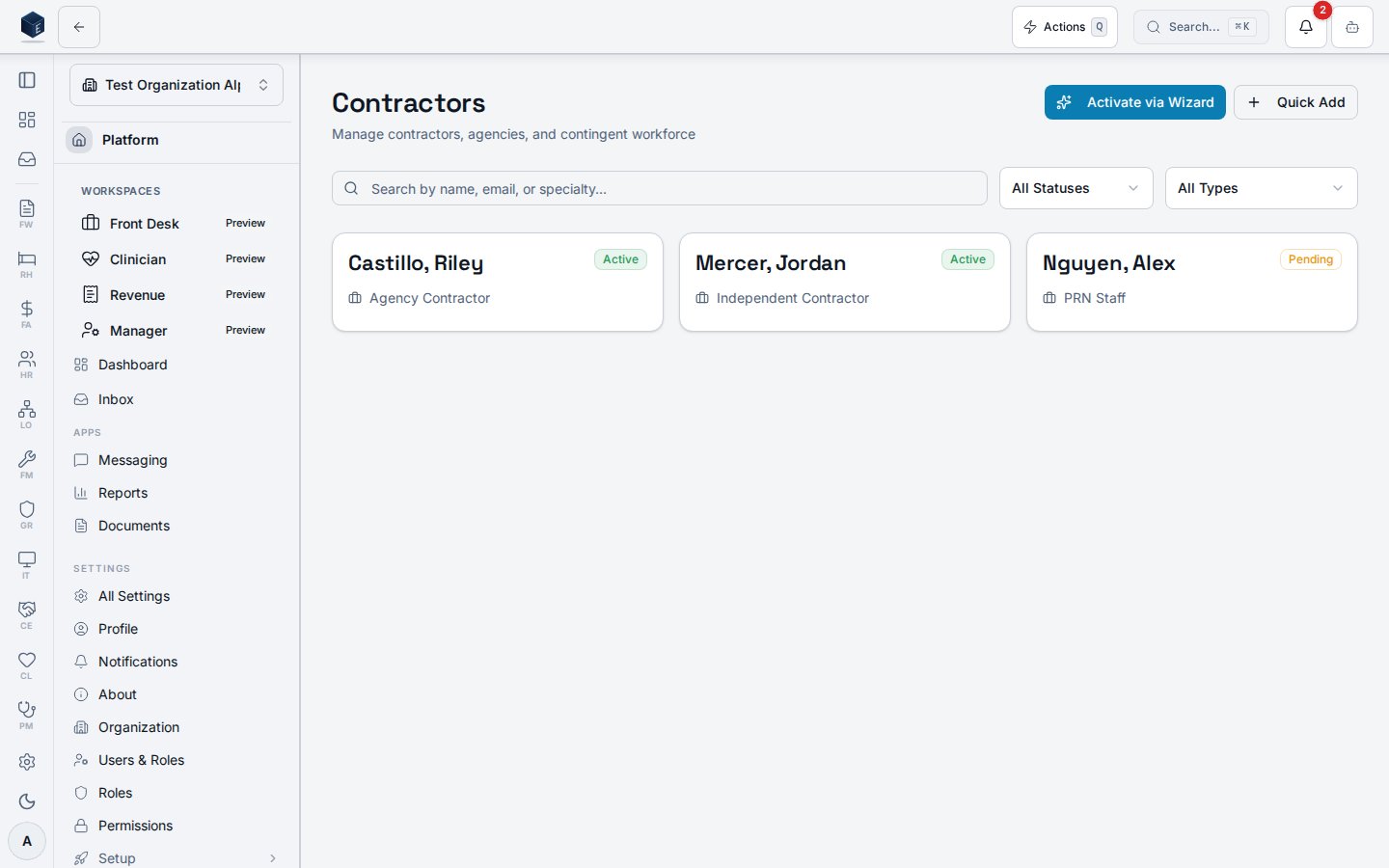
The page fetches contractors fromuseContractorsList with optional status and classification filters. Results are further filtered client-side by a search term matching name, email, or specialty. Each contractor renders as a card showing last name, first name, email, status badge, classification, specialty, and hourly rate. Users with hr.contractor.manage see two action buttons: Activate via Wizard (navigates to /hr/contractors/new/wizard) and Quick Add (opens a dialog for a faster, single-step create without the full wizard flow).
Who it’s for
Requires permissionhr.contractor.read.
Before you start
- No prerequisites for viewing. The list may be empty if no contractors have been added.
- To activate a new contractor, you need
hr.contractor.manage.
Steps
1
Open the Contractors directory
Navigate to HR → Contractors or go directly to
/hr/contractors.2
Search and filter
Use the search box to find contractors by name, email, or specialty. Use the Status and Classification dropdowns to narrow results.
3
Open a contractor record
Click any contractor card to open the detail page at
/hr/contractors/:id.4
Activate a new contractor (if permitted)
Click Activate via Wizard to start the five-step onboarding wizard, or Quick Add for a faster single-step form.
Key concepts
- Status values —
active,inactive,pending_onboarding,terminated. The status filter is applied server-side; the search filter is applied client-side. - Quick Add vs. Wizard — Quick Add creates only the contractor profile row. The wizard additionally creates a contract row and a classification attestation row.
Detail view
The Contractor detail page shows a full profile and tabbed sections for a single contractor. It is available at route/hr/contractors/:id.
Overview
The page reads the contractor record by:id via useContractorDetail. The header card shows name, status badge, classification label, specialty, email, phone, start/end dates, and W-9 on-file status. Users with hr.contractor.tax_id.read also see the Tax ID Type. Four tabs provide:
- Contracts — SOW and contract records linked to this contractor (
ContractorContractsTab). - Classification — Classification history and attestations; visible only to users with
hr.contractor.classification.manage. - Time Entries — Logged hours; users with
hr.contractor.time.approvecan approve entries. - Credentials — Credential records linked to this contractor (
ContractorCredentialsTab).
active, inactive, pending_onboarding, terminated.
Who it’s for
Requires permissionhr.contractor.read.
Before you start
- The contractor record must already exist (created via the wizard or Quick Add dialog on the Contractors list).
- To manage classification or approve time, you need the corresponding additional permissions.
Steps
1
Navigate to the contractor record
Go to HR → Contractors (
/hr/contractors), then click a contractor card. Alternatively navigate directly to /hr/contractors/:id.2
Review the profile summary
The header card shows identifying information. Tax ID Type is only visible if you hold
hr.contractor.tax_id.read.3
View contracts
The Contracts tab lists all SOW/contract records. Each contract shows title, type, dates, and status.
4
Manage classification (if permitted)
Users with
hr.contractor.classification.manage see the Classification tab with attestation history.5
Review or approve time entries
The Time Entries tab shows logged hours. Users with
hr.contractor.time.approve have approval controls.6
Review credentials
The Credentials tab lists linked credential records for this contractor.
Key concepts
- Tab state — Active tab is tracked in the URL via the
tabquery parameter (contracts,classification,time,credentials). - Classification visibility — The Classification tab only renders for users with
hr.contractor.classification.manage.
Permissions
Viewing the directory requireshr.contractor.read; additional capabilities are gated by the keys below. Tax identifiers are stored encrypted and only their type is exposed in the UI, behind a dedicated permission.
Permission keys are assigned to roles in the role editor.
Related
Human Resources
Human Resources core overview.
Governance & parity
This page documents shipped product behavior. It is not medical, legal, or
billing advice. Verify against your organization’s policies and applicable
regulations before using it for clinical, compliance, or billing decisions.
Protected health information (PHI) shown in the product is governed by your
tenant’s access controls and is never exposed in this documentation.
Documentation sources
Documentation sources
- src/routes/hr.tsx
- src/cores/hr/pages/ContractorsListPage.tsx
- src/cores/hr/hooks/contractors/useContractorsList.ts
- src/cores/hr/pages/ContractorDetailPage.tsx
- src/cores/hr/hooks/contractors/useContractorDetail.ts