

/hr/timesheets-admin.
Overview
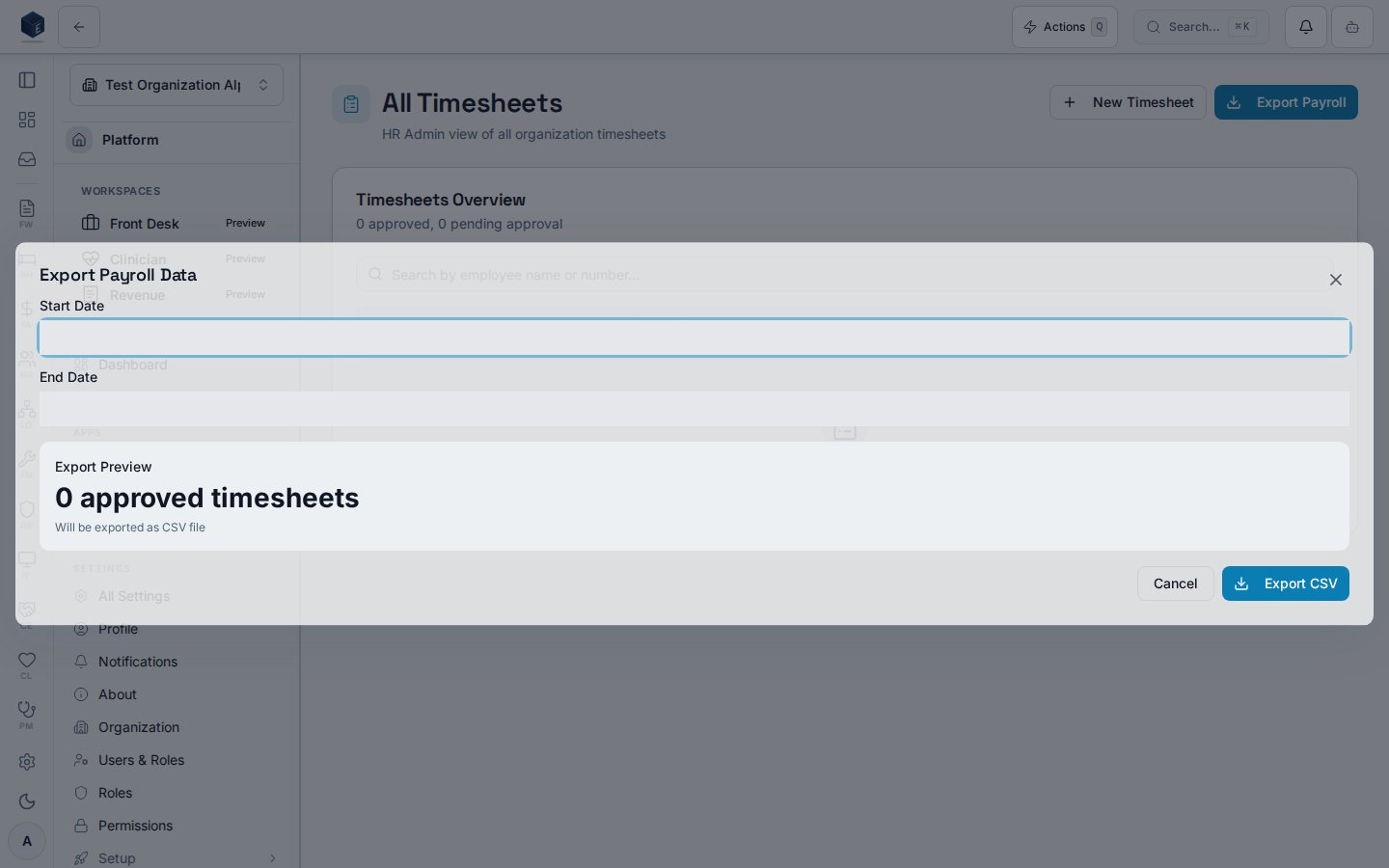
The All Timesheets page provides an organization-wide HR admin view of every employee timesheet. A header shows approved and pending counts. A search input filters by employee name or number. Tabbed status filters include All, Draft, Pending (submitted), Approved, Rejected, and Paid. Each timesheet is rendered as aTeamTimesheetCard. Clicking a card opens the admin detail page at /hr/timesheets-admin/:id. An Export Payroll button opens the PayrollExportDialog for data export.
HR admins with hr.timesheets.admin can correct punches on any employee timesheet, including approved and paid timesheets after a documented override. Admins can also materialize a missing timesheet from existing punch data via Ensure Timesheet from Punches.
Who it’s for
Requires permissionhr.timesheets.admin (HR_PERMISSIONS.TIMESHEETS_ADMIN) — enforced by RequirePermission on /hr/timesheets-admin, /hr/timesheets-admin/:id, and /hr/timesheets-admin/ensure.
Before you start
- You need
hr.timesheets.adminfor this area; managers use Team Timesheets instead. - Punch corrections require a documented reason of at least 10 characters.
- Corrections on
approvedorpaidtimesheets require an additional override confirmation before the edit or add dialog opens.
Steps
1
Open All Timesheets
Navigate to
/hr/timesheets-admin.2
Filter by status
Click the desired status tab (All, Draft, Pending, Approved, Rejected, Paid).
3
Search
Enter an employee name or number in the search field to narrow results.
4
Open a timesheet
Click a timesheet card to open
/hr/timesheets-admin/:id.5
Create a new timesheet
Click New Timesheet, select an employee and pay period, then click Create Timesheet.
6
Export payroll data
Click Export Payroll to open the export dialog.
Key concepts
Create a new timesheet
When an employee has not submitted a timesheet for a pay period, HR admins can create one from All Timesheets:- Click New Timesheet in the page header.
- Search and select the employee.
- Choose a pay period from the dropdown (from the org pay schedule when configured) or enter custom start/end dates.
- Click Create Timesheet.
/hr/timesheets-admin/:id where you can Add Missed Punch or edit entries.
Admin timesheet detail
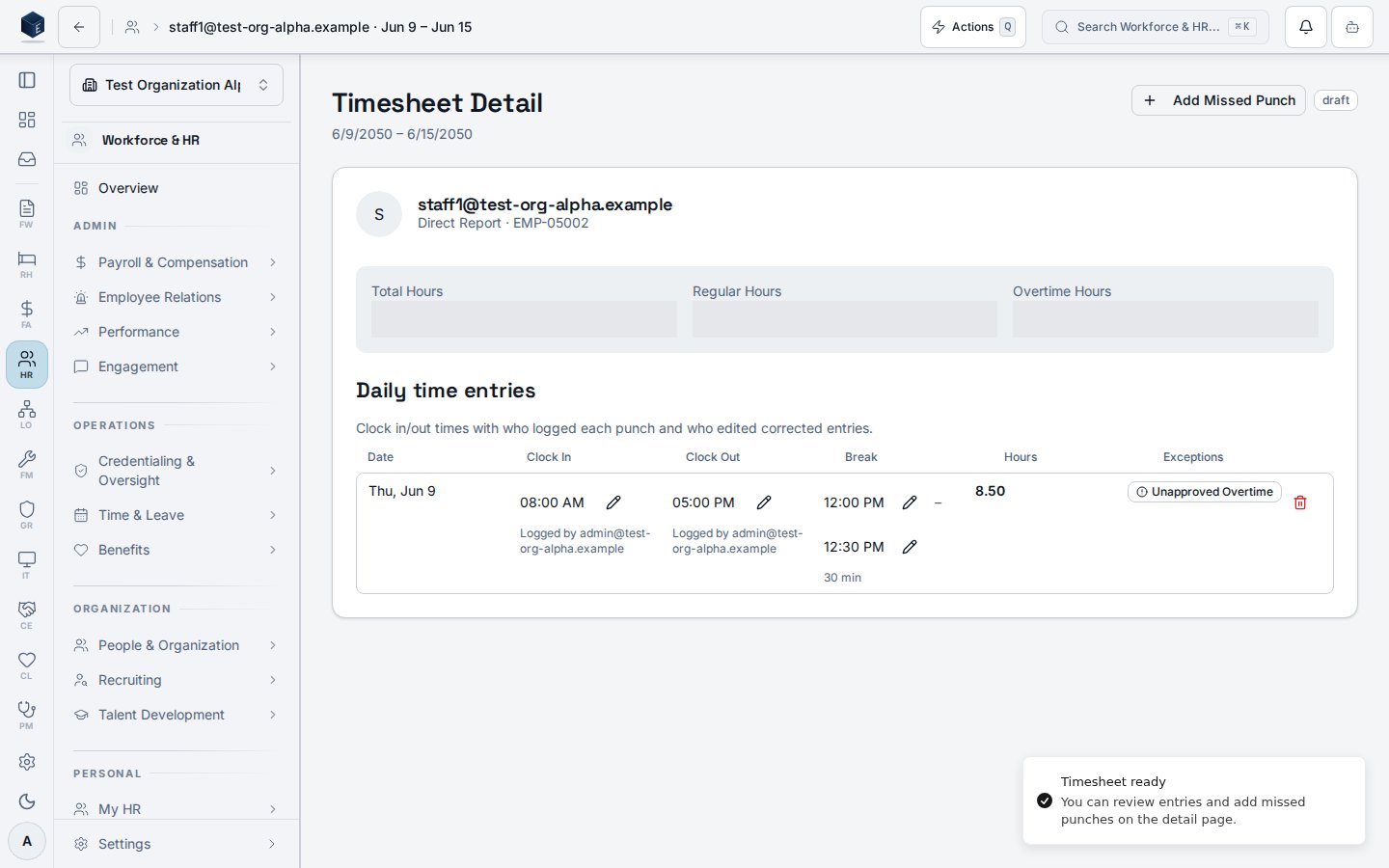
The admin detail page at/hr/timesheets-admin/:id shows employee identity, pay-period summary, approval metadata when present, and a daily time-entries table with audit subtext. Correction actions use useTimesheetCorrections in admin mode.
Edit an existing punch
- Open a timesheet from the All Timesheets list.
- Click the pencil icon on a clock-in or clock-out row.
- If the timesheet is
approvedorpaid, confirm Override locked timesheet? with a reason (minimum 10 characters), then complete Edit Punch Time (new time + reason, minimum 10 characters). - Click Save Edit. Hours recalculate; edited punches show a warning icon and Edited by audit subtext.
- Click Add Missed Punch in the page header.
- If the timesheet is locked (
approvedorpaid), complete the override confirmation first. - Select punch type, date, time, and reason (minimum 10 characters), then click Add Punch.
punch_correction, punch_insert, and timesheet_admin_override actions). The detail table shows who logged each punch and, when applicable, who edited it and the stored edit reason (visible on hover).
Ensure timesheet from punches
Use this when punch data exists for a pay period but nohr_timesheets row has been generated yet.
Entry route: /hr/timesheets-admin/ensure?employeeId=<uuid>&periodStart=<YYYY-MM-DD>&periodEnd=<YYYY-MM-DD>
- Open the ensure URL with all three query parameters (for example from the time exception queue when no timesheet exists).
- Review the pay period shown in the page description.
- Click Ensure Timesheet from Punches.
- On success, the app navigates to the new admin detail page for that timesheet so you can review and correct entries.
Related
Human Resources
Human Resources core overview.
Team Timesheets
Manager review and approval for direct reports.
Governance & parity
Documentation coverage and governance.
This page documents shipped product behavior. It is not medical, legal, or
billing advice. Verify against your organization’s policies and applicable
regulations before using it for clinical, compliance, or billing decisions.
Protected health information (PHI) shown in the product is governed by your
tenant’s access controls and is never exposed in this documentation.
Documentation sources
Documentation sources
- src/routes/hr.tsx
- src/cores/hr/pages/TimesheetsAdmin.tsx
- src/cores/hr/components/time/NewTimesheetDialog.tsx
- src/cores/hr/pages/TimesheetsAdminDetail.tsx
- src/cores/hr/pages/TimesheetsAdminEnsure.tsx
- src/cores/hr/hooks/time/useAllTimesheets.ts
- src/cores/hr/hooks/time/useTimesheetDetail.ts
- src/cores/hr/hooks/time/useTimesheetCorrections.ts
- src/cores/hr/hooks/time/useTimesheetMutation.ts
- src/cores/hr/hooks/time/useEnsureTimesheet.ts
- src/cores/hr/lib/time/canEditTimesheet.ts
- src/cores/hr/lib/time/timesheetRpc.ts
- src/cores/hr/components/time/TimesheetCorrectionDialogs.tsx
- src/cores/hr/components/time/AdminOverrideConfirmDialog.tsx
- src/cores/hr/components/time/EditPunchDialog.tsx
- src/cores/hr/components/time/AddMissedPunchDialog.tsx
- src/cores/hr/components/time/PunchAuditMeta.tsx