

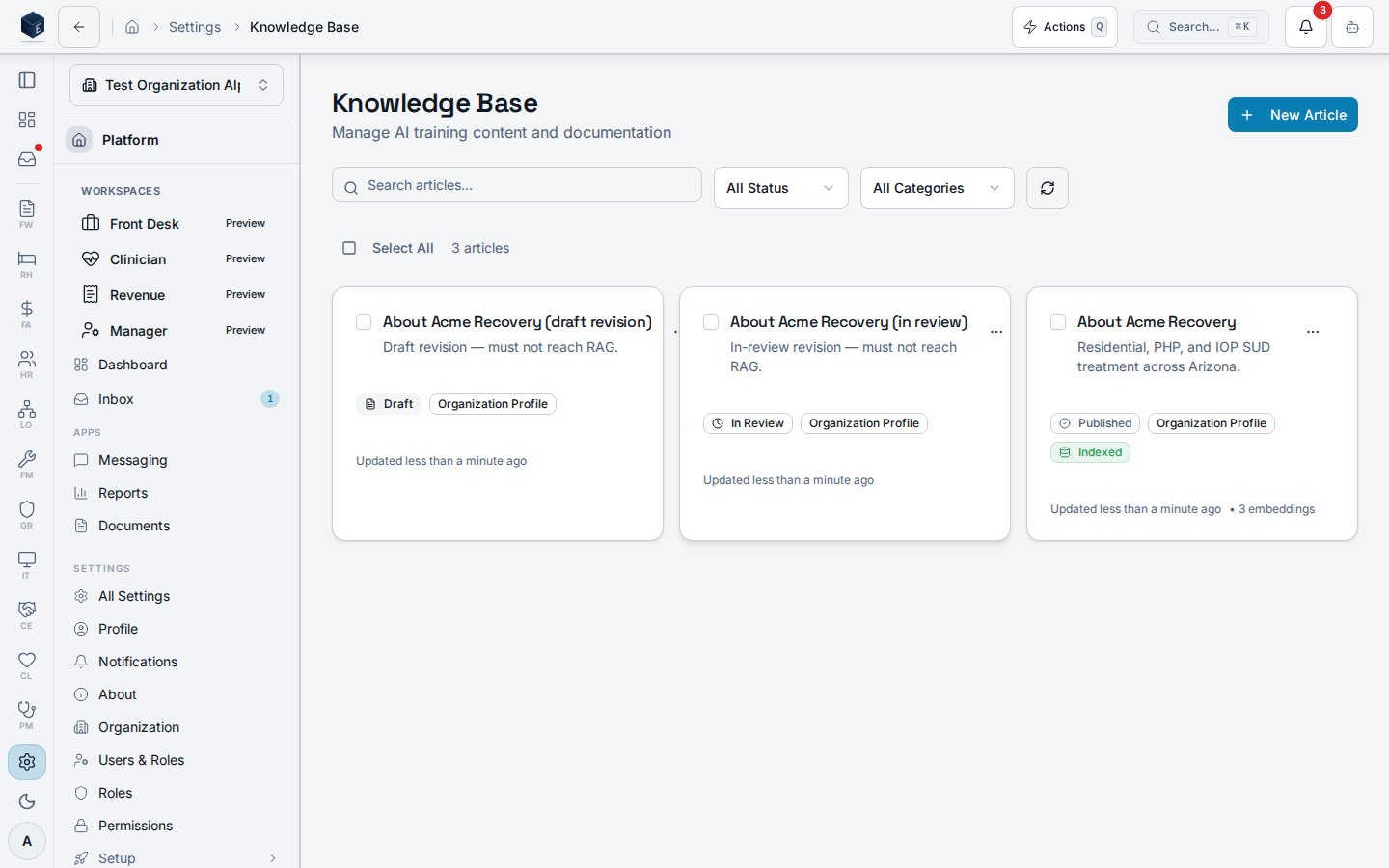
/settings/knowledge-base where authorized users manage the organization’s library of knowledge articles. Articles can be created, searched, filtered by status and category, published, archived, and deleted.
Overview
The page renders a searchable, filterable card grid ofKnowledgeArticle records fetched via useKnowledgeArticles. Search is debounced and URL-synced. Filters include status (KnowledgeArticleStatus) and category (KnowledgeArticleCategory). Bulk operations (publish, archive, delete) are available via useBulkKnowledgeOperations. Individual articles support publish, archive, and delete. Navigation to create and edit pages is provided.
The individual article editor is at /settings/knowledge-base/:id.
Who it’s for
Requires permissionpf.ai_skills.view.
Before you start
- You must hold
pf.ai_skills.viewto access this page. - To create or publish articles, additional write permissions may apply (confirm with SME).
Steps
- Navigate to Settings → Knowledge Base (
/settings/knowledge-base). - Use the search input to filter articles by title or content.
- Use the Status and Category dropdowns to narrow results.
- To create a new article, click New Article.
- To publish a draft article, click the publish action on its card.
- To archive an article, use the archive action.
- For bulk operations, select multiple articles and choose a bulk action (publish, archive, or delete).
Key concepts
Knowledge article status — values include draft, published, and archived (fromSTATUS_OPTIONS). Only published articles are available to AI skills.
Category — articles are tagged with a category from CATEGORY_OPTIONS. Confirm values with an SME.
Creating or editing an article
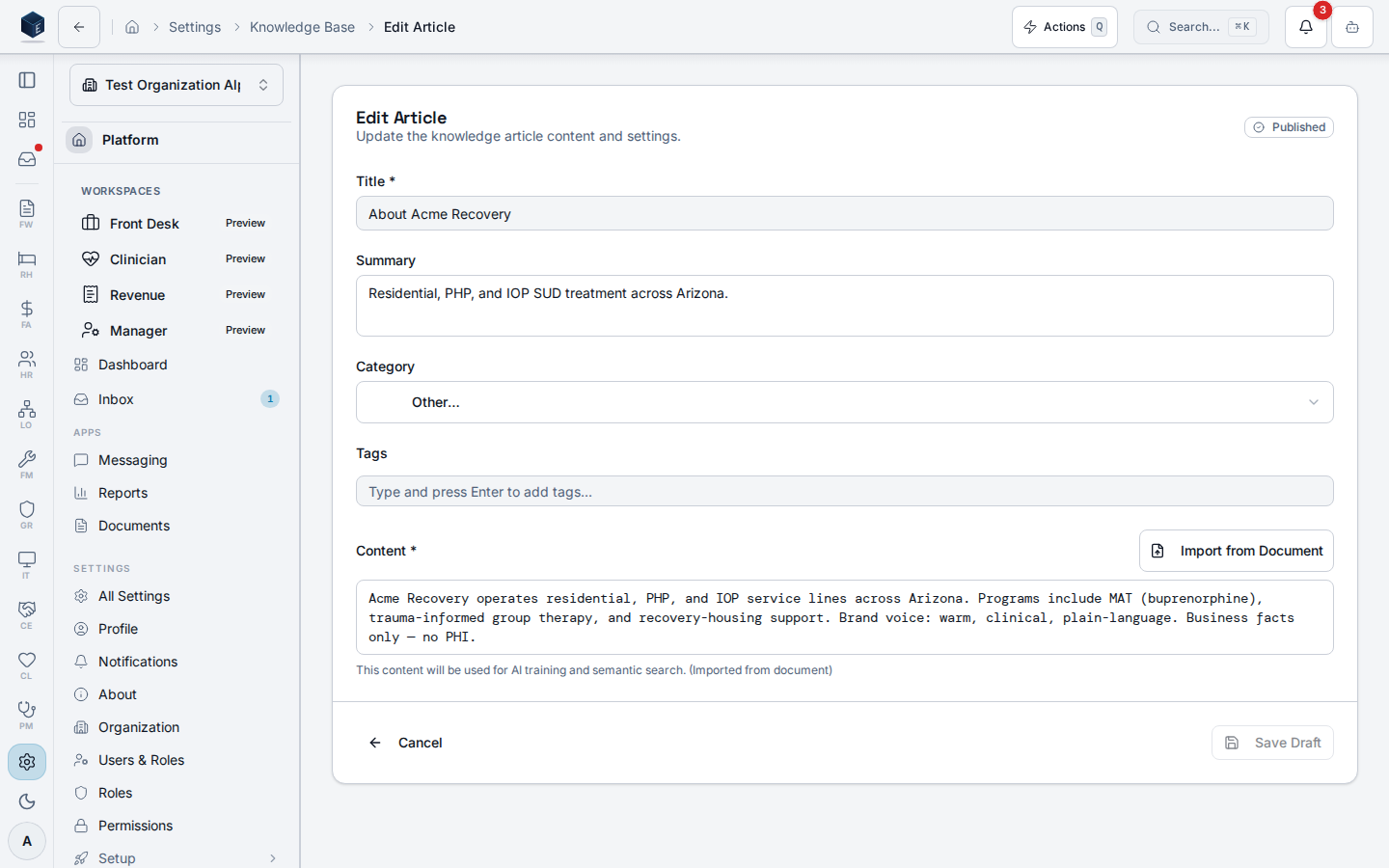
The Edit Article page (/settings/knowledge-base/:id) is the editor for knowledge base articles, supporting both creation (via the new ID) and modification of existing articles. Requires pf.ai_skills.view.
The page reads :id from useParams — when id === 'new', it operates in create mode (no pre-fetch); otherwise it calls useKnowledgeArticle to load the existing article. Loading state shows a full-page skeleton. Mutations are handled by useCreateKnowledgeArticle, useUpdateKnowledgeArticle, and usePublishKnowledgeArticle. The editor component KnowledgeArticleEditor is responsible for the form UI and exposes save, publish, and cancel actions. On save in create mode, the new article’s ID is returned and navigation goes to the edit URL for that article. On cancel, the editor navigates back to the knowledge base list.
1
Create a new article
Navigate to
/settings/knowledge-base/new. The editor opens with empty fields.2
Edit an existing article
Navigate to
/settings/knowledge-base/:id. The editor pre-fills with the article’s existing content.3
Fill in the article content
Use
KnowledgeArticleEditor to write the article title and body content.4
Save the article
Click Save to persist the draft. In create mode, the URL updates to the new article’s edit URL.
5
Publish the article
Click Publish to make the article available. This calls
usePublishKnowledgeArticle.6
Cancel editing
Click Cancel to discard unsaved changes and return to the knowledge base list.
Organization profile article
Theorg_profile category holds exactly one published “About <Org>” narrative per organization — the canonical org-context article the AI onboarding wizard authors, an admin publishes, and every AI skill retrieves via RAG. Publishing a new revision auto-archives the previous one (a server-side supersede trigger plus a partial unique index enforce the singleton).
Related
Platform Foundation
Platform Foundation overview.
Governance & parity
Documentation coverage and governance.
This page documents shipped product behavior. It is not medical, legal, or
billing advice. Verify against your organization’s policies and applicable
regulations before using it for clinical, compliance, or billing decisions.
Protected health information (PHI) shown in the product is governed by your
tenant’s access controls and is never exposed in this documentation.
Documentation sources
Documentation sources
- src/routes/platform.tsx
- src/platform/knowledge/pages/KnowledgeBaseListPage.tsx
- src/platform/knowledge/hooks/use-knowledge-articles.ts
- src/platform/knowledge/pages/KnowledgeArticleEditPage.tsx