

/settings/ai-skills.
Overview
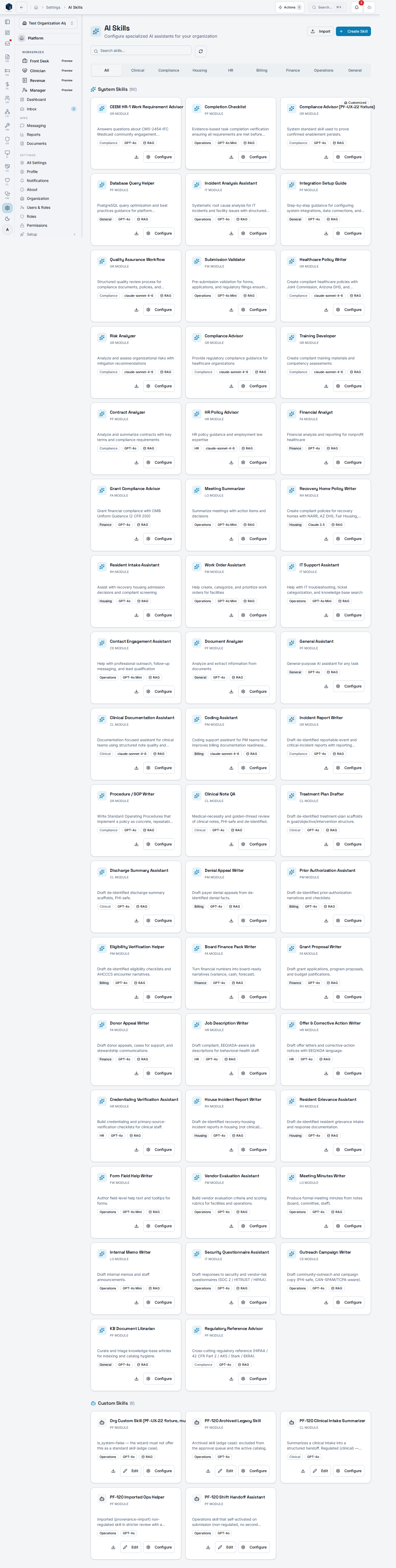
The screen displays all AI skills (system-provided and custom) in a categorized tab layout covering All, Compliance, Housing, HR, Finance, Operations, and General. A search input filters by name, description, or skill code. Users withpf.ai_skills.manage can configure, edit, create (via wizard), import (SKILL.md format), and export skills. System and custom skills are grouped into separate sections within each tab.
Who it’s for
Required permission:pf.ai_skills.view (view); pf.ai_skills.manage (create/edit/import/export)
Before you start
- You must hold the
pf.ai_skills.viewpermission to access this screen. - Management actions (Create, Import, Edit, Export) require
pf.ai_skills.manage. - Organization admins are granted both
pf.ai_skills.viewandpf.ai_skills.manageby default. If your admin account does not see AI Skills, ask a platform admin to re-sync your organization’s permissions.
Steps
1
Open AI Skills
Navigate to Settings → AI Skills.
2
Browse or search
Use the category tabs or search box to find a skill by name, description, or code.
3
Configure a skill
Click a skill card’s configure action to open the configuration dialog and adjust settings.
4
Create a custom skill
Click “Create Skill” to open the creation wizard and define a new custom skill.
5
Import a skill
Click “Import” and upload a SKILL.md file to add an externally authored skill.
6
Export a skill
Use the export action on a skill card to download it as a
<skill_code>.SKILL.md file.Configure a standard skill
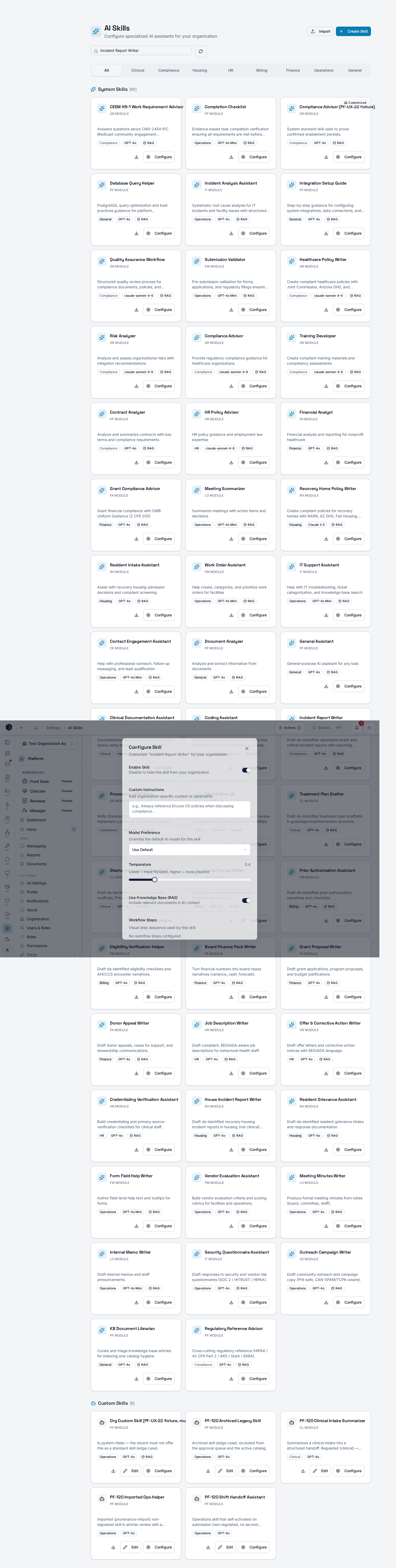
From a standard skill’s card, open Configure to apply an organization-specific override — enable/disable, custom instructions, model, and a knowledge-base RAG toggle — without mutating the shared platform catalog. The override is saved topf_ai_skill_overrides and merged onto the base skill at runtime.
Key concepts
skill_code— unique identifier for each skillis_system— distinguishes platform-provided skills from organization-custom skills- SKILL.md — serialized skill format for import/export
Related
Platform Foundation
Platform Foundation overview.
Governance & parity
Documentation coverage and governance.
This page documents shipped product behavior. It is not medical, legal, or
billing advice. Verify against your organization’s policies and applicable
regulations before using it for clinical, compliance, or billing decisions.
Protected health information (PHI) shown in the product is governed by your
tenant’s access controls and is never exposed in this documentation.
Documentation sources
Documentation sources
- src/routes/platform.tsx
- src/platform/ai/pages/AISkillsListPage.tsx