

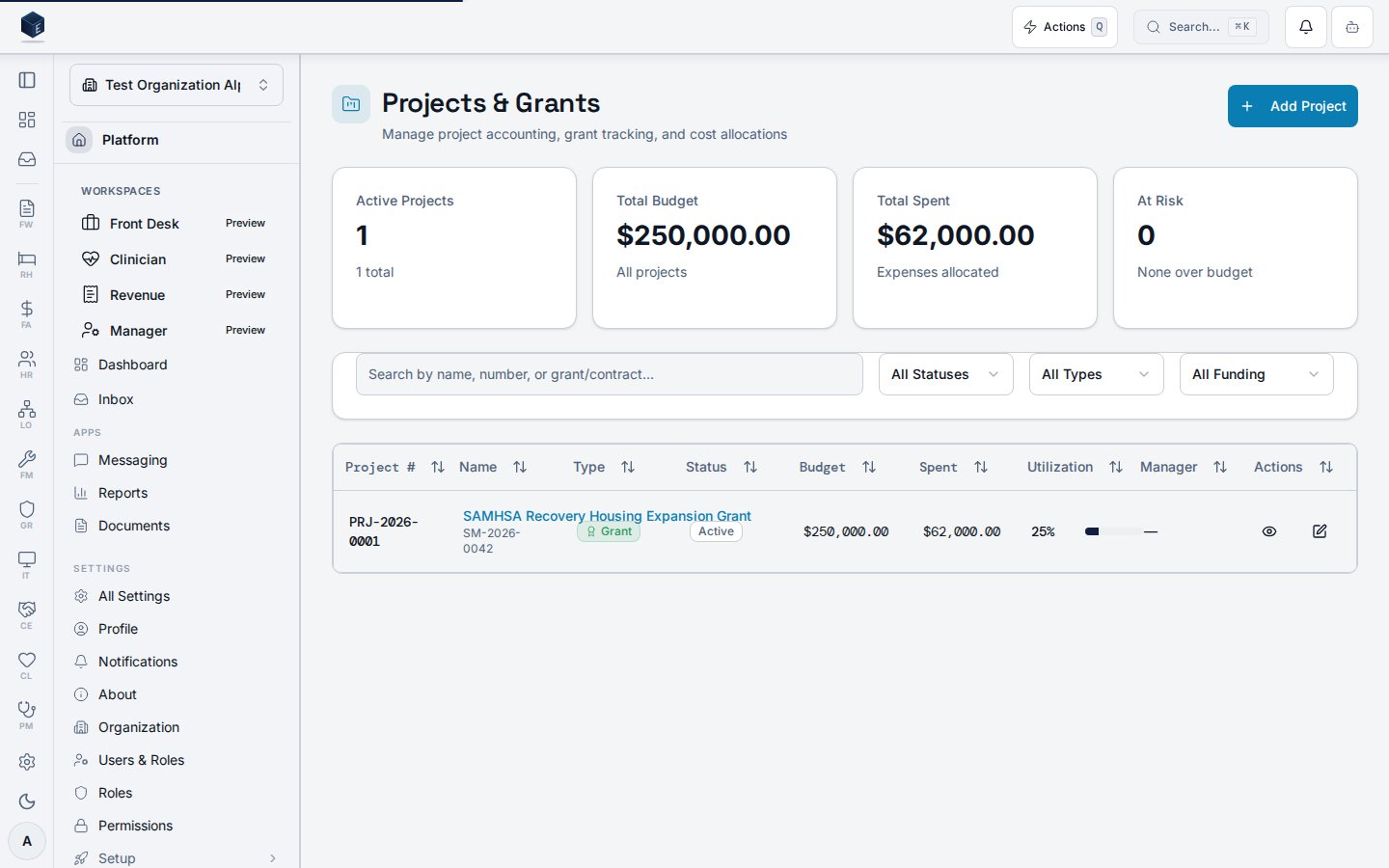
/fa/projects lists all project records for the organization with status, type, and funding-source filters, plus summary statistics.
Overview
The route/fa/projects loads ProjectsPage (permission: fa.projects.view). The page fetches the project list via useProjectList with filters for status, type, funding source, and a text search query. Four summary StatCard components are shown at the top. A New Project button navigates to /fa/projects/new. Each row links to /fa/projects/:id.
Who it’s for
Requires permissionfa.projects.view. Creating projects requires fa.projects.create. Editing requires fa.projects.edit.
Before you start
No setup required. Filters are optional. When creating, know the project name, type, and funding source.Steps
- Navigate to Finance & Revenue → Projects, or go to
/fa/projects. - Optionally filter by status, type, or funding source, or use the search input.
- Review the summary stat cards.
- Select a project row to open its detail page.
- Select New Project to create a new project.
Key concepts
Filters — Status, project type, funding source type, and free-text search. All are optional.StatCard — Summary statistics displayed at the top of the list; exact labels should be confirmed with an SME.
Viewing a project
The Project Details page at/fa/projects/:id provides a tabbed view of a project record, covering overview, budget, expenses, revenue, and drawdowns.
The route /fa/projects/:id loads ProjectDetailPage (permission: fa.projects.view). The page has five tabs: overview, budget, expenses, revenue, and drawdowns. Tab state is URL-synced via useTabUrlState. Summary cards display key project metrics. DrawdownAlertBanner appears when useDrawdownAlert returns an alert for the project. An Edit button navigates to /fa/projects/:id/edit.
Key concepts:
- Project tabs —
overview,budget,expenses,revenue,drawdowns. Each is lazily loaded and URL-synced. - Drawdown alert —
DrawdownAlertBanneris conditionally rendered based onuseDrawdownAlertoutput for the project. ProjectStatusBadge/ProjectTypeBadge— Visual indicators for project status and type, derived fromtoProjectStatusandtoProjectTypeutilities.
- Navigate to Finance & Revenue → Projects and select a project, or go to
/fa/projects/:id. - Review the overview summary cards: project status, type, and key figures.
- Navigate to the Budget, Expenses, Revenue, or Drawdowns tabs as needed.
- If a drawdown alert banner is visible, review and address the flagged condition.
- Use Edit to modify project details.
Creating a project
The New Project page at/fa/projects/new provides a form for creating a project record used in project accounting, grant tracking, or other cost-allocation workflows. Requires permission fa.projects.create.
ProjectCreatePage wraps ProjectForm. On submit, useCreateProject is called with the form data plus organization_id. On success the user is redirected to /fa/projects/:id.
Key concepts:
- Project — A cost-accounting container that can track budgets, expenses, revenue, and grant drawdowns. The
project_numberis assigned by the system.
- Navigate to Finance & Revenue → Projects and select New Project, or go to
/fa/projects/new. - Complete the project form fields as required.
- Select Create (or the form submit action).
- On success you are taken to the new project’s detail page.
Editing a project
The Edit Project page at/fa/projects/:id/edit provides a form for updating an existing project record’s details. Requires permission fa.projects.edit.
ProjectEditPage fetches the project via useProject(id, organizationId) and renders ProjectForm pre-populated with current values. On submit, useUpdateProject is called with the updated data. On success, the page navigates to /fa/projects/:id. The breadcrumb displays Edit <project_name>.
Key concepts:
- Navigate to Finance → Projects (
/fa/projects) and open the project record. - Click Edit to go to
/fa/projects/:id/edit. - Update the relevant project fields in
ProjectForm. - Click Save to submit via
useUpdateProject. - Click Cancel to return to the project detail without saving.
- On success, the page navigates to the project detail.
Related
Finance & Revenue
Finance & Revenue core overview.
Governance & parity
This page documents shipped product behavior. It is not medical, legal, or
billing advice. Verify against your organization’s policies and applicable
regulations before using it for clinical, compliance, or billing decisions.
Protected health information (PHI) shown in the product is governed by your
tenant’s access controls and is never exposed in this documentation.
Documentation sources
Documentation sources
- src/routes/fa.tsx
- src/cores/fa/pages/ProjectsPage.tsx
- src/cores/fa/pages/ProjectDetailPage.tsx
- src/cores/fa/pages/ProjectCreatePage.tsx
- src/cores/fa/pages/ProjectEditPage.tsx
- src/cores/fa/hooks/useProjects.ts
- src/cores/fa/hooks/useGrantDrawdowns.ts
- src/cores/fa/types/projects.ts
- src/cores/fa/components/projects/ProjectForm.tsx