

/fa/expenses/reports.
Overview
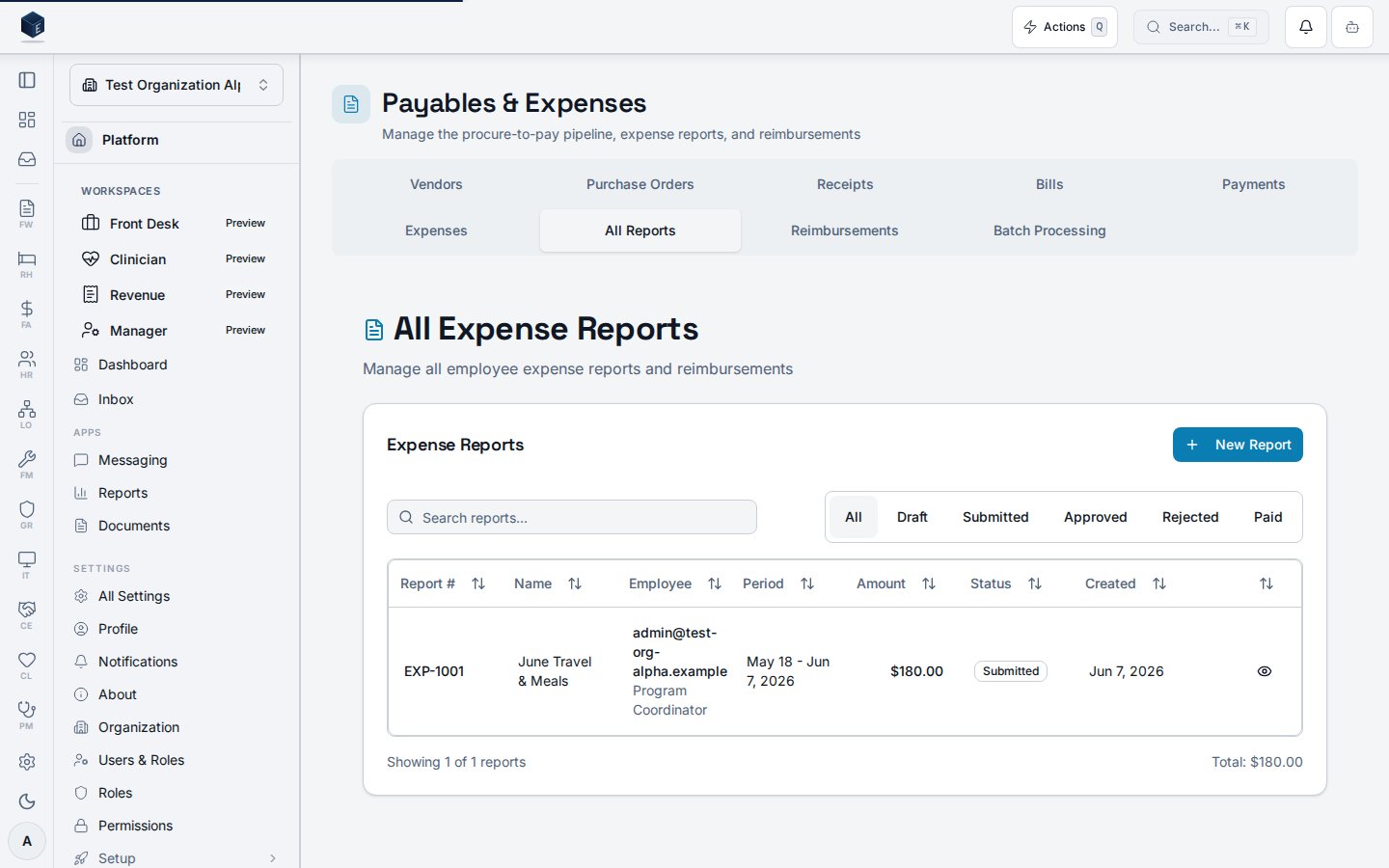
This screen rendersExpenseReportsPage with filter="all", showing all expense reports across the organization (not filtered to the current user). The page title is “All Expense Reports” and the description reads “Manage all employee expense reports and reimbursements.” A “New Report” button links to /fa/expenses/new. The table supports viewing, editing, submitting for approval, and soft-deleting individual reports. A confirmation dialog is presented before deletion.
Who it’s for
Required permission:fa.expenses.view (enforced at the route via RequirePermission).
Before you start
- An organization must be selected.
- Expense reports are submitted by employees and then reviewed here by managers or finance staff.
Steps
1
Navigate to All Expense Reports
Go to
/fa/expenses/reports via the Finance & Revenue Expenses section.2
Review the reports table
The table shows report number, name, date range, total amount, status, created date, and employee.
3
Open a report
Click View on a row to open
ExpenseReportDetailPage at /fa/expenses/:id.4
Edit a report
Click Edit to open
ExpenseReportEditPage at /fa/expenses/:id/edit.5
Submit for approval
Click Submit on a
draft report. A toast confirms submission with the report_number.6
Delete a report
Click Delete; confirm in the dialog. The report is soft-deleted.
Key concepts
filter="all"— this page shows all organization reports, unlike “My Expenses” which filters to the current userreport_number— the display identifier for an expense report- Soft delete — deleted reports are marked inactive, not permanently removed
Related
Finance & Revenue
Finance & Revenue core overview.
Governance & parity
Documentation coverage and governance.
This page documents shipped product behavior. It is not medical, legal, or
billing advice. Verify against your organization’s policies and applicable
regulations before using it for clinical, compliance, or billing decisions.
Protected health information (PHI) shown in the product is governed by your
tenant’s access controls and is never exposed in this documentation.
Documentation sources
Documentation sources
- src/routes/fa.tsx
- src/cores/fa/pages/ExpenseReportsPage.tsx
- src/cores/fa/hooks/useExpenseReports.ts