

/fa/collections
Overview
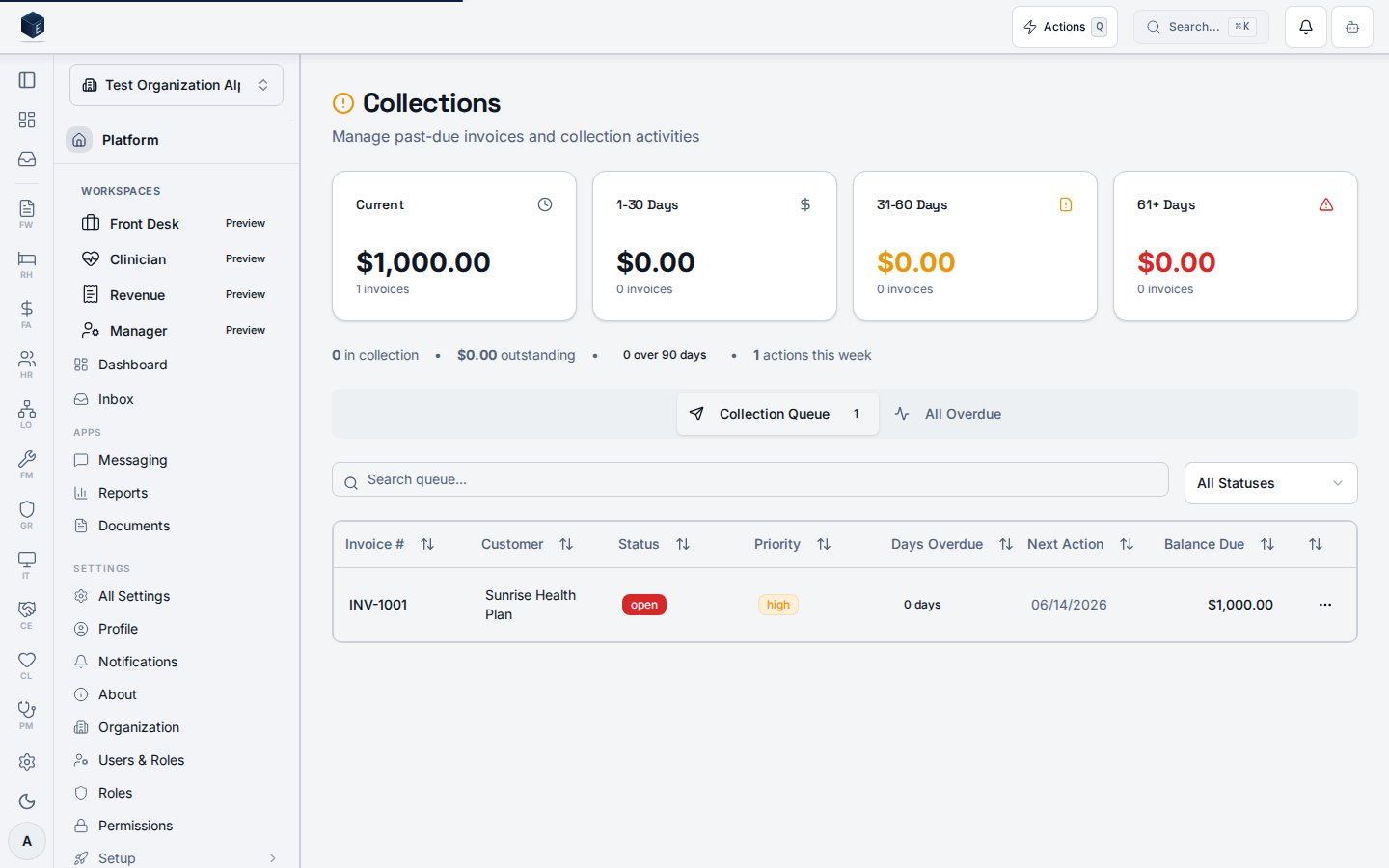
The page has two queue systems shown in separate tabs: the new structured queue (fa_collection_queue) accessed via useCollectionQueueList and rendered in CollectionQueueWorkflowTable; and the legacy queue (invoices flagged in_collection) accessed via useCollectionQueue and rendered in CollectionQueueTable. Collection stats are loaded via useCollectionStats. AR aging buckets are loaded via useArAgingBuckets. Independent search and filter state is maintained for each queue. CollectionQueueStatus filters the new queue.
Who it’s for
Requires permission:fa.collections.view
Before you start
- Invoices must be outstanding and have been flagged for collection (legacy), or records must exist in
fa_collection_queue(new queue). - You must hold the
fa.collections.viewpermission.
Steps
1
Navigate to Collections Queue
Go to
/fa/collections.2
Review collection statistics
Stat cards at the top show summary counts from
useCollectionStats.3
Review AR aging buckets
Aging bucket cards show overdue balances by age bucket from
useArAgingBuckets.4
Switch between queue tabs
Use the tabbed interface to toggle between the new structured queue and the legacy in-collection view.
5
Filter and search
Each tab has independent search and status filter controls.
6
Take action on items
Select items in the queue to perform available collection workflow actions.
Key concepts
CollectionQueueStatus— Type for queue item status used to filter the new queue.useCollectionQueueList— Hook for the structuredfa_collection_queuetable.useCollectionQueue— Hook for legacy invoices flaggedin_collection.useArAgingBuckets— Hook returning AR aging bucket totals.
Related
Finance & Revenue
Finance & Revenue core overview.
Governance & parity
This page documents shipped product behavior. It is not medical, legal, or
billing advice. Verify against your organization’s policies and applicable
regulations before using it for clinical, compliance, or billing decisions.
Protected health information (PHI) shown in the product is governed by your
tenant’s access controls and is never exposed in this documentation.
Documentation sources
Documentation sources
- src/routes/fa.tsx
- src/cores/fa/pages/CollectionWorkflowPage.tsx
- src/cores/fa/hooks/useCollectionQueueList.ts
- src/cores/fa/hooks/useCollectionWorkflow.ts
- src/cores/fa/hooks/useArAgingBuckets.ts
- src/cores/fa/types/collectionQueue.ts