Documentation Index
Fetch the complete documentation index at: https://docs.encoreos.io/llms.txt
Use this file to discover all available pages before exploring further.
Module: GR-02 Training & CEU Management
Audience: Training Coordinators, Compliance Officers, HR Managers, Administrators
Last Updated: 2025-12-13
Overview
This guide covers training management administration including creating training courses, managing enrollments, recording completions, tracking CEU credits, and monitoring training compliance.
Initial Setup
Configuring GR Module Settings
- Navigate to GR → Settings
- Configure the following training options:
| Setting | Description | Default |
|---|
| Enable Training Reminders | Send automatic training reminders | Yes |
| Reminder Days | Days before due date to send reminders | 30, 14, 7 |
| Expiration Reminder Days | Days before expiration to remind | 90, 60, 30 |
| Default Training Duration | Default course duration estimate | 1 hour |
| Enable AI Assistance | AI-powered training recommendations | Yes |
Setting Up Training Categories
Training categories are managed via Picklists:
- Navigate to Platform → Picklists
- Find or create the
gr_training_category picklist
- Add categories as needed:
- Clinical
- Safety
- Compliance
- Professional Development
- Regulatory
- Orientation
- Leadership
Setting Up Course Types
- Navigate to Platform → Picklists
- Find or create the
gr_training_type picklist
- Add course types:
- Online
- In-Person
- Webinar
- Self-Paced
- On-the-Job
- Blended
Managing Training Courses
Creating a New Course
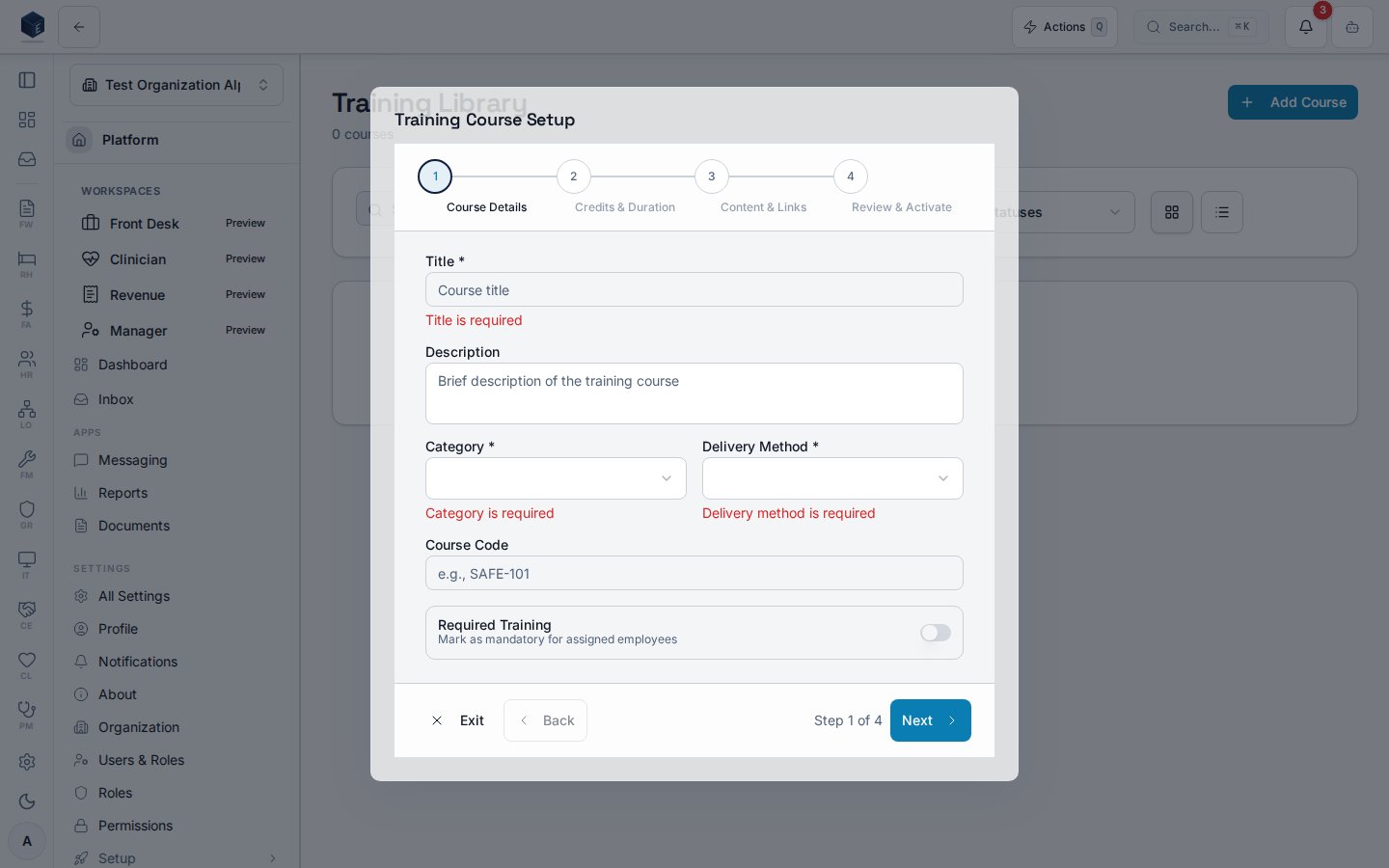
- Navigate to GR → Training
- Click New Course
- Complete the form:
| Field | Required | Description |
|---|
| Title | Yes | Course name (e.g., “HIPAA Privacy Training 2024”) |
| Description | No | Course objectives and content summary |
| Category | Yes | Course category from picklist |
| Course Type | Yes | Delivery method (online, in-person, etc.) |
| Duration | No | Estimated hours to complete |
| CEU Credits | No | Credits awarded upon completion |
| CEU Category | No | Credit type (State, Professional, etc.) |
| Expiration Period | No | Months until certification expires |
| Materials | No | Upload course documents, videos, etc. |
| Is Required | No | Whether this is mandatory training |
| Prerequisites | No | Courses required before this one |
- Click Create Course (saves as Active)
Course Types Explained
| Type | Description | Completion Method |
|---|
| Online | Web-based self-paced modules | Auto-tracked or quiz |
| In-Person | Classroom or hands-on training | Attendance verification |
| Webinar | Live online sessions | Attendance + optional quiz |
| Self-Paced | Materials for independent study | Self-attestation |
| On-the-Job | Supervised practical training | Supervisor sign-off |
| Blended | Combination of methods | Multiple verifications |
Course Categories
| Category | Typical Courses |
|---|
| Clinical | HIPAA, medication handling, clinical procedures |
| Safety | Fire safety, workplace safety, emergency response |
| Compliance | Ethics, fraud prevention, regulatory requirements |
| Professional Development | Leadership, communication, time management |
| Regulatory | State-mandated training, certification renewals |
| Orientation | New employee onboarding |
| Leadership | Management training, supervisor development |
Setting CEU Credits
When creating or editing a course:
- Enter the CEU Credits amount (e.g., 2.0)
- Select the CEU Category:
- State Licensing (for license renewals)
- Professional Certification (for credentials)
- Organization Required (internal requirements)
- Credits are automatically added to employee transcripts upon completion
Setting Expiration Periods
For training that requires periodic renewal:
- Enter Expiration Period in months
- When an employee completes the course:
- Completion date is recorded
- Expiration date is calculated (completion + period)
- Reminders are scheduled before expiration
Common expiration periods:
- CPR/First Aid: 24 months
- HIPAA: 12 months
- Annual safety: 12 months
Uploading Course Materials
- In the course form, click Upload Materials
- Supported file types: PDF, DOC, DOCX, MP4, etc.
- Materials are stored securely and accessible to enrolled employees
- Multiple files can be attached to a single course
Archiving Courses
When a course is no longer offered:
- Open the course details
- Click Archive
- The course is hidden from the library
- Historical completions are preserved
Training Enrollment
Enrollment Methods
| Method | Description | Use Case |
|---|
| Individual | Enroll specific employees | Targeted training needs |
| Bulk | Enroll multiple employees | New course rollout |
| Role-Based | Enroll by job role | Role-specific requirements |
| Department | Enroll by department | Team training |
| Site-Based | Enroll by location | Site-specific training |
| Auto-Enrollment | Triggered by hire date or role change | Orientation, compliance |
Creating an Individual Enrollment
- Open the course details
- Click Enroll Employee or go to the Enrollments tab
- Select the employee(s)
- Set the Due Date for completion
- Choose Required or Optional
- Click Create Enrollment
Bulk Enrollment
- From the course details, click Bulk Enroll
- Select enrollment criteria:
- All employees
- By role
- By department
- By site
- By date range (hire date, etc.)
- Set a uniform Due Date
- Click Create Enrollments
Enrollment Status Workflow
┌─────────────┐ ┌─────────────┐ ┌───────────┐
│ Not Started │ ──> │ In Progress │ ──> │ Completed │
└─────────────┘ └─────────────┘ └───────────┘
│ │
│ │
▼ ▼
┌─────────────┐ ┌─────────────┐
│ Overdue │ ──> │ Overdue │
└─────────────┘ └─────────────┘
| Status | Description | Action |
|---|
| Not Started | Assigned but not begun | Send reminder |
| In Progress | Employee has started | Monitor progress |
| Completed | Successfully finished | No action needed |
| Overdue | Past due date | Escalate, extend, or excuse |
Managing Overdue Training
- Navigate to GR → Training and filter by “Overdue”
- Review overdue enrollments
- Options:
- Send Reminder: Notify employee again
- Extend Due Date: Grant additional time
- Excuse: Mark as not required with reason
- Escalate: Notify supervisor/HR
Recording Training Completions
Completion Verification Methods
| Method | Description | When to Use |
|---|
| Self-Report | Employee marks complete | Low-risk, self-paced training |
| Quiz Score | Passing score required | Knowledge verification |
| Attendance | Instructor verifies | In-person or webinar |
| Supervisor Sign-Off | Manager confirms | On-the-job training |
| Certificate Upload | External verification | External courses |
Recording a Completion (Admin)
- Open the course details
- Go to the Enrollments tab
- Find the employee’s enrollment
- Click Record Completion
- Enter:
- Completion Date
- Verification Method
- Quiz Score (if applicable)
- Notes (optional)
- Click Save Completion
Automatic CEU Credit Calculation
When a completion is recorded:
- System checks course CEU configuration
- Creates CEU credit record for employee
- Sets credit expiration (if course has expiration period)
- Credit appears on employee’s transcript
Recording External Training
For training completed outside the system:
- Navigate to employee’s training record
- Click Add External Training
- Enter:
- Course name
- Provider/Institution
- Completion date
- CEU credits (with documentation)
- Expiration date (if applicable)
- Certificate/proof document
- Click Save
CEU Credit Management
Understanding Credit Categories
| Category | Purpose | Common Uses |
|---|
| State Licensing | License renewal | Social work, counseling, nursing |
| Professional Certification | Credential maintenance | CADC, CASAC, LADC |
| Organization Required | Internal compliance | Annual training requirements |
Viewing Employee Transcripts
- Navigate to HR → Employees and select an employee
- Click the Training or CEU tab
- View all credits earned and transcripts
- Export for license renewals
Generating Compliance Reports
- Navigate to GR → Reports (or dashboard)
- Select Training Compliance Report
- Filter by:
- Date range
- Department
- Course
- Compliance status
- Export as needed
Credit Totals by Period
Track credit accumulation for licensing periods:
- Set the licensing period date range
- View total credits by category
- Identify gaps in required credits
- Generate attestation letters
Tracking Training Compliance
Training Dashboard
The GR Overview dashboard shows:
- Total active courses
- Pending training assignments
- Overdue training count
- Completion rate percentage
- Upcoming expirations
Compliance Metrics
| Metric | Description | Target |
|---|
| Completion Rate | % of assigned training completed on time | 95%+ |
| Overdue Rate | % of training past due | <5% |
| Expiration Risk | Certifications expiring in 30 days | Monitor |
Department Training Status
- Navigate to training reports
- Filter by department
- View:
- Compliance rate by team
- Overdue training by employee
- Upcoming expirations
Recurring Training
Setting Up Recurring Requirements
For training that must be repeated:
- Set Expiration Period on the course
- When employees complete:
- Expiration date is calculated
- Reminders scheduled before expiration
- Employee must re-complete when expired
Expiration Reminders
Automatic reminders are sent at:
- 90 days before expiration
- 60 days before expiration
- 30 days before expiration
Renewal Workflow
- Employee receives expiration reminder
- Training coordinator enrolls in renewal course (or auto-enrollment)
- Employee completes training
- New expiration date is calculated
Reporting
Dashboard Metrics Explained
| Metric | Calculation | Action |
|---|
| Active Courses | Count of non-archived courses | Manage catalog |
| Pending Training | Enrollments not yet completed | Monitor progress |
| Overdue Training | Enrollments past due date | Escalate |
| Completion Rate | Completed / Total Enrolled × 100 | Track trends |
| Expiring Soon | Completions expiring in 30 days | Plan renewals |
Standard Reports
| Report | Purpose | Frequency |
|---|
| Training Compliance | Overall compliance status | Weekly |
| Overdue Training | Employees with past-due training | Daily |
| Expiration Report | Upcoming certification expirations | Monthly |
| CEU Summary | Credit totals by employee | Quarterly |
| Course Completion | Completion rates by course | Monthly |
Exporting Data
- Navigate to the relevant list view
- Apply desired filters
- Click Export to download as CSV or PDF
Notifications & Reminders
Automatic Notifications
| Event | Recipients | Timing |
|---|
| New Assignment | Employee | Immediate |
| Due Reminder | Employee | 30, 14, 7 days before |
| Overdue | Employee, Supervisor | After due date |
| Expiration Warning | Employee | 90, 60, 30 days before |
| Completion | Employee | Immediate |
Configuring Reminders
- Navigate to GR → Settings
- Adjust reminder schedules:
- Due date reminder days
- Expiration reminder days
- Enable/disable specific notifications
Sending Manual Reminders
- Select one or more enrollments
- Click Send Reminder
- Employees receive immediate notification
Troubleshooting
Employee doesn’t see assigned training
- Check if the course is Active (not Archived)
- Verify the enrollment exists and is assigned to that employee
- Check the employee’s role and department match criteria
- Review RLS policies if using custom roles
Training reminders aren’t sending
- Verify Enable Training Reminders is on in GR Settings
- Check that the scheduled job is running
- Verify employee has valid notification preferences
- Check edge function logs for errors
CEU credits not appearing
- Verify the course has CEU credits configured
- Check that the completion was recorded (not just enrollment)
- Verify the CEU credit record was created
- Check for errors in the completion workflow
Quiz scores not recording
- Ensure quiz integration is configured
- Verify the completion form includes score field
- Check that the score meets passing threshold
- Review completion record for stored score
Best Practices
Course Naming
- Use clear, descriptive titles
- Include year for annual training (e.g., “HIPAA 2024”)
- Indicate level if applicable (e.g., “Basic”, “Advanced”)
- Avoid abbreviations unless standard
Due Date Recommendations
| Training Type | Recommended Lead Time |
|---|
| New Hire Orientation | Within 30 days |
| Annual Compliance | 30-60 days notice |
| Certification Renewal | 90 days before expiration |
| Optional Development | Flexible |
CEU Documentation
- Always record credit category correctly
- Maintain documentation for external credits
- Keep certificates on file for audits
- Verify credit amounts match official requirements
Enrollment Timing
- Stagger enrollments to avoid overwhelming employees
- Align with work schedules and busy periods
- Consider combining related training
- Use automation for recurring requirements
Compliance Monitoring
- Review compliance dashboard weekly
- Address overdue training promptly
- Track trends over time
- Report metrics to leadership monthly
Need Help? Contact your system administrator or refer to the platform documentation.