

/cl/charts) is the clinical patient chart registry — a searchable list of all patient charts for the organization.
Overview
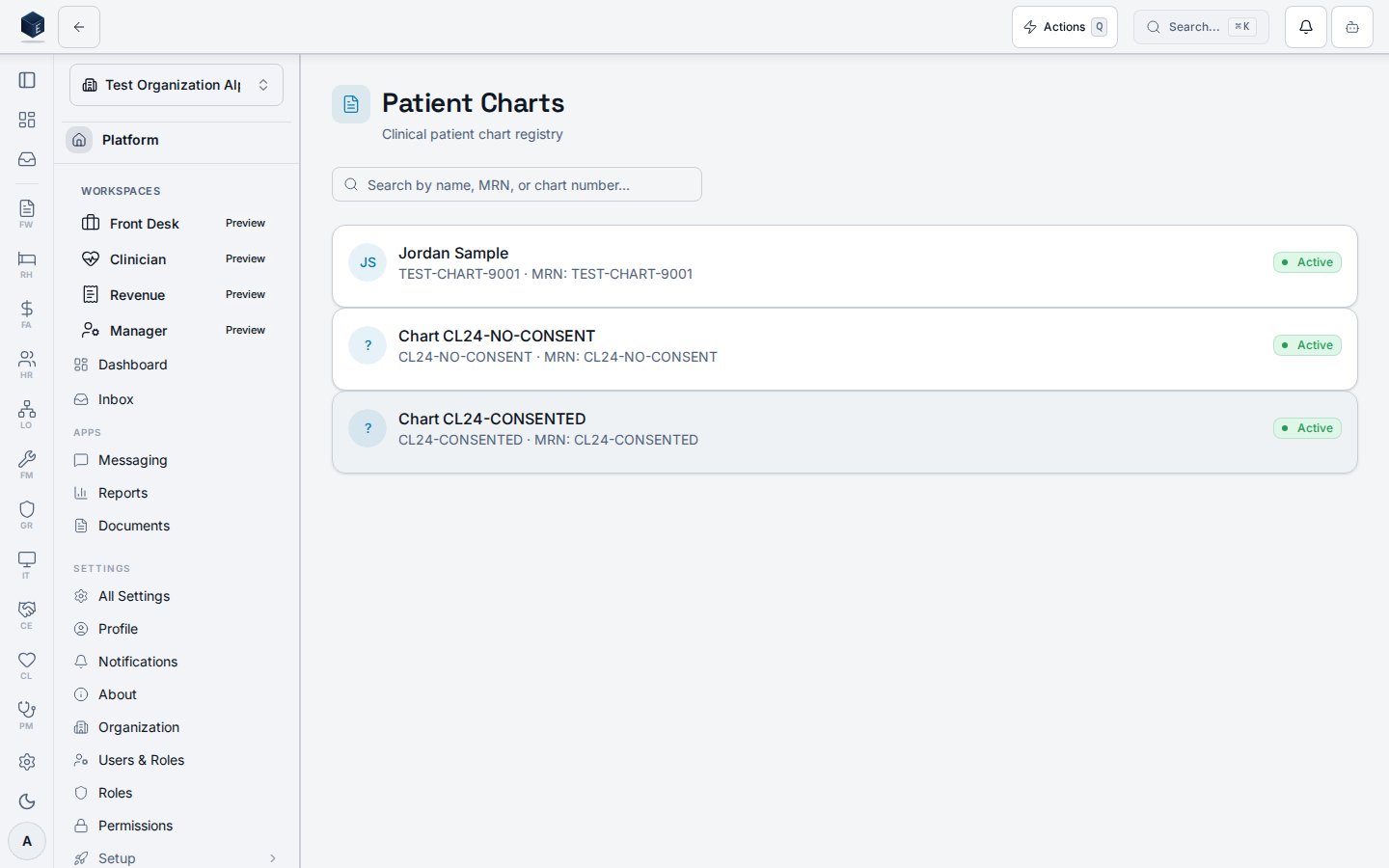
The page loads charts fromcl_patient_charts joined to pf_patient_identities (MRN) and pm_patients (first/last name) via useChartList. When a search term is provided, up to 200 charts (CHART_SEARCH_LIMIT) are fetched and filtered client-side by chart number, MRN, full name, and reversed name. Without a search, all non-deleted charts for the organization are returned ordered by created_at descending. Each chart row is a clickable link to /cl/charts/:chartId and displays a name avatar with initials, full name or fallback chart number, chart number and MRN, a ClinicalUrgencyIndicator if current_risk_level is set, and an active/secondary status badge. Charts with urgency critical or high render with an urgency-specific border class.
Who it’s for
Requires permission:cl.charts.view
Before you start
You must hold thecl.charts.view permission. Charts are scoped to your organization. Patient identity data (name, MRN) is PHI — handle per your organization’s privacy policy and applicable regulations.
Steps
1
Navigate to /cl/charts
Open the Clinical module and navigate to Patient Charts. The registry loads all non-deleted charts for your organization.
2
Search for a patient chart
Type in the search box to filter by patient name, MRN, or chart number. The search field also supports reversed name order (last name first).
3
Open a patient chart
Click any chart row to navigate to the individual chart detail at
/cl/charts/:chartId.Key concepts
Search behavior
Search behavior
Search is client-side after a server fetch limited to 200 rows. Matches on chart number, MRN,
first last, and last first name combinations. No pagination UI is present in this version.Risk level display
Risk level display
If
current_risk_level is present on a chart record, a ClinicalUrgencyIndicator renders the value as an uppercase label. Charts with critical or high urgency also receive an urgency border class on the card.Empty state
Empty state
When no charts match, the page shows: “No patient charts — Patient charts will appear here once created.”
Error state
Error state
If the data fetch fails, a destructive card renders the sanitized error message above the chart list.
Detail view
The Patient Chart screen displays the comprehensive clinical record for one patient at route/cl/charts/:chartId.
Overview
The Patient Chart page loads a singlecl_patient_charts row (filtered by organization_id) and renders a sticky PatientBanner showing patient name, MRN, allergy count, and active problem count. A contextual sidebar replaces the module navigation on desktop, providing chart section tabs with badge counts for draft notes, pending consents, and high-risk screening results. On mobile, a bottom sheet handles section navigation. A CdsAlertsPanel appears above content whenever CDS (clinical decision support) alerts are present for the chart. Quick-action buttons for new note, record vitals, new screening, and order-set activation are always available. A “Generate C-CDA” button is shown when the user holds the cl.cda.view permission.
Who it’s for
Requires permission:cl.charts.view
Individual chart sections enforce additional scoped permissions (e.g., cl.progress_note.view, cl.medications.view, cl.results.view) via PermissionGate.
Before you start
- Must hold
cl.charts.viewpermission to reach this page. - The chart must exist and not be soft-deleted (
deleted_at IS NULL).
Steps
1
Open a chart
Navigate to
/cl/charts, select a row, or follow any deep-link to /cl/charts/:chartId. The sticky Patient Banner loads immediately with name, MRN, allergy count, and active-problem count.2
Select a section tab
Use the contextual sidebar (desktop) or bottom-sheet (mobile) to switch between sections: Summary, Timeline, Notes, Assessments, COD Assessments, Treatment Plans, Orders, Labs, PDMP, Medications, Allergies, Risk, Vitals, SDOH, Care Team, Outcomes, Transitions, Peer, Discharge, Consents, Disclosures.
3
Act on quick actions
Use the floating
ChartQuickActions buttons to open a new note form (navigates to Notes tab), record vitals, start a risk screening, or launch an order-set activation dialog.4
Generate C-CDA (optional)
If
cl.cda.view is held, click “Generate C-CDA” to navigate to /cl/charts/:chartId/cda.5
Export chart
Click the export button on the Patient Banner to open the
ChartExportDialog.Key concepts
Tab sections and their permissions
Tab sections and their permissions
Each tab renders a dedicated section component under a
PermissionGate. If the user lacks the tab’s permission, the section is not rendered. The active tab is persisted in the URL via the tab query parameter (managed by useTabUrlState).COD Indicator badge
COD Indicator badge
A
CODFlagBadge is displayed if the chart’s cod_indicator field is truthy. The COD (co-occurring disorder) indicator enables the COD Assessments tab and the COD section inside Treatment Plans.CDS Lab Monitoring
CDS Lab Monitoring
On chart load,
useCdsLabMonitoring is evaluated for the chart. If evaluation fails, a destructive alert is shown. Any active CDS alerts are displayed in the CdsAlertsPanel above the tabbed content.Error and empty states
Error and empty states
If the chart fails to load, a destructive card with a sanitized error message is shown. If the chart ID is not found or is deleted, a “Chart not found” empty-state card is shown.
Related
Clinical
Overview of the Clinical core.
Governance & parity
Documentation coverage and governance.
This page documents shipped product behavior. It is not medical, legal, or
billing advice. Verify against your organization’s policies and applicable
regulations before using it for clinical, compliance, or billing decisions.
Protected health information (PHI) shown in the product is governed by your
tenant’s access controls and is never exposed in this documentation.
Documentation sources
Documentation sources
- src/routes/cl.tsx
- src/cores/cl/pages/ChartListPage.tsx
- src/cores/cl/hooks/useChartList.ts
- src/cores/cl/components/ClinicalUrgencyIndicator.tsx
- src/cores/cl/components/clinicalUrgencyUtils.ts
- src/cores/cl/pages/PatientChartPage.tsx
- src/cores/cl/hooks/useChartDetail.ts