

/pm/statements) lists all statement run records for the current organization and allows users with the appropriate permission to trigger new runs.
Overview
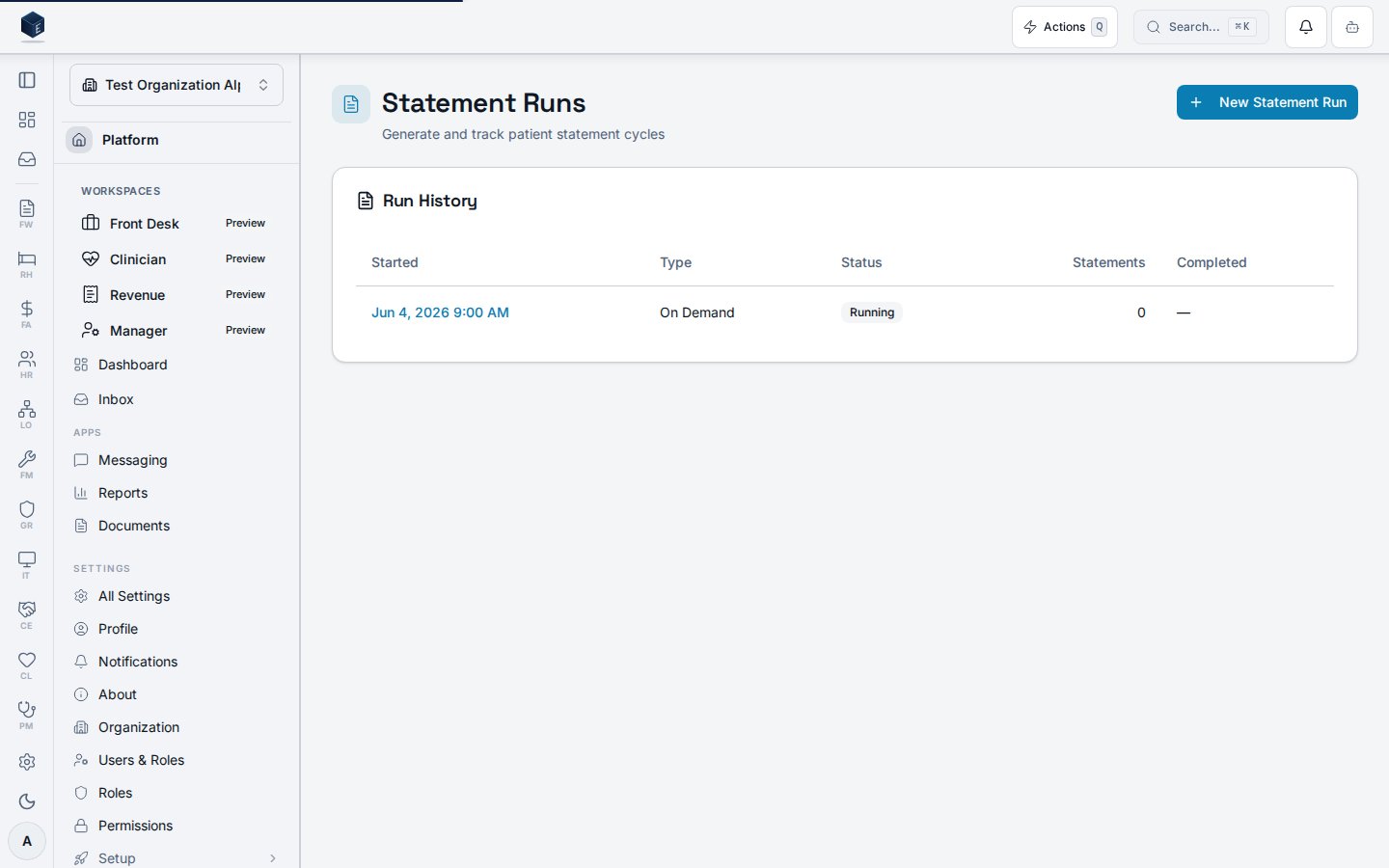
The screen renders a “Run History” table ordered byrun_started_at descending. Each row links to the run detail page (/pm/statements/:runId) via the started timestamp, and shows the run type (Scheduled or On Demand), a status badge (Running, Completed, Failed, Cancelled), the count of statements generated, and the completion timestamp. The page wraps its content in a PermissionGate so it renders only for users with pm.statements.view. Users with pm.statements.generate see a “New Statement Run” button in the header.
Who it’s for
Requires thepm.statements.view permission. Triggering a new statement run additionally requires pm.statements.generate.
Before you start
- The
pm.statements.viewpermission must be granted for the user’s role. - An organization must be selected; the hook returns an empty array when no org is active.
Steps
1
View run history
The Run History table loads automatically. Each row shows the started timestamp (linked to detail), run type, status, statements generated, and completion time.
2
Open a run detail
Click the started timestamp link in any row to navigate to the statement run detail page at
/pm/statements/:runId.3
Trigger a new statement run
Users with
pm.statements.generate can click “New Statement Run” to open StatementRunTriggerDialog. After submission, the list invalidates and the new run appears at the top.Key concepts
Empty and error states
Empty and error states
When no runs exist, an empty state reads “No statement runs yet — Create a new run to generate patient statements.” If the fetch fails, an error message reads “Failed to load statement runs” with a Retry button that reloads the page.
Viewing a statement run
The Statement Run Details page displays summary information for a completed or in-progress statement generation run at route/pm/statements/:runId (permission: pm.statements.view).
StatementRunDetailPage loads a run record via useStatementRunDetail keyed by runId. It displays:
- Run type (using
STATEMENT_RUN_TYPE_LABELS) - Status badge (using
STATEMENT_RUN_STATUS_LABELSandSTATEMENT_RUN_STATUS_VARIANT) - Start timestamp formatted as month/day/year hour:minute AM/PM
/pm/statements. Content is gated by pm.statements.view via PermissionGate. A three-column summary grid is rendered.
- Navigate to Practice Management → Statements, select a run from the list, or go to
/pm/statements/:runId. - The summary shows run type, start timestamp, and status badge. Additional columns may display further run metadata.
- Statement run status — reflects whether the run is in progress, completed, or errored; rendered from
STATEMENT_RUN_STATUS_LABELS. - Run type — the category of statement generated (e.g., batch vs. individual); rendered from
STATEMENT_RUN_TYPE_LABELS.
Related
Practice Management
Overview of the Practice Management core.
Governance & parity
Documentation coverage and governance.
This page documents shipped product behavior. It is not medical, legal, or
billing advice. Verify against your organization’s policies and applicable
regulations before using it for clinical, compliance, or billing decisions.
Protected health information (PHI) shown in the product is governed by your
tenant’s access controls and is never exposed in this documentation.
Documentation sources
Documentation sources
- src/routes/pm.tsx
- src/cores/pm/pages/StatementRunListPage.tsx
- src/cores/pm/hooks/useStatementRuns.ts
- src/cores/pm/types/statement-billing.ts
- src/cores/pm/pages/StatementRunDetailPage.tsx