

/rh/outcomes/indicators and lets staff define, search, activate, and edit the measurable indicators applied to discharged residents.
Overview
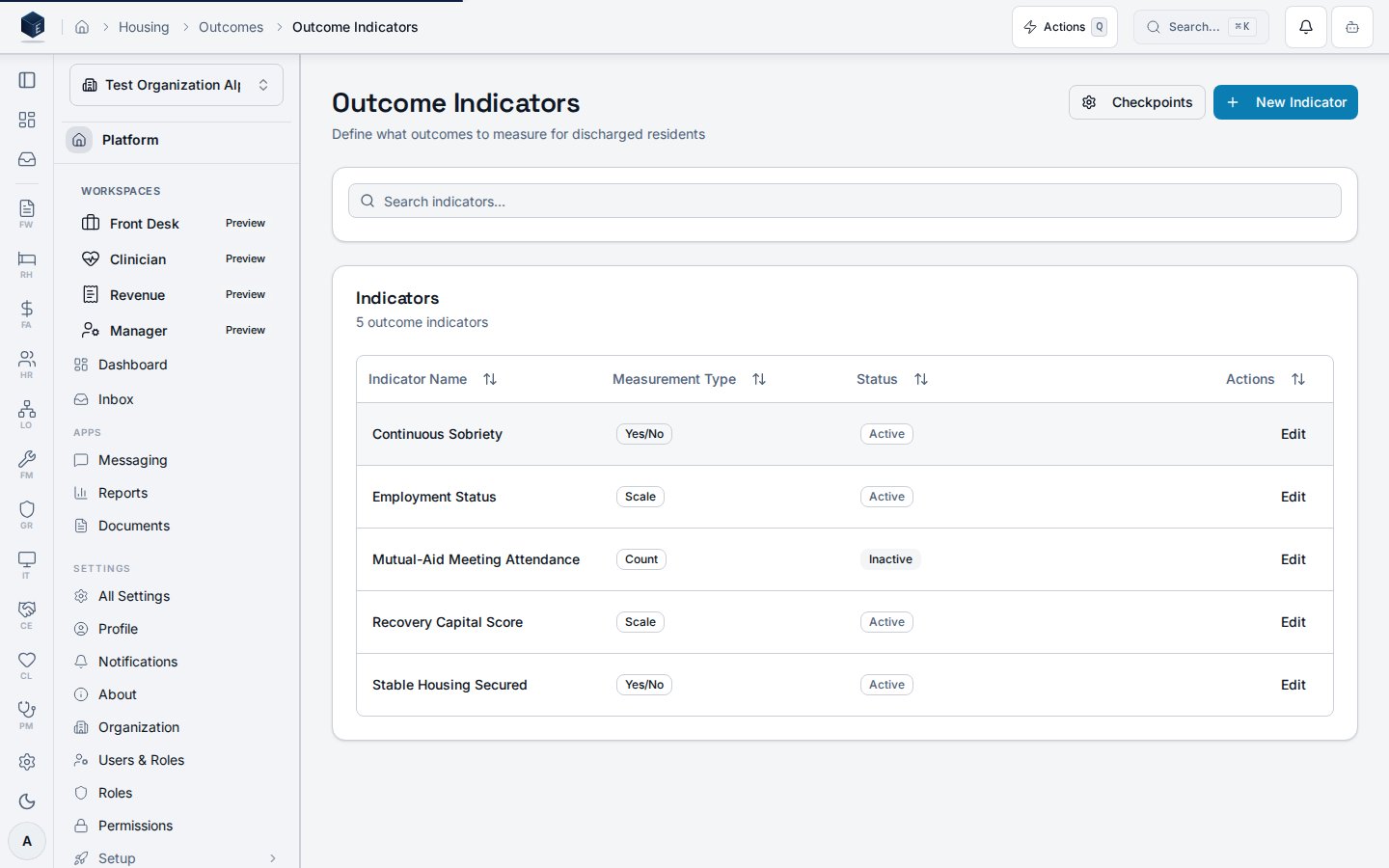
The page loads indicator records from therh_outcome_indicators table via useOutcomeIndicators, scoped to organization_id and filtered by deleted_at IS NULL. Indicators are displayed in a DataTable with columns for Indicator Name, Measurement Type, Status (Active/Inactive), and an Edit action. A search field filters the list client-side by indicator_name. Users can create a new indicator by clicking “New Indicator” to open the OutcomeIndicatorDialog, or edit an existing indicator by clicking “Edit” on its row. A “Checkpoints” button links to /rh/outcomes/checkpoints.
Who it’s for
RequiresRH_PERMISSIONS.DASHBOARD_VIEW (rh.dashboard.view) via the parent RHViewGuard. No finer-grained permission gate is visible on this route in rh.tsx.
Before you start
Hold therh.dashboard.view permission. Ensure outcome indicators have been created before referencing them in assessments.
Steps
1
Navigate to Outcome Indicators
Go to
/rh/outcomes/indicators.2
Search indicators
Type in the search field to filter indicators by name.
3
Create a new indicator
Click “New Indicator” to open the creation dialog. Enter the indicator name and select a measurement type.
4
Edit an existing indicator
Click “Edit” on any row in the table. The same dialog opens pre-populated with the indicator’s current values.
5
Toggle indicator status
Active/Inactive status is visible in the table; toggle is available in the edit dialog (observable from
is_active field).Key concepts
Measurement types
Measurement types
The code defines four measurement type values:
binary (displayed as “Yes/No”), scale (displayed as “Scale”), count (displayed as “Count”), and percentage (displayed as “Percentage”).Empty state
Empty state
When no indicators exist, the
DataTable shows the empty state title “No indicators defined yet” with a “Create First Indicator” action button.Creating an indicator
Outcome indicators are created via theOutcomeIndicatorDialog modal, which opens from the New Indicator button on the /rh/outcomes/indicators list page. The dialog wraps OutcomeIndicatorForm, a single-screen form (no wizard). On success, the dialog closes and the indicators list refreshes. No dedicated /rh/outcomes/indicators/new route exists.
Permission required: rh.dashboard.view via the parent RHViewGuard.
- Navigate to
/rh/outcomes/indicators(Outcome Indicators list). - Click the New Indicator button in the page header to open the
OutcomeIndicatorDialogmodal. - Enter the Indicator Name (required). Select a Measurement Type: Binary (Yes/No), Scale (1–10), Count, or Percentage. Optionally add a Description. Toggle Active to control whether this indicator appears in assessments (defaults to on).
- Click Create Indicator. On success the dialog closes and the list refreshes. On error a sanitized error toast is displayed.
Related
Recovery Housing
Recovery Housing references and overview.
Governance & parity
Documentation coverage and governance.
This page documents shipped product behavior. It is not medical, legal, or
billing advice. Verify against your organization’s policies and applicable
regulations before using it for clinical, compliance, or billing decisions.
Protected health information (PHI) shown in the product is governed by your
tenant’s access controls and is never exposed in this documentation.
Documentation sources
Documentation sources
- src/routes/rh.tsx
- src/cores/rh/pages/OutcomeIndicatorsPage.tsx
- src/cores/rh/hooks/useOutcomeIndicators.ts
- src/cores/rh/components/forms/OutcomeIndicatorDialog.tsx
- src/cores/rh/components/forms/OutcomeIndicatorForm.tsx