

/rh/episodes
Overview
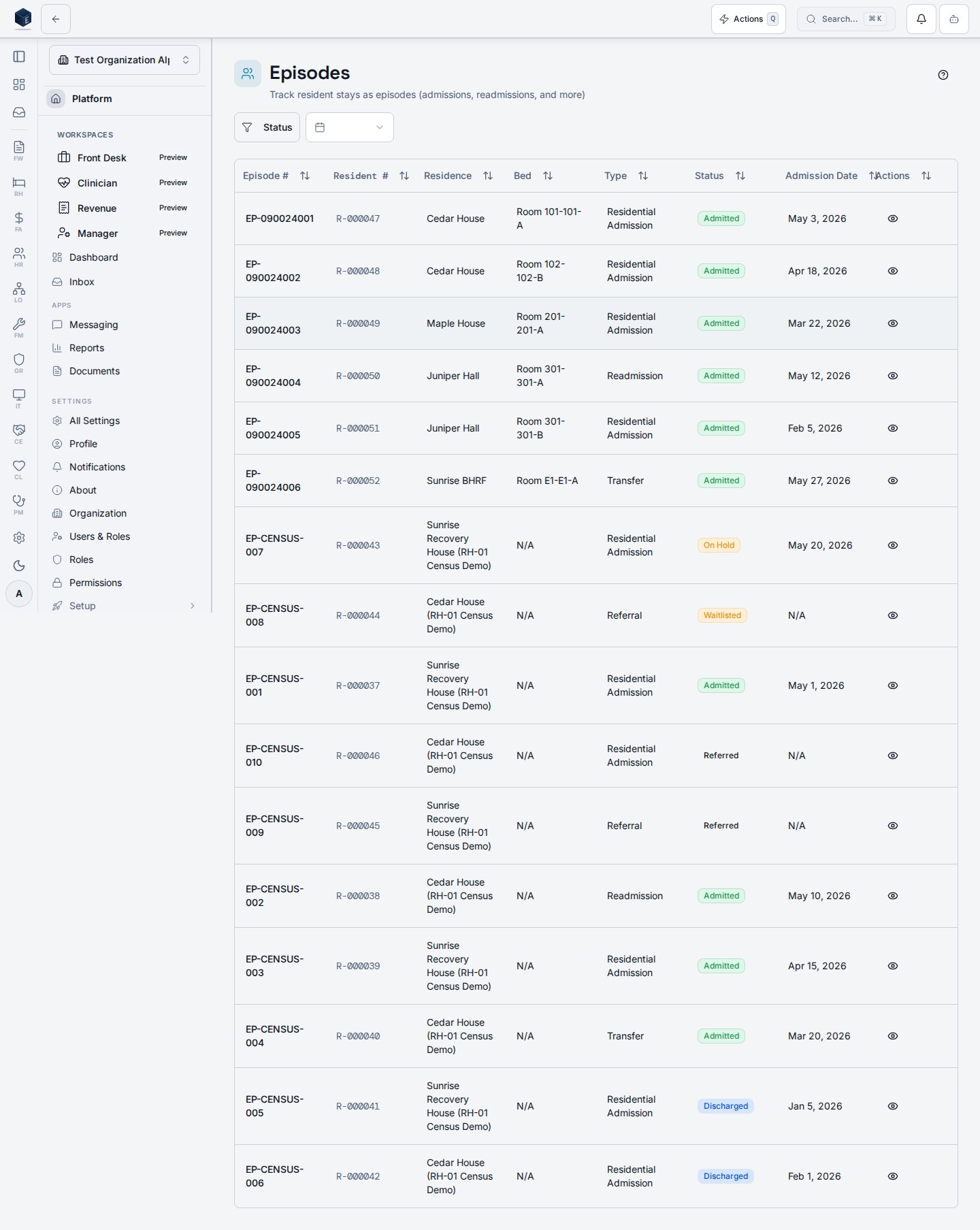
The page renders aPageHeader with a New Admission button and a ListFilterBar. The filter bar supports:
- Status (multi-select):
referred,waitlisted,admitted,on_hold,discharged - Date range (single-select preset): last 7 days, 30 days, 90 days, or all time
EpisodesTable renders the filtered episode list. Clicking a row navigates to /rh/episodes/:id.
A Help button launches a GuidedTour (admissionTour) that walks users through the page interactively. The tour is not auto-started.
Clicking New Admission navigates to /rh/admissions/new.
Who it’s for
Requires therh.dashboard.view permission (applied to all RH routes via RHViewGuard). No additional inner permission gate exists on this route.
Before you start
- Ensure at least one residence and bed are configured so that admissions can be assigned.
- Users who only need to view episodes do not need any additional permission beyond
rh.dashboard.view.
Steps
1
Open Episodes
Navigate to Recovery Housing → Episodes (
/rh/episodes). The episodes table loads for your organization.2
Filter by status
Use the Status filter (multi-select) in the filter bar to narrow results to one or more episode statuses.
3
Filter by date range
Select a date-range preset (7 days, 30 days, 90 days) to restrict results to episodes with referral dates within that window.
4
Open an episode
Click any row in the table to open the Episode Details page for that record.
5
Start a new admission
Click New Admission (top-right) to open the Admission Wizard at
/rh/admissions/new.6
Take the guided tour (optional)
Click the Help button (question-mark icon) next to New Admission to start the interactive admission tour.
Key concepts
- Episode — the record linking a resident profile to a residence stay from referral through discharge.
- Admission wizard — a separate multi-step wizard at
/rh/admissions/newthat creates the episode record. - Date range filter — filters episodes by referral date (the
referral_datecolumn); it does not filter by admission or discharge date.
Viewing an episode
The Episode Details page displays the full record for a single resident episode and provides tabbed access to eligibility, agreements, payment, phases, milestones, and discharge planning. Route:/rh/episodes/:id
When a resident episode record exists, the page renders a three-column summary row (Referral Date, Admission Date, Bed Assignment) followed by seven tabs:
If the episode is not found or the user lacks permission, an error state is shown with a link back to the Episodes list.
Requires
rh.dashboard.view (applied to all RH routes via RHViewGuard). No additional inner permission gate exists on this route. Obtain the episode ID from the Episodes list or from a bed-board or residence detail link; the query enforces tenant isolation via RLS.
1
Navigate to the episode
From Recovery Housing → Episodes, click a row in the episodes table. The URL changes to
/rh/episodes/<id> and the page loads.2
Review the summary row
The header shows the episode number, resident number badge (if available), status badge, and the associated residence name. The summary cards show Referral Date, Admission Date, and Bed Assignment.
3
Review the Details tab
The Details tab displays the episode status and referral source. Switch to other tabs as needed using the scrollable tab list.
4
Check eligibility and agreements
Select Eligibility or Agreement tabs to review checklist completion and resident agreement status for this episode.
5
Review payment, phases, and milestones
Use the Payment Status, Phases, and Milestones tabs to track financial and program-phase progress.
6
Manage discharge planning
Select the Discharge tab to view or update the discharge plan, checklist, external referrals, and scheduled follow-ups linked to this episode.
Key concepts
- Episode — the primary record linking a resident profile to a residence stay, tracking the full lifecycle from referral through discharge.
- Episode number — a human-readable identifier (
episode_number) displayed in the page header and breadcrumb. - Referral source — the origin of the referral, stored on the episode record.
- Bed assignment — the room and bed label allocated to this episode (
room_number-bed_label); displayed as “Not assigned” if no bed is linked.
Related
Recovery Housing
Governance & parity
This page documents shipped product behavior. It is not medical, legal, or
billing advice. Verify against your organization’s policies and applicable
regulations before using it for clinical, compliance, or billing decisions.
Protected health information (PHI) shown in the product is governed by your
tenant’s access controls and is never exposed in this documentation.
Documentation sources
Documentation sources
- src/routes/rh.tsx
- src/cores/rh/pages/EpisodesPage.tsx
- src/cores/rh/pages/EpisodeDetailPage.tsx
- src/cores/rh/hooks/useEpisodeDetail.ts