> ## Documentation Index
> Fetch the complete documentation index at: https://docs.encoreos.io/llms.txt
> Use this file to discover all available pages before exploring further.
# Outcome Indicators
> Manage the outcome indicators used to measure post-discharge resident outcomes in the Recovery Housing module.
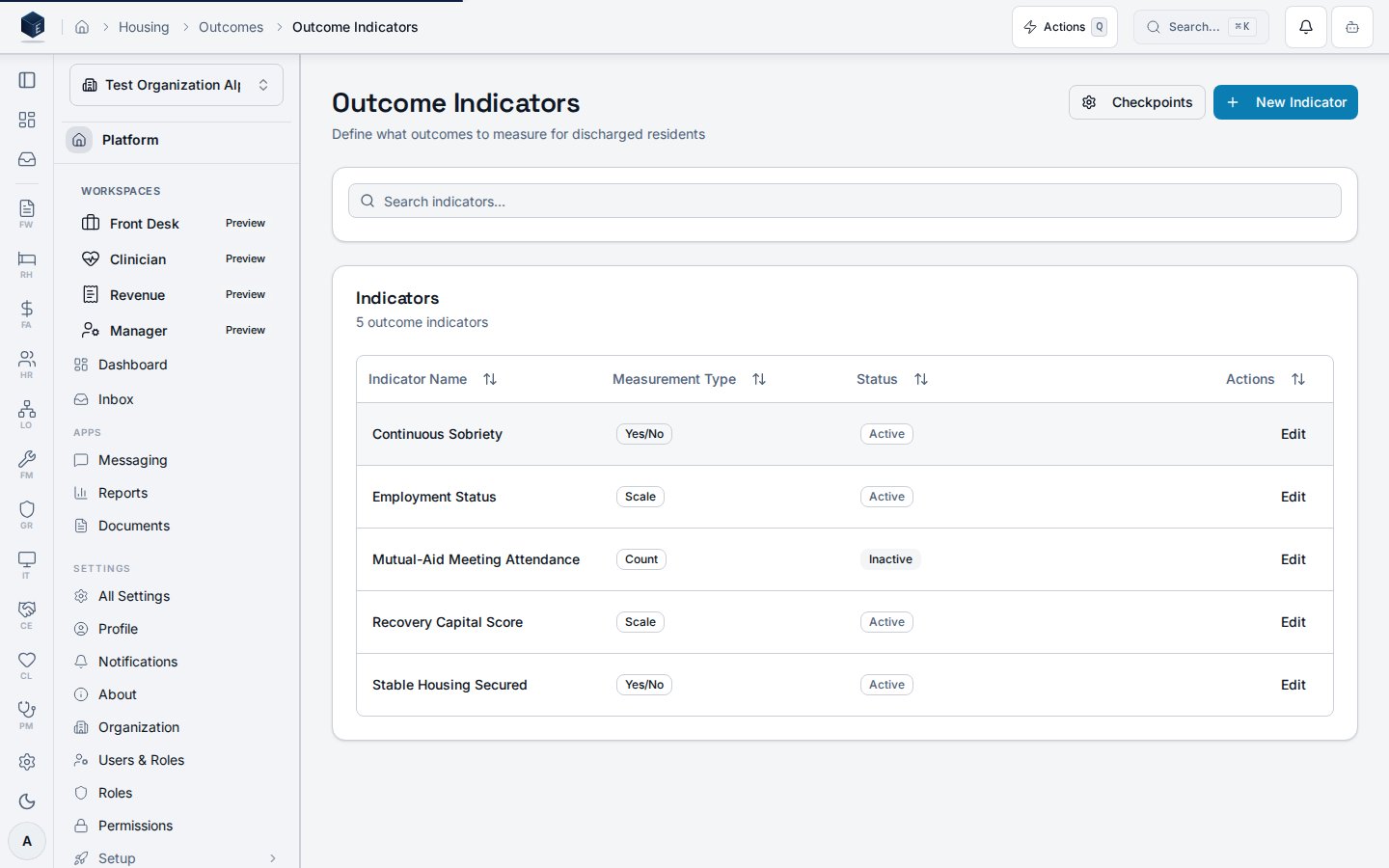
The Outcome Indicators screen lives at `/rh/outcomes/indicators` and lets staff define, search, activate, and edit the measurable indicators applied to discharged residents.
## Overview
The page loads indicator records from the `rh_outcome_indicators` table via `useOutcomeIndicators`, scoped to `organization_id` and filtered by `deleted_at IS NULL`. Indicators are displayed in a `DataTable` with columns for Indicator Name, Measurement Type, Status (Active/Inactive), and an Edit action. A search field filters the list client-side by `indicator_name`. Users can create a new indicator by clicking "New Indicator" to open the `OutcomeIndicatorDialog`, or edit an existing indicator by clicking "Edit" on its row. A "Checkpoints" button links to `/rh/outcomes/checkpoints`.
 ## Who it's for
Requires `RH_PERMISSIONS.DASHBOARD_VIEW` (`rh.dashboard.view`) via the parent `RHViewGuard`. No finer-grained permission gate is visible on this route in `rh.tsx`.
## Before you start
Hold the `rh.dashboard.view` permission. Ensure outcome indicators have been created before referencing them in assessments.
## Steps
Go to `/rh/outcomes/indicators`.
Type in the search field to filter indicators by name.
Click "New Indicator" to open the creation dialog. Enter the indicator name and select a measurement type.
Click "Edit" on any row in the table. The same dialog opens pre-populated with the indicator's current values.
Active/Inactive status is visible in the table; toggle is available in the edit dialog (observable from `is_active` field).
## Key concepts
The code defines four measurement type values: `binary` (displayed as "Yes/No"), `scale` (displayed as "Scale"), `count` (displayed as "Count"), and `percentage` (displayed as "Percentage").
When no indicators exist, the `DataTable` shows the empty state title "No indicators defined yet" with a "Create First Indicator" action button.
## Creating an indicator
Outcome indicators are created via the `OutcomeIndicatorDialog` modal, which opens from the **New Indicator** button on the `/rh/outcomes/indicators` list page. The dialog wraps `OutcomeIndicatorForm`, a single-screen form (no wizard). On success, the dialog closes and the indicators list refreshes. No dedicated `/rh/outcomes/indicators/new` route exists.
Permission required: `rh.dashboard.view` via the parent `RHViewGuard`.
1. Navigate to `/rh/outcomes/indicators` (Outcome Indicators list).
2. Click the **New Indicator** button in the page header to open the `OutcomeIndicatorDialog` modal.
3. Enter the **Indicator Name** (required). Select a **Measurement Type**: Binary (Yes/No), Scale (1–10), Count, or Percentage. Optionally add a **Description**. Toggle **Active** to control whether this indicator appears in assessments (defaults to on).
4. Click **Create Indicator**. On success the dialog closes and the list refreshes. On error a sanitized error toast is displayed.
| Term | Code identifier | Notes |
| ------------------------ | ----------------------- | ---------------------------------------------- |
| Outcome Indicator | `OutcomeIndicator` type | Named measurable outcome tracked for residents |
| Measurement Type | `measurement_type` | `binary`, `scale`, `count`, or `percentage` |
| Active | `is_active` | Controls inclusion in assessments |
| `OutcomeIndicatorDialog` | Dialog component | Modal wrapper for the create/edit form |
| `OutcomeIndicatorForm` | Form component | Single-screen form, no wizard |
## Related
Recovery Housing references and overview.
Documentation coverage and governance.
This page documents shipped product behavior. It is not medical, legal, or
billing advice. Verify against your organization's policies and applicable
regulations before using it for clinical, compliance, or billing decisions.
Protected health information (PHI) shown in the product is governed by your
tenant's access controls and is never exposed in this documentation.
* src/routes/rh.tsx
* src/cores/rh/pages/OutcomeIndicatorsPage.tsx
* src/cores/rh/hooks/useOutcomeIndicators.ts
* src/cores/rh/components/forms/OutcomeIndicatorDialog.tsx
* src/cores/rh/components/forms/OutcomeIndicatorForm.tsx
## Who it's for
Requires `RH_PERMISSIONS.DASHBOARD_VIEW` (`rh.dashboard.view`) via the parent `RHViewGuard`. No finer-grained permission gate is visible on this route in `rh.tsx`.
## Before you start
Hold the `rh.dashboard.view` permission. Ensure outcome indicators have been created before referencing them in assessments.
## Steps
Go to `/rh/outcomes/indicators`.
Type in the search field to filter indicators by name.
Click "New Indicator" to open the creation dialog. Enter the indicator name and select a measurement type.
Click "Edit" on any row in the table. The same dialog opens pre-populated with the indicator's current values.
Active/Inactive status is visible in the table; toggle is available in the edit dialog (observable from `is_active` field).
## Key concepts
The code defines four measurement type values: `binary` (displayed as "Yes/No"), `scale` (displayed as "Scale"), `count` (displayed as "Count"), and `percentage` (displayed as "Percentage").
When no indicators exist, the `DataTable` shows the empty state title "No indicators defined yet" with a "Create First Indicator" action button.
## Creating an indicator
Outcome indicators are created via the `OutcomeIndicatorDialog` modal, which opens from the **New Indicator** button on the `/rh/outcomes/indicators` list page. The dialog wraps `OutcomeIndicatorForm`, a single-screen form (no wizard). On success, the dialog closes and the indicators list refreshes. No dedicated `/rh/outcomes/indicators/new` route exists.
Permission required: `rh.dashboard.view` via the parent `RHViewGuard`.
1. Navigate to `/rh/outcomes/indicators` (Outcome Indicators list).
2. Click the **New Indicator** button in the page header to open the `OutcomeIndicatorDialog` modal.
3. Enter the **Indicator Name** (required). Select a **Measurement Type**: Binary (Yes/No), Scale (1–10), Count, or Percentage. Optionally add a **Description**. Toggle **Active** to control whether this indicator appears in assessments (defaults to on).
4. Click **Create Indicator**. On success the dialog closes and the list refreshes. On error a sanitized error toast is displayed.
| Term | Code identifier | Notes |
| ------------------------ | ----------------------- | ---------------------------------------------- |
| Outcome Indicator | `OutcomeIndicator` type | Named measurable outcome tracked for residents |
| Measurement Type | `measurement_type` | `binary`, `scale`, `count`, or `percentage` |
| Active | `is_active` | Controls inclusion in assessments |
| `OutcomeIndicatorDialog` | Dialog component | Modal wrapper for the create/edit form |
| `OutcomeIndicatorForm` | Form component | Single-screen form, no wizard |
## Related
Recovery Housing references and overview.
Documentation coverage and governance.
This page documents shipped product behavior. It is not medical, legal, or
billing advice. Verify against your organization's policies and applicable
regulations before using it for clinical, compliance, or billing decisions.
Protected health information (PHI) shown in the product is governed by your
tenant's access controls and is never exposed in this documentation.
* src/routes/rh.tsx
* src/cores/rh/pages/OutcomeIndicatorsPage.tsx
* src/cores/rh/hooks/useOutcomeIndicators.ts
* src/cores/rh/components/forms/OutcomeIndicatorDialog.tsx
* src/cores/rh/components/forms/OutcomeIndicatorForm.tsx