> ## Documentation Index
> Fetch the complete documentation index at: https://docs.encoreos.io/llms.txt
> Use this file to discover all available pages before exploring further.
# Recovery Housing Grievances
> Review, assign, and resolve resident grievances. List at /rh/grievances, file via /rh/grievances/new, and view details at /rh/grievances/:id.
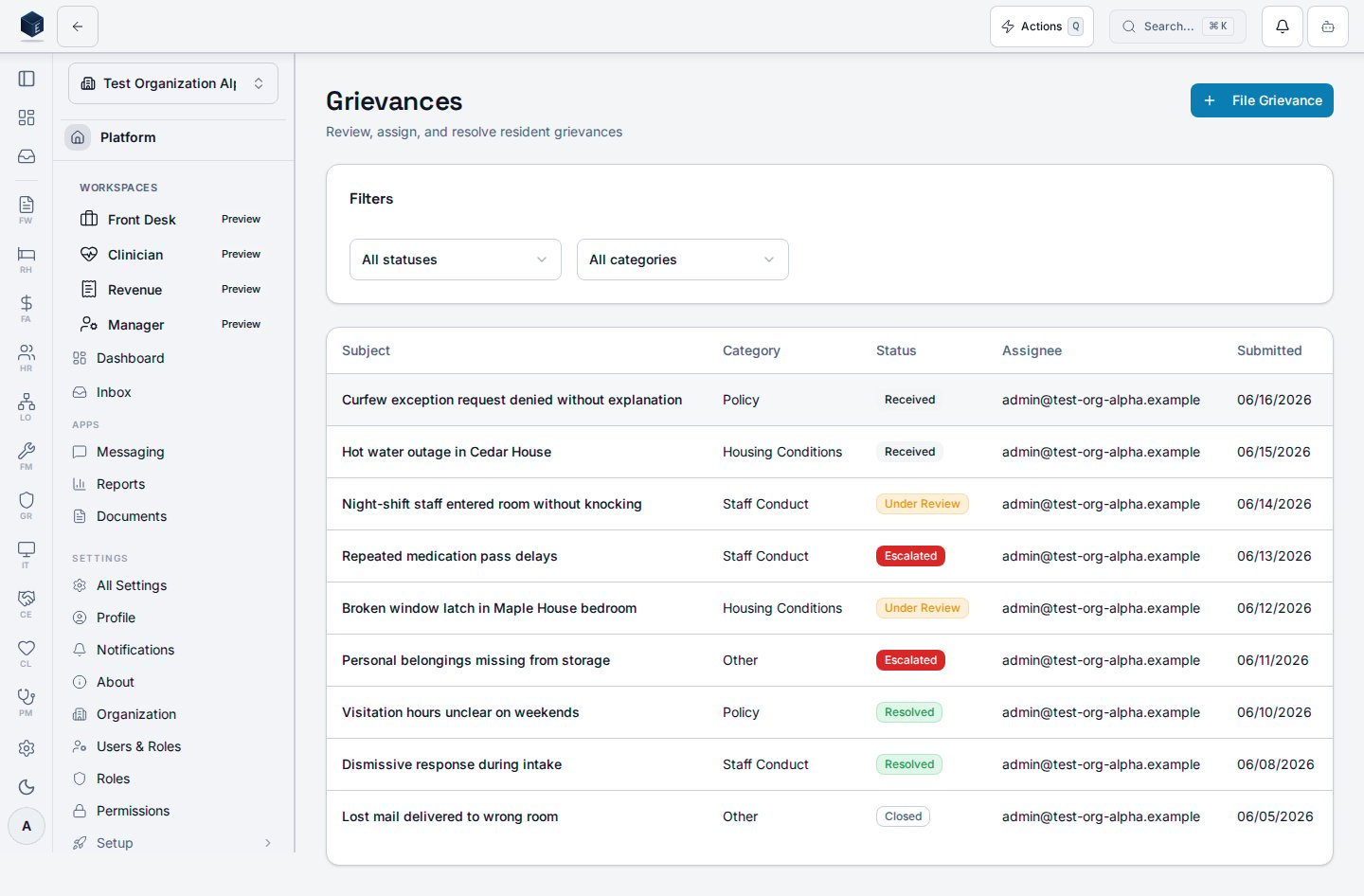
The Grievances screen (`/rh/grievances`, `GrievancesListPage`) lists resident grievances for the organization with status and category filters. File a new grievance at `/rh/grievances/new` and open a grievance's detail at `/rh/grievances/:id`.
## Overview
The list (`useGrievances`) loads `rh_grievances` for the active organization ordered by submission date, with a filter bar for **status** (received, under review, resolved, escalated, closed) and **category** (staff conduct, housing conditions, policy, other). Each row shows the subject, category, status badge, assignee, and submitted date, and links to the grievance detail. Grievance data is persisted to the `rh_grievances` table, with optional attachments in the `rh-grievance-attachments` Supabase storage bucket.
 ## Who it's for
Access follows your organization's role and module configuration. The `rh_grievances` table is associated with `RH_PERMISSIONS.GRIEVANCES_VIEW` (`rh.grievances.view`) and `RH_PERMISSIONS.GRIEVANCES_CREATE` (`rh.grievances.create`) in the permissions constants, but neither is applied to a list route in the router. The `/rh/grievances/new` route is protected by `RH_PERMISSIONS.GRIEVANCES_CREATE` (`rh.grievances.create`) inside the outer `RHViewGuard` (`rh.dashboard.view`).
## Before you start
* These routes are currently unregistered. Visiting `/rh/grievances` or `/rh/grievances/:id` will result in a Not Found page.
## Steps
Open `/rh/grievances` to see all grievances, then filter by status or category to focus the list.
Navigate to `/rh/grievances/new` to open the grievance filing wizard.
Click any row to open its detail at `/rh/grievances/:id`.
## Key concepts
| Term | Code value |
| -------------------------- | -------------------------------------------------------- |
| Grievance status (initial) | `received` (set on wizard submission) |
| Grievance categories | `staff_conduct`, `housing_conditions`, `policy`, `other` |
## Viewing a grievance
Clicking a row in the list opens the grievance detail at `/rh/grievances/:id` (`GrievanceDetailPage`), which reads the record (and its resident profile and assignee) via `useGrievanceDetail`. After the filing wizard (`/rh/grievances/new`) writes a grievance to the `rh_grievances` table — with attachments in the `rh-grievance-attachments` storage bucket — it navigates back to the `/rh/grievances` list.
## Related
Recovery Housing references and overview.
Documentation coverage and governance.
This page documents shipped product behavior. It is not medical, legal, or
billing advice. Verify against your organization's policies and applicable
regulations before using it for clinical, compliance, or billing decisions.
Protected health information (PHI) shown in the product is governed by your
tenant's access controls and is never exposed in this documentation.
* src/routes/rh.tsx
* src/cores/rh/pages/GrievancesListPage.tsx
* src/cores/rh/pages/GrievanceDetailPage.tsx
* src/cores/rh/pages/GrievanceFilingWizardPage.tsx
* src/cores/rh/hooks/useGrievances.ts
* src/cores/rh/components/wizards/grievance-filing/GrievanceFilingWizard.tsx
## Who it's for
Access follows your organization's role and module configuration. The `rh_grievances` table is associated with `RH_PERMISSIONS.GRIEVANCES_VIEW` (`rh.grievances.view`) and `RH_PERMISSIONS.GRIEVANCES_CREATE` (`rh.grievances.create`) in the permissions constants, but neither is applied to a list route in the router. The `/rh/grievances/new` route is protected by `RH_PERMISSIONS.GRIEVANCES_CREATE` (`rh.grievances.create`) inside the outer `RHViewGuard` (`rh.dashboard.view`).
## Before you start
* These routes are currently unregistered. Visiting `/rh/grievances` or `/rh/grievances/:id` will result in a Not Found page.
## Steps
Open `/rh/grievances` to see all grievances, then filter by status or category to focus the list.
Navigate to `/rh/grievances/new` to open the grievance filing wizard.
Click any row to open its detail at `/rh/grievances/:id`.
## Key concepts
| Term | Code value |
| -------------------------- | -------------------------------------------------------- |
| Grievance status (initial) | `received` (set on wizard submission) |
| Grievance categories | `staff_conduct`, `housing_conditions`, `policy`, `other` |
## Viewing a grievance
Clicking a row in the list opens the grievance detail at `/rh/grievances/:id` (`GrievanceDetailPage`), which reads the record (and its resident profile and assignee) via `useGrievanceDetail`. After the filing wizard (`/rh/grievances/new`) writes a grievance to the `rh_grievances` table — with attachments in the `rh-grievance-attachments` storage bucket — it navigates back to the `/rh/grievances` list.
## Related
Recovery Housing references and overview.
Documentation coverage and governance.
This page documents shipped product behavior. It is not medical, legal, or
billing advice. Verify against your organization's policies and applicable
regulations before using it for clinical, compliance, or billing decisions.
Protected health information (PHI) shown in the product is governed by your
tenant's access controls and is never exposed in this documentation.
* src/routes/rh.tsx
* src/cores/rh/pages/GrievancesListPage.tsx
* src/cores/rh/pages/GrievanceDetailPage.tsx
* src/cores/rh/pages/GrievanceFilingWizardPage.tsx
* src/cores/rh/hooks/useGrievances.ts
* src/cores/rh/components/wizards/grievance-filing/GrievanceFilingWizard.tsx