> ## Documentation Index
> Fetch the complete documentation index at: https://docs.encoreos.io/llms.txt
> Use this file to discover all available pages before exploring further.
# Episodes
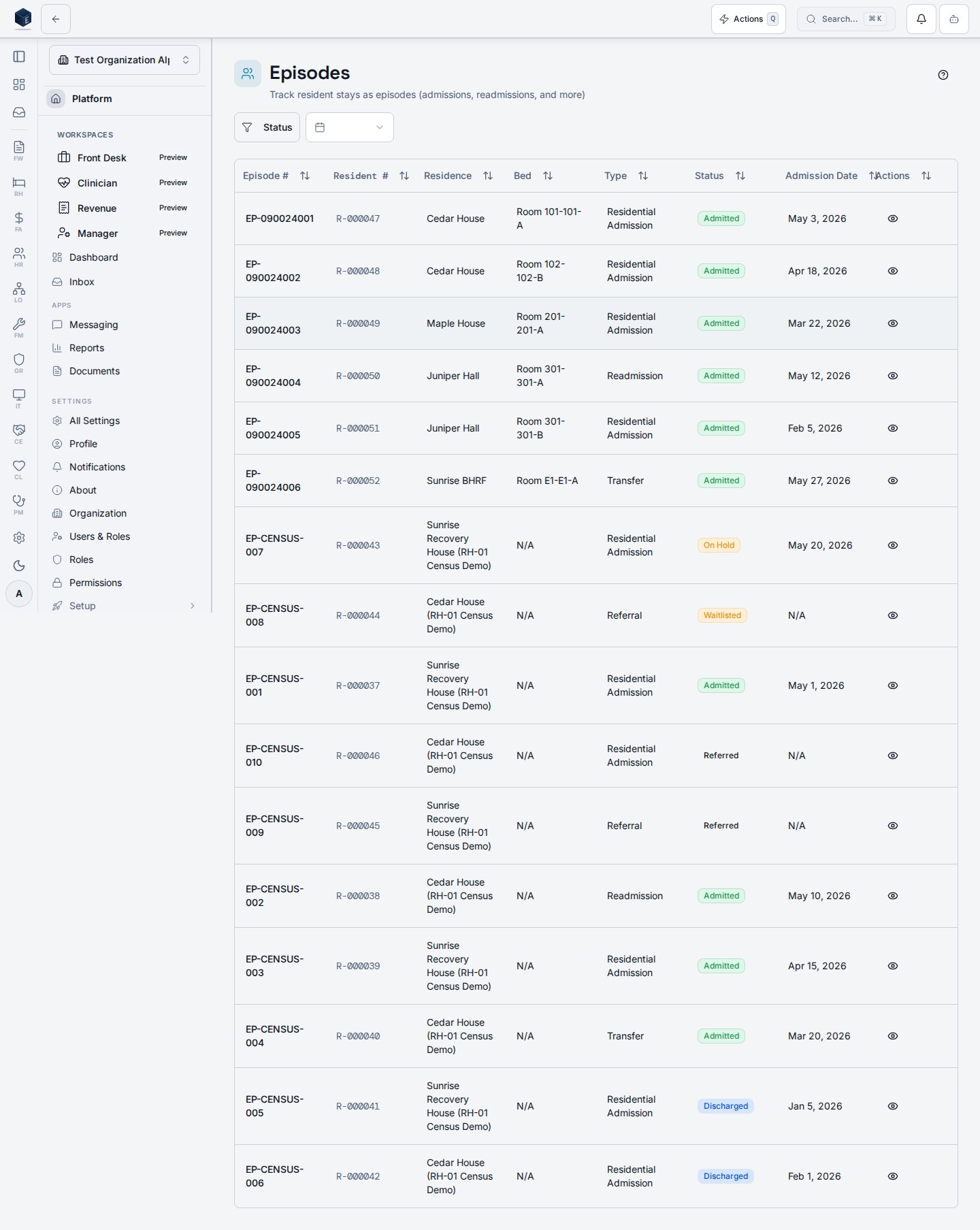
> Browse, filter, and view all resident episodes across your organization; access eligibility, agreements, payment, phases, milestones, and discharge planning.
The Episodes page lists all resident episodes for the organization with status and date-range filters, and provides a guided tour for new users starting the admission workflow. Route: `/rh/episodes`
## Overview
The page renders a `PageHeader` with a **New Admission** button and a `ListFilterBar`. The filter bar supports:
* **Status** (multi-select): `referred`, `waitlisted`, `admitted`, `on_hold`, `discharged`
* **Date range** (single-select preset): last 7 days, 30 days, 90 days, or all time
Below the filters, an `EpisodesTable` renders the filtered episode list. Clicking a row navigates to `/rh/episodes/:id`.
A **Help** button launches a `GuidedTour` (`admissionTour`) that walks users through the page interactively. The tour is not auto-started.
Clicking **New Admission** navigates to `/rh/admissions/new`.
 ## Who it's for
Requires the `rh.dashboard.view` permission (applied to all RH routes via `RHViewGuard`). No additional inner permission gate exists on this route.
## Before you start
* Ensure at least one residence and bed are configured so that admissions can be assigned.
* Users who only need to view episodes do not need any additional permission beyond `rh.dashboard.view`.
## Steps
Navigate to **Recovery Housing → Episodes** (`/rh/episodes`). The episodes table loads for your organization.
Use the **Status** filter (multi-select) in the filter bar to narrow results to one or more episode statuses.
Select a date-range preset (7 days, 30 days, 90 days) to restrict results to episodes with referral dates within that window.
Click any row in the table to open the Episode Details page for that record.
Click **New Admission** (top-right) to open the Admission Wizard at `/rh/admissions/new`.
Click the **Help** button (question-mark icon) next to **New Admission** to start the interactive admission tour.
## Key concepts
* **Episode** — the record linking a resident profile to a residence stay from referral through discharge.
* **Admission wizard** — a separate multi-step wizard at `/rh/admissions/new` that creates the episode record.
* **Date range filter** — filters episodes by referral date (the `referral_date` column); it does not filter by admission or discharge date.
## Viewing an episode
The Episode Details page displays the full record for a single resident episode and provides tabbed access to eligibility, agreements, payment, phases, milestones, and discharge planning. Route: `/rh/episodes/:id`
When a resident episode record exists, the page renders a three-column summary row (Referral Date, Admission Date, Bed Assignment) followed by seven tabs:
| Tab | Content |
| -------------- | ------------------------------------------------------------- |
| Details | Episode status, referral source |
| Eligibility | `EligibilityChecklistCard` — checklist items for this episode |
| Agreement | `ResidentAgreementCard` — resident agreement status |
| Payment Status | `PaymentStatusCard` — payment tracking for this episode |
| Phases | `EpisodePhaseProgressCard` — current phase and progression |
| Milestones | `EpisodeMilestonesCard` — milestone records |
| Discharge | Discharge plan, checklist, referrals, and follow-up card |
If the episode is not found or the user lacks permission, an error state is shown with a link back to the Episodes list.
Requires `rh.dashboard.view` (applied to all RH routes via `RHViewGuard`). No additional inner permission gate exists on this route. Obtain the episode ID from the Episodes list or from a bed-board or residence detail link; the query enforces tenant isolation via RLS.
From **Recovery Housing → Episodes**, click a row in the episodes table. The URL changes to `/rh/episodes/` and the page loads.
The header shows the episode number, resident number badge (if available), status badge, and the associated residence name. The summary cards show Referral Date, Admission Date, and Bed Assignment.
The **Details** tab displays the episode status and referral source. Switch to other tabs as needed using the scrollable tab list.
Select **Eligibility** or **Agreement** tabs to review checklist completion and resident agreement status for this episode.
Use the **Payment Status**, **Phases**, and **Milestones** tabs to track financial and program-phase progress.
Select the **Discharge** tab to view or update the discharge plan, checklist, external referrals, and scheduled follow-ups linked to this episode.
### Key concepts
* **Episode** — the primary record linking a resident profile to a residence stay, tracking the full lifecycle from referral through discharge.
* **Episode number** — a human-readable identifier (`episode_number`) displayed in the page header and breadcrumb.
* **Referral source** — the origin of the referral, stored on the episode record.
* **Bed assignment** — the room and bed label allocated to this episode (`room_number`-`bed_label`); displayed as "Not assigned" if no bed is linked.
## Related
This page documents shipped product behavior. It is not medical, legal, or
billing advice. Verify against your organization's policies and applicable
regulations before using it for clinical, compliance, or billing decisions.
Protected health information (PHI) shown in the product is governed by your
tenant's access controls and is never exposed in this documentation.
* src/routes/rh.tsx
* src/cores/rh/pages/EpisodesPage.tsx
* src/cores/rh/pages/EpisodeDetailPage.tsx
* src/cores/rh/hooks/useEpisodeDetail.ts
## Who it's for
Requires the `rh.dashboard.view` permission (applied to all RH routes via `RHViewGuard`). No additional inner permission gate exists on this route.
## Before you start
* Ensure at least one residence and bed are configured so that admissions can be assigned.
* Users who only need to view episodes do not need any additional permission beyond `rh.dashboard.view`.
## Steps
Navigate to **Recovery Housing → Episodes** (`/rh/episodes`). The episodes table loads for your organization.
Use the **Status** filter (multi-select) in the filter bar to narrow results to one or more episode statuses.
Select a date-range preset (7 days, 30 days, 90 days) to restrict results to episodes with referral dates within that window.
Click any row in the table to open the Episode Details page for that record.
Click **New Admission** (top-right) to open the Admission Wizard at `/rh/admissions/new`.
Click the **Help** button (question-mark icon) next to **New Admission** to start the interactive admission tour.
## Key concepts
* **Episode** — the record linking a resident profile to a residence stay from referral through discharge.
* **Admission wizard** — a separate multi-step wizard at `/rh/admissions/new` that creates the episode record.
* **Date range filter** — filters episodes by referral date (the `referral_date` column); it does not filter by admission or discharge date.
## Viewing an episode
The Episode Details page displays the full record for a single resident episode and provides tabbed access to eligibility, agreements, payment, phases, milestones, and discharge planning. Route: `/rh/episodes/:id`
When a resident episode record exists, the page renders a three-column summary row (Referral Date, Admission Date, Bed Assignment) followed by seven tabs:
| Tab | Content |
| -------------- | ------------------------------------------------------------- |
| Details | Episode status, referral source |
| Eligibility | `EligibilityChecklistCard` — checklist items for this episode |
| Agreement | `ResidentAgreementCard` — resident agreement status |
| Payment Status | `PaymentStatusCard` — payment tracking for this episode |
| Phases | `EpisodePhaseProgressCard` — current phase and progression |
| Milestones | `EpisodeMilestonesCard` — milestone records |
| Discharge | Discharge plan, checklist, referrals, and follow-up card |
If the episode is not found or the user lacks permission, an error state is shown with a link back to the Episodes list.
Requires `rh.dashboard.view` (applied to all RH routes via `RHViewGuard`). No additional inner permission gate exists on this route. Obtain the episode ID from the Episodes list or from a bed-board or residence detail link; the query enforces tenant isolation via RLS.
From **Recovery Housing → Episodes**, click a row in the episodes table. The URL changes to `/rh/episodes/` and the page loads.
The header shows the episode number, resident number badge (if available), status badge, and the associated residence name. The summary cards show Referral Date, Admission Date, and Bed Assignment.
The **Details** tab displays the episode status and referral source. Switch to other tabs as needed using the scrollable tab list.
Select **Eligibility** or **Agreement** tabs to review checklist completion and resident agreement status for this episode.
Use the **Payment Status**, **Phases**, and **Milestones** tabs to track financial and program-phase progress.
Select the **Discharge** tab to view or update the discharge plan, checklist, external referrals, and scheduled follow-ups linked to this episode.
### Key concepts
* **Episode** — the primary record linking a resident profile to a residence stay, tracking the full lifecycle from referral through discharge.
* **Episode number** — a human-readable identifier (`episode_number`) displayed in the page header and breadcrumb.
* **Referral source** — the origin of the referral, stored on the episode record.
* **Bed assignment** — the room and bed label allocated to this episode (`room_number`-`bed_label`); displayed as "Not assigned" if no bed is linked.
## Related
This page documents shipped product behavior. It is not medical, legal, or
billing advice. Verify against your organization's policies and applicable
regulations before using it for clinical, compliance, or billing decisions.
Protected health information (PHI) shown in the product is governed by your
tenant's access controls and is never exposed in this documentation.
* src/routes/rh.tsx
* src/cores/rh/pages/EpisodesPage.tsx
* src/cores/rh/pages/EpisodeDetailPage.tsx
* src/cores/rh/hooks/useEpisodeDetail.ts