> ## Documentation Index
> Fetch the complete documentation index at: https://docs.encoreos.io/llms.txt
> Use this file to discover all available pages before exploring further.
# Bed Board
> Real-time visual display of bed occupancy across all residences, grouped by facility type and room.
The Bed Board screen provides a live visual grid of all beds across facilities at `/rh/bed-board`, refreshing automatically every 30 seconds.
## Overview
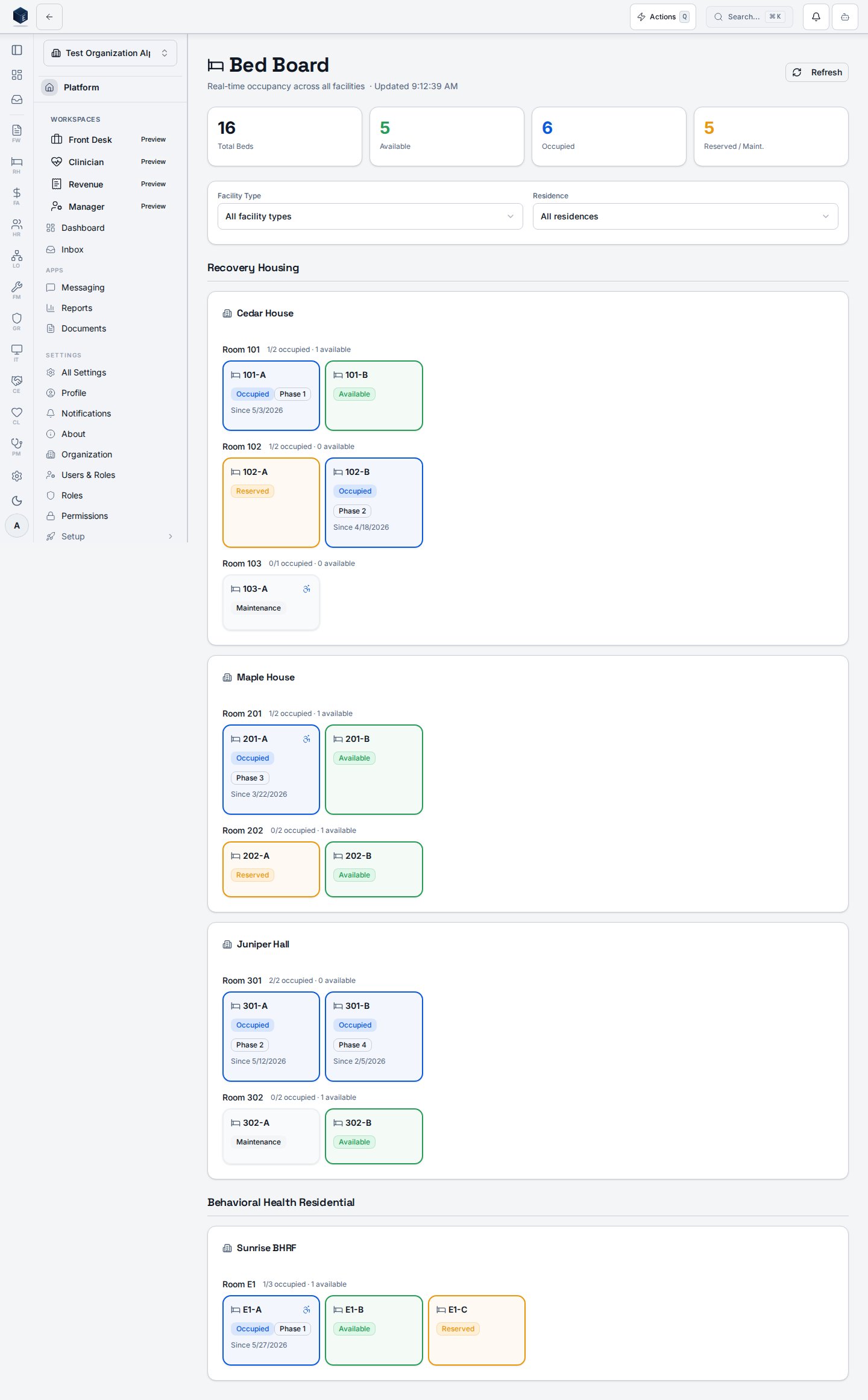
The Bed Board displays summary statistics (Total Beds, Available, Occupied, Reserved/Maintenance) and a grid of bed cards grouped by facility type, then residence, then room or unit. Each bed card is color-coded by status: available (green), occupied (blue), reserved (yellow), and maintenance (muted). Occupied bed cards show the resident's full name, phase, and admission date, and are clickable to navigate to the resident's episode at `/rh/episodes/:id`. The board supports filtering by facility type (Recovery Housing, Behavioral Health Residential, Inpatient Unit) and by individual residence.
 ## Who it's for
Protected by `PermissionGate` with permission `rh.beds.view` inside the component, in addition to the outer `RH_PERMISSIONS.DASHBOARD_VIEW` guard on all RH routes. Users without `rh.beds.view` see an "Access restricted" message.
## Before you start
* Your account must have `rh.beds.view` and `rh.dashboard.view` permissions.
* At least one active residence with configured beds must exist for the board to populate.
## Steps
Open Recovery Housing and select Bed Board, or go to `/rh/bed-board` directly.
The four summary cards at the top show totals for all beds, available beds, occupied beds, and reserved or maintenance beds.
Use the Facility Type and Residence selectors to focus the board on a specific subset of beds. Select "All facility types" or "All residences" to remove a filter.
Each card shows the bed label, status badge, and — for occupied beds — the resident's name, phase, and admission date.
Click an occupied bed card (it shows a pointer cursor) to navigate to the resident's active episode detail page.
Click "Refresh" in the header if you need an immediate update outside the 30-second automatic interval.
## Key concepts
Four status values appear on the board: `available`, `occupied`, `reserved`, and `maintenance`. Each has a distinct border and background color.
Beds with `is_ada_accessible: true` display a wheelchair icon on the card.
The board queries the database every 30 seconds via `refetchInterval`. The header subtitle shows the last-updated time.
If no beds are found after filtering, the board shows "No beds found. Add residences and beds to see the board." with a link to Manage Residences.
## Related
Recovery Housing references and overview.
Documentation coverage and governance.
This page documents shipped product behavior. It is not medical, legal, or
billing advice. Verify against your organization's policies and applicable
regulations before using it for clinical, compliance, or billing decisions.
Protected health information (PHI) shown in the product is governed by your
tenant's access controls and is never exposed in this documentation.
* src/routes/rh.tsx
* src/cores/rh/pages/BedBoardPage.tsx
* src/cores/rh/hooks/useBedBoard.ts
* src/platform/permissions/constants.ts
## Who it's for
Protected by `PermissionGate` with permission `rh.beds.view` inside the component, in addition to the outer `RH_PERMISSIONS.DASHBOARD_VIEW` guard on all RH routes. Users without `rh.beds.view` see an "Access restricted" message.
## Before you start
* Your account must have `rh.beds.view` and `rh.dashboard.view` permissions.
* At least one active residence with configured beds must exist for the board to populate.
## Steps
Open Recovery Housing and select Bed Board, or go to `/rh/bed-board` directly.
The four summary cards at the top show totals for all beds, available beds, occupied beds, and reserved or maintenance beds.
Use the Facility Type and Residence selectors to focus the board on a specific subset of beds. Select "All facility types" or "All residences" to remove a filter.
Each card shows the bed label, status badge, and — for occupied beds — the resident's name, phase, and admission date.
Click an occupied bed card (it shows a pointer cursor) to navigate to the resident's active episode detail page.
Click "Refresh" in the header if you need an immediate update outside the 30-second automatic interval.
## Key concepts
Four status values appear on the board: `available`, `occupied`, `reserved`, and `maintenance`. Each has a distinct border and background color.
Beds with `is_ada_accessible: true` display a wheelchair icon on the card.
The board queries the database every 30 seconds via `refetchInterval`. The header subtitle shows the last-updated time.
If no beds are found after filtering, the board shows "No beds found. Add residences and beds to see the board." with a link to Manage Residences.
## Related
Recovery Housing references and overview.
Documentation coverage and governance.
This page documents shipped product behavior. It is not medical, legal, or
billing advice. Verify against your organization's policies and applicable
regulations before using it for clinical, compliance, or billing decisions.
Protected health information (PHI) shown in the product is governed by your
tenant's access controls and is never exposed in this documentation.
* src/routes/rh.tsx
* src/cores/rh/pages/BedBoardPage.tsx
* src/cores/rh/hooks/useBedBoard.ts
* src/platform/permissions/constants.ts