> ## Documentation Index
> Fetch the complete documentation index at: https://docs.encoreos.io/llms.txt
> Use this file to discover all available pages before exploring further.
# Statement Runs
> Generate and track patient statement cycles, viewing run history with type, status, statement counts, and per-run detail.
The Statement Runs screen (`/pm/statements`) lists all statement run records for the current organization and allows users with the appropriate permission to trigger new runs.
 ## Overview
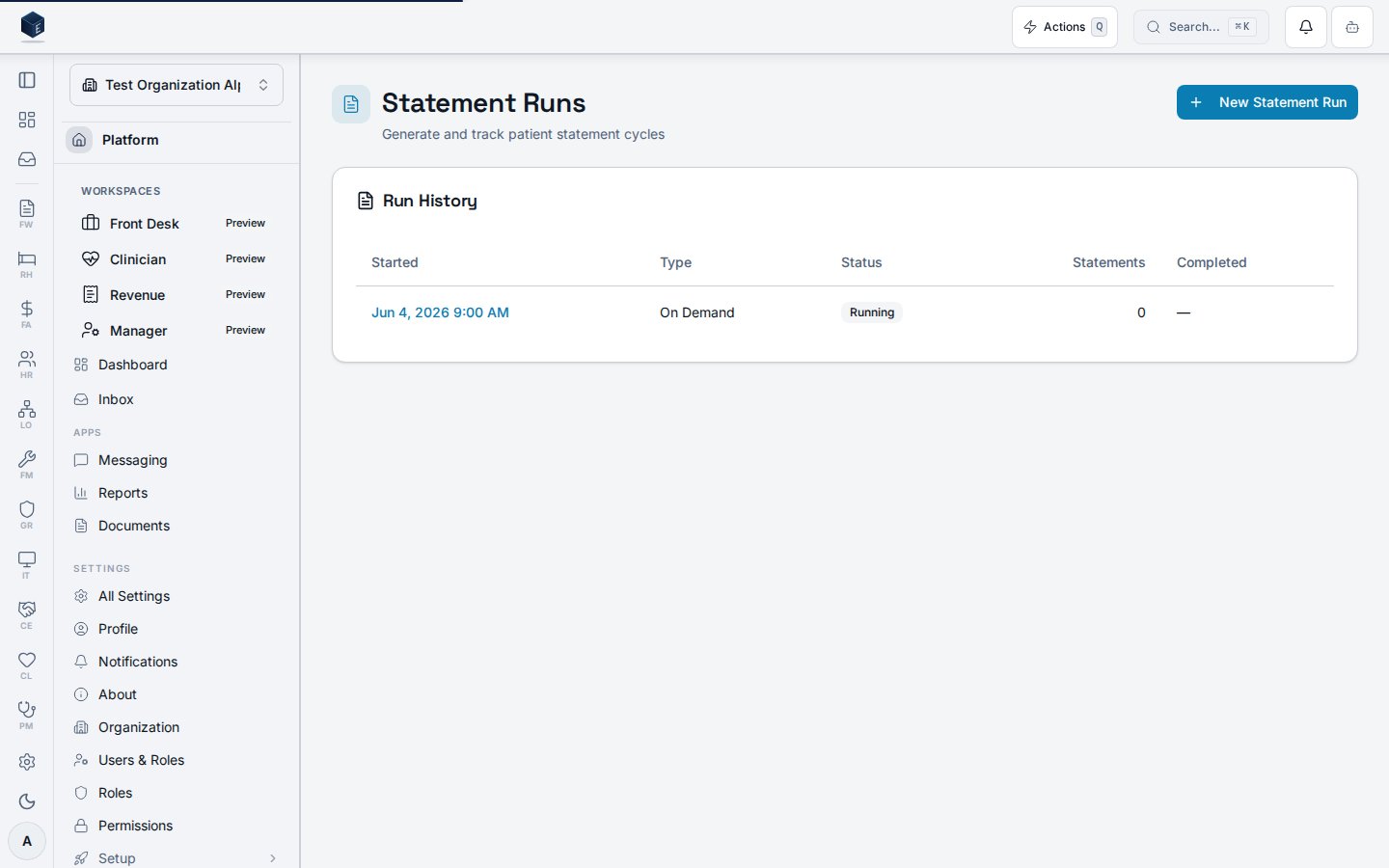
The screen renders a "Run History" table ordered by `run_started_at` descending. Each row links to the run detail page (`/pm/statements/:runId`) via the started timestamp, and shows the run type (Scheduled or On Demand), a status badge (Running, Completed, Failed, Cancelled), the count of statements generated, and the completion timestamp. The page wraps its content in a `PermissionGate` so it renders only for users with `pm.statements.view`. Users with `pm.statements.generate` see a "New Statement Run" button in the header.
## Who it's for
Requires the `pm.statements.view` permission. Triggering a new statement run additionally requires `pm.statements.generate`.
## Before you start
* The `pm.statements.view` permission must be granted for the user's role.
* An organization must be selected; the hook returns an empty array when no org is active.
## Steps
The Run History table loads automatically. Each row shows the started timestamp (linked to detail), run type, status, statements generated, and completion time.
Click the started timestamp link in any row to navigate to the statement run detail page at `/pm/statements/:runId`.
Users with `pm.statements.generate` can click "New Statement Run" to open `StatementRunTriggerDialog`. After submission, the list invalidates and the new run appears at the top.
## Key concepts
Statement run
When no runs exist, an empty state reads "No statement runs yet — Create a new run to generate patient statements." If the fetch fails, an error message reads "Failed to load statement runs" with a Retry button that reloads the page.
## Viewing a statement run
The Statement Run Details page displays summary information for a completed or in-progress statement generation run at route `/pm/statements/:runId` (permission: `pm.statements.view`).
`StatementRunDetailPage` loads a run record via `useStatementRunDetail` keyed by `runId`. It displays:
* Run type (using `STATEMENT_RUN_TYPE_LABELS`)
* Status badge (using `STATEMENT_RUN_STATUS_LABELS` and `STATEMENT_RUN_STATUS_VARIANT`)
* Start timestamp formatted as month/day/year hour:minute AM/PM
Breadcrumbs link back to `/pm/statements`. Content is gated by `pm.statements.view` via `PermissionGate`. A three-column summary grid is rendered.
1. Navigate to **Practice Management → Statements**, select a run from the list, or go to `/pm/statements/:runId`.
2. The summary shows run type, start timestamp, and status badge. Additional columns may display further run metadata.
* **Statement run status** — reflects whether the run is in progress, completed, or errored; rendered from `STATEMENT_RUN_STATUS_LABELS`.
* **Run type** — the category of statement generated (e.g., batch vs. individual); rendered from `STATEMENT_RUN_TYPE_LABELS`.
## Related
Overview of the Practice Management core.
Documentation coverage and governance.
This page documents shipped product behavior. It is not medical, legal, or
billing advice. Verify against your organization's policies and applicable
regulations before using it for clinical, compliance, or billing decisions.
Protected health information (PHI) shown in the product is governed by your
tenant's access controls and is never exposed in this documentation.
* src/routes/pm.tsx
* src/cores/pm/pages/StatementRunListPage.tsx
* src/cores/pm/hooks/useStatementRuns.ts
* src/cores/pm/types/statement-billing.ts
* src/cores/pm/pages/StatementRunDetailPage.tsx
## Overview
The screen renders a "Run History" table ordered by `run_started_at` descending. Each row links to the run detail page (`/pm/statements/:runId`) via the started timestamp, and shows the run type (Scheduled or On Demand), a status badge (Running, Completed, Failed, Cancelled), the count of statements generated, and the completion timestamp. The page wraps its content in a `PermissionGate` so it renders only for users with `pm.statements.view`. Users with `pm.statements.generate` see a "New Statement Run" button in the header.
## Who it's for
Requires the `pm.statements.view` permission. Triggering a new statement run additionally requires `pm.statements.generate`.
## Before you start
* The `pm.statements.view` permission must be granted for the user's role.
* An organization must be selected; the hook returns an empty array when no org is active.
## Steps
The Run History table loads automatically. Each row shows the started timestamp (linked to detail), run type, status, statements generated, and completion time.
Click the started timestamp link in any row to navigate to the statement run detail page at `/pm/statements/:runId`.
Users with `pm.statements.generate` can click "New Statement Run" to open `StatementRunTriggerDialog`. After submission, the list invalidates and the new run appears at the top.
## Key concepts
Statement run
When no runs exist, an empty state reads "No statement runs yet — Create a new run to generate patient statements." If the fetch fails, an error message reads "Failed to load statement runs" with a Retry button that reloads the page.
## Viewing a statement run
The Statement Run Details page displays summary information for a completed or in-progress statement generation run at route `/pm/statements/:runId` (permission: `pm.statements.view`).
`StatementRunDetailPage` loads a run record via `useStatementRunDetail` keyed by `runId`. It displays:
* Run type (using `STATEMENT_RUN_TYPE_LABELS`)
* Status badge (using `STATEMENT_RUN_STATUS_LABELS` and `STATEMENT_RUN_STATUS_VARIANT`)
* Start timestamp formatted as month/day/year hour:minute AM/PM
Breadcrumbs link back to `/pm/statements`. Content is gated by `pm.statements.view` via `PermissionGate`. A three-column summary grid is rendered.
1. Navigate to **Practice Management → Statements**, select a run from the list, or go to `/pm/statements/:runId`.
2. The summary shows run type, start timestamp, and status badge. Additional columns may display further run metadata.
* **Statement run status** — reflects whether the run is in progress, completed, or errored; rendered from `STATEMENT_RUN_STATUS_LABELS`.
* **Run type** — the category of statement generated (e.g., batch vs. individual); rendered from `STATEMENT_RUN_TYPE_LABELS`.
## Related
Overview of the Practice Management core.
Documentation coverage and governance.
This page documents shipped product behavior. It is not medical, legal, or
billing advice. Verify against your organization's policies and applicable
regulations before using it for clinical, compliance, or billing decisions.
Protected health information (PHI) shown in the product is governed by your
tenant's access controls and is never exposed in this documentation.
* src/routes/pm.tsx
* src/cores/pm/pages/StatementRunListPage.tsx
* src/cores/pm/hooks/useStatementRuns.ts
* src/cores/pm/types/statement-billing.ts
* src/cores/pm/pages/StatementRunDetailPage.tsx