> ## Documentation Index
> Fetch the complete documentation index at: https://docs.encoreos.io/llms.txt
> Use this file to discover all available pages before exploring further.
# Provider Schedule
> Create and manage recurring weekly availability blocks for a provider, including block type, day, time range, effective dates, and optional notes.
The Provider Schedule page (`/pm/provider-schedule`) lets providers define their recurring weekly availability by creating, editing, and deleting time blocks across the seven days of the week.
 ## Overview
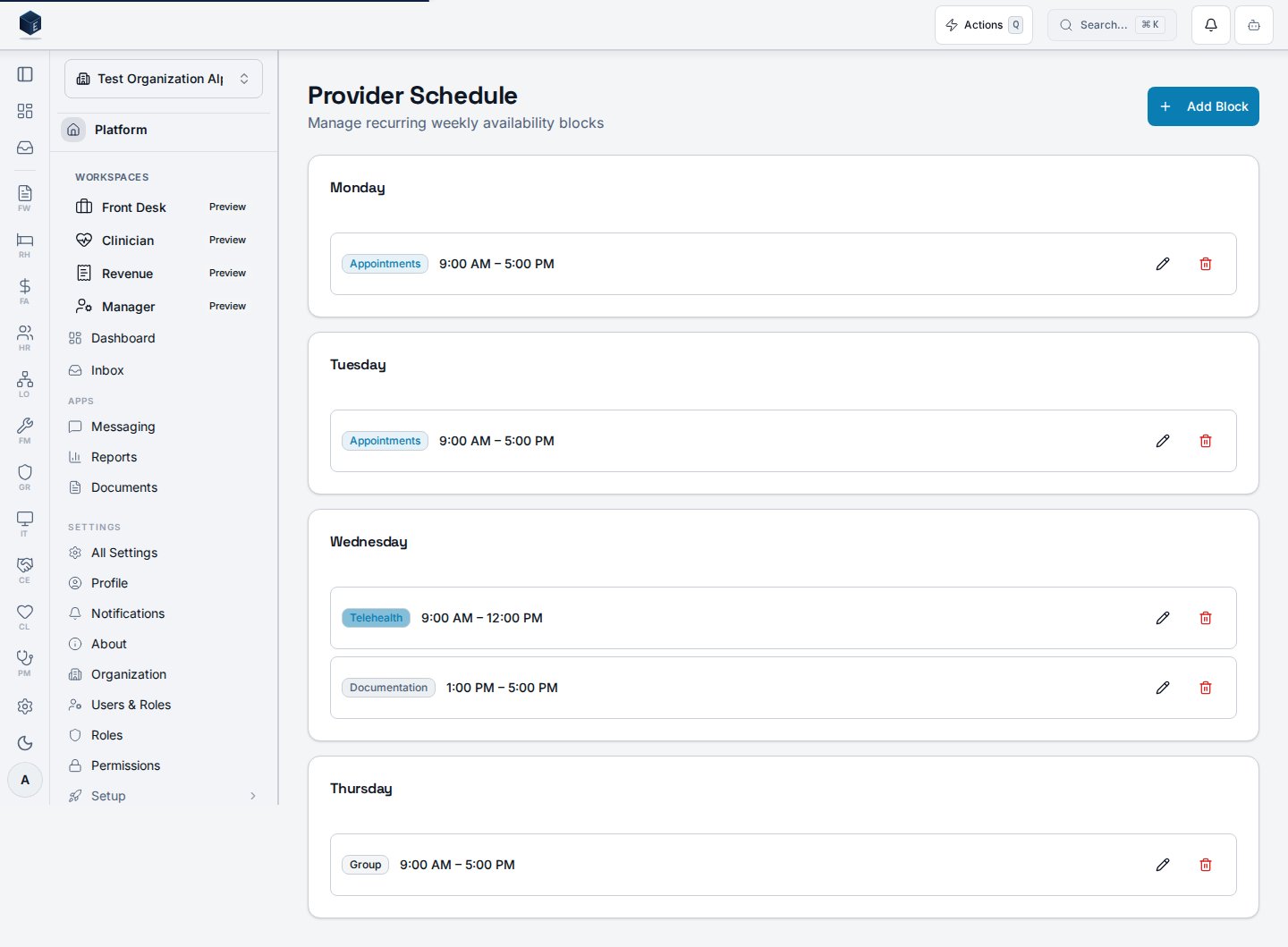
The page groups schedule blocks by day of the week (Sunday through Saturday), showing only days that have at least one block. Each block displays its type badge, formatted start and end time, and optional notes. Users with `pm.schedule.edit` can edit a block; users with `pm.schedule.delete` can delete a block via a confirmation dialog. Blocks are stored in `pm_provider_schedules` and fetched by `useProviderScheduleList`. Mutations (create, update, delete) are handled by `useProviderScheduleMutation`. The logged-in user's ID is used as the `provider_id` when creating new blocks.
## Who it's for
Requires permission: `pm.schedule.view` (`PM_PERMISSIONS.SCHEDULE_VIEW`)
Creating blocks additionally requires: `pm.schedule.create` (`PM_PERMISSIONS.SCHEDULE_CREATE`)
Editing blocks additionally requires: `pm.schedule.edit` (`PM_PERMISSIONS.SCHEDULE_EDIT`)
Deleting blocks additionally requires: `pm.schedule.delete` (`PM_PERMISSIONS.SCHEDULE_DELETE`)
## Before you start
* Your account must have the `pm.schedule.view` permission.
* To add blocks, you also need `pm.schedule.create`.
## Steps
Go to `/pm/provider-schedule`. Days with existing blocks are listed in order Sunday through Saturday. Days with no blocks are hidden.
Click "Add Block" in the page header. In the `ProviderScheduleFormDialog`, choose the day of the week, start time, end time, block type, and effective date. Optionally set an end date and notes. Submit to save.
Click the pencil icon on any existing block. The form dialog opens pre-populated with the block's values. Make changes and submit.
Click the trash icon on any existing block. Confirm deletion in the alert dialog. This action permanently removes the block and cannot be undone.
## Key concepts
The following block types are available: Appointments, Telehealth, Documentation, Supervision, Group, Administrative, On Call. Each type is rendered with a distinct badge color.
Each block has an `effective_date` (required) and an optional `end_date`. Blocks can be filtered by effective date when querying via `useProviderScheduleList`.
When no schedule blocks exist, the page shows: "No schedule blocks — Add recurring availability blocks to define your weekly schedule," with an "Add Block" action button.
If the schedule data fails to load, the page shows: "Unable to load schedules — Please try again later."
## Related
Overview of the Practice Management core.
Documentation coverage and governance.
This page documents shipped product behavior. It is not medical, legal, or
billing advice. Verify against your organization's policies and applicable
regulations before using it for clinical, compliance, or billing decisions.
Protected health information (PHI) shown in the product is governed by your
tenant's access controls and is never exposed in this documentation.
* src/routes/pm.tsx
* src/cores/pm/pages/ProviderSchedulePage.tsx
* src/cores/pm/hooks/useProviderScheduleList.ts
* src/cores/pm/hooks/useProviderScheduleMutation.ts
* src/platform/permissions/constants.ts
## Overview
The page groups schedule blocks by day of the week (Sunday through Saturday), showing only days that have at least one block. Each block displays its type badge, formatted start and end time, and optional notes. Users with `pm.schedule.edit` can edit a block; users with `pm.schedule.delete` can delete a block via a confirmation dialog. Blocks are stored in `pm_provider_schedules` and fetched by `useProviderScheduleList`. Mutations (create, update, delete) are handled by `useProviderScheduleMutation`. The logged-in user's ID is used as the `provider_id` when creating new blocks.
## Who it's for
Requires permission: `pm.schedule.view` (`PM_PERMISSIONS.SCHEDULE_VIEW`)
Creating blocks additionally requires: `pm.schedule.create` (`PM_PERMISSIONS.SCHEDULE_CREATE`)
Editing blocks additionally requires: `pm.schedule.edit` (`PM_PERMISSIONS.SCHEDULE_EDIT`)
Deleting blocks additionally requires: `pm.schedule.delete` (`PM_PERMISSIONS.SCHEDULE_DELETE`)
## Before you start
* Your account must have the `pm.schedule.view` permission.
* To add blocks, you also need `pm.schedule.create`.
## Steps
Go to `/pm/provider-schedule`. Days with existing blocks are listed in order Sunday through Saturday. Days with no blocks are hidden.
Click "Add Block" in the page header. In the `ProviderScheduleFormDialog`, choose the day of the week, start time, end time, block type, and effective date. Optionally set an end date and notes. Submit to save.
Click the pencil icon on any existing block. The form dialog opens pre-populated with the block's values. Make changes and submit.
Click the trash icon on any existing block. Confirm deletion in the alert dialog. This action permanently removes the block and cannot be undone.
## Key concepts
The following block types are available: Appointments, Telehealth, Documentation, Supervision, Group, Administrative, On Call. Each type is rendered with a distinct badge color.
Each block has an `effective_date` (required) and an optional `end_date`. Blocks can be filtered by effective date when querying via `useProviderScheduleList`.
When no schedule blocks exist, the page shows: "No schedule blocks — Add recurring availability blocks to define your weekly schedule," with an "Add Block" action button.
If the schedule data fails to load, the page shows: "Unable to load schedules — Please try again later."
## Related
Overview of the Practice Management core.
Documentation coverage and governance.
This page documents shipped product behavior. It is not medical, legal, or
billing advice. Verify against your organization's policies and applicable
regulations before using it for clinical, compliance, or billing decisions.
Protected health information (PHI) shown in the product is governed by your
tenant's access controls and is never exposed in this documentation.
* src/routes/pm.tsx
* src/cores/pm/pages/ProviderSchedulePage.tsx
* src/cores/pm/hooks/useProviderScheduleList.ts
* src/cores/pm/hooks/useProviderScheduleMutation.ts
* src/platform/permissions/constants.ts