> ## Documentation Index
> Fetch the complete documentation index at: https://docs.encoreos.io/llms.txt
> Use this file to discover all available pages before exploring further.
# Fee Schedules
> Manage payer fee schedules and rate tables, view schedule details with CPT-code rate entries, and add or delete individual rates.
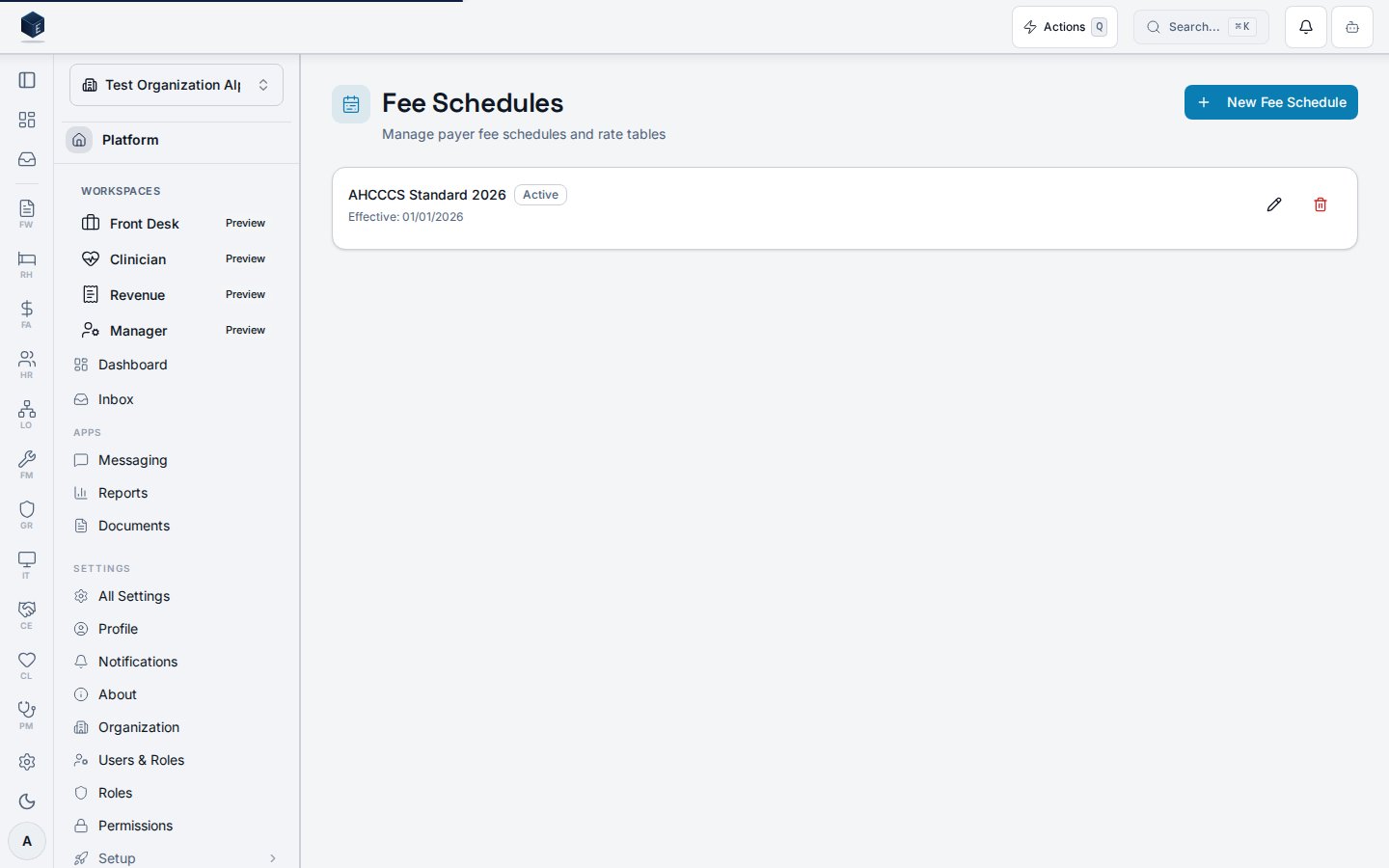
The Fee Schedules page (`/pm/fee-schedules`) lists all payer fee schedules for the organization and provides controls to create, edit, and deactivate them.
 ## Overview
The Fee Schedules page reads records from `pm_fee_schedules`, scoped to the current organization, excluding soft-deleted records, and ordered by effective date descending. Each schedule is presented as a card showing the schedule name, an Active/Inactive badge, the effective date, and the end date (if set).
Clicking a schedule card navigates to `/pm/fee-schedules/:id` for the detail and rate-entry view. Edit (pencil icon) and Delete (trash icon) action buttons are displayed per card; clicking either requires the respective `pm.fee_schedules.edit` or `pm.fee_schedules.delete` permission. The delete action opens a confirmation dialog labeled "Deactivate Fee Schedule," which performs a soft-delete (sets `deleted_at`). The confirmation dialog states: "Existing charges using it will not be affected."
Creating a new schedule opens the `FeeScheduleFormDialog` in create mode.
## Who it's for
Requires permission: `PM_PERMISSIONS.FEE_SCHEDULES_VIEW` (`pm.fee_schedules.view`).
Creating schedules requires `pm.fee_schedules.create`. Editing requires `pm.fee_schedules.edit`. Deactivating requires `pm.fee_schedules.delete`.
## Before you start
* Ensure you have the `pm.fee_schedules.view` permission.
* To create or manage schedules, you additionally need `pm.fee_schedules.create` or `pm.fee_schedules.edit`.
## Steps
Navigate to `/pm/fee-schedules`. All active fee schedules for the organization are listed as cards, sorted by effective date (most recent first).
Each card shows the schedule name, Active/Inactive status badge, and effective date range. Click anywhere on a card to navigate to `/pm/fee-schedules/:id` for the rate table detail.
Click **New Fee Schedule** (requires `pm.fee_schedules.create`) in the page header to open the `FeeScheduleFormDialog` in create mode. Complete the form and save.
Click the pencil icon on a schedule card (requires `pm.fee_schedules.edit`) to open the `FeeScheduleFormDialog` in edit mode, pre-populated with the schedule's current values.
Click the trash icon on a schedule card (requires `pm.fee_schedules.delete`) to open the deactivation confirmation dialog. Click **Deactivate** to soft-delete the schedule. Existing charges referencing this schedule are not affected.
## Key concepts
**Active vs. Inactive:** A schedule is `Active` when `is_active` is true and `deleted_at` is null. Deactivating sets `deleted_at` to the current timestamp — the record is excluded from the list view but is not permanently deleted.
**Effective date range:** Each schedule has an `effective_date` (required) and an optional `end_date`. End date is displayed as "Effective: {date} – {end_date}" when present.
**Rate entries:** Individual CPT-code-level rates are stored in `pm_fee_schedule_entries` and managed from the fee schedule detail page (`/pm/fee-schedules/:id`), not from this list page.
When no fee schedules exist: "Create a fee schedule to define payer rates for CPT codes."
## Viewing a fee schedule
The Fee Schedule Details screen displays a single fee schedule with its rate entries and provides tools to manage them at route `/pm/fee-schedules/:id` (permission: `pm.fee_schedules.view`). Adding and deleting entries requires `pm.fee_schedules.edit`.
The page loads the fee schedule from `useFeeScheduleList` (matching by `id` param) and its rate entries from `useFeeScheduleEntries`. The header shows the schedule name, effective date range (`effective_date` to `end_date` if set), and an Active/Inactive badge from `is_active`. Users with `pm.fee_schedules.edit` see an Add Rate Entry card containing `FeeScheduleEntryForm`. The entries table lists all rates with CPT code, modifier, rate amount, unit type, and effective date range. Each row has a delete button (requires `pm.fee_schedules.edit`) that calls `deleteEntry.mutate(entry.id)`.
1. From the Fee Schedules list (`/pm/fee-schedules`), click a row to open the detail page.
2. The header shows the schedule name, effective date range, and Active/Inactive status.
3. The entries table lists all CPT code rates with modifier, amount, unit type, and date range.
4. Use the Add Rate Entry form (requires `pm.fee_schedules.edit`) to enter a CPT code, modifier, rate, unit type, and effective date, then submit.
5. Click the trash icon on a rate row (requires `pm.fee_schedules.edit`) to delete it. The deletion is immediate.
| Term | Meaning in code |
| ----------------------------- | --------------------------------------------- |
| `schedule_name` | Display name for the fee schedule |
| `effective_date` / `end_date` | Validity period of the fee schedule |
| `is_active` | Whether the schedule is currently active |
| `cpt_code` | Procedure code for the rate entry |
| `modifier` | Optional billing modifier for the rate |
| `rate` | The rate amount for the CPT code entry |
| `unit_type` | Unit measure for billing (SME confirm values) |
## Related
Overview of the Practice Management core.
Documentation coverage and governance.
This page documents shipped product behavior. It is not medical, legal, or
billing advice. Verify against your organization's policies and applicable
regulations before using it for clinical, compliance, or billing decisions.
Protected health information (PHI) shown in the product is governed by your
tenant's access controls and is never exposed in this documentation.
* src/routes/pm.tsx
* src/cores/pm/pages/FeeScheduleListPage.tsx
* src/cores/pm/hooks/useFeeScheduleList.ts
* src/cores/pm/hooks/useFeeScheduleMutation.ts
* src/cores/pm/types/charges.ts
* src/cores/pm/pages/FeeScheduleDetailPage.tsx
* src/cores/pm/hooks/useFeeScheduleEntries.ts
## Overview
The Fee Schedules page reads records from `pm_fee_schedules`, scoped to the current organization, excluding soft-deleted records, and ordered by effective date descending. Each schedule is presented as a card showing the schedule name, an Active/Inactive badge, the effective date, and the end date (if set).
Clicking a schedule card navigates to `/pm/fee-schedules/:id` for the detail and rate-entry view. Edit (pencil icon) and Delete (trash icon) action buttons are displayed per card; clicking either requires the respective `pm.fee_schedules.edit` or `pm.fee_schedules.delete` permission. The delete action opens a confirmation dialog labeled "Deactivate Fee Schedule," which performs a soft-delete (sets `deleted_at`). The confirmation dialog states: "Existing charges using it will not be affected."
Creating a new schedule opens the `FeeScheduleFormDialog` in create mode.
## Who it's for
Requires permission: `PM_PERMISSIONS.FEE_SCHEDULES_VIEW` (`pm.fee_schedules.view`).
Creating schedules requires `pm.fee_schedules.create`. Editing requires `pm.fee_schedules.edit`. Deactivating requires `pm.fee_schedules.delete`.
## Before you start
* Ensure you have the `pm.fee_schedules.view` permission.
* To create or manage schedules, you additionally need `pm.fee_schedules.create` or `pm.fee_schedules.edit`.
## Steps
Navigate to `/pm/fee-schedules`. All active fee schedules for the organization are listed as cards, sorted by effective date (most recent first).
Each card shows the schedule name, Active/Inactive status badge, and effective date range. Click anywhere on a card to navigate to `/pm/fee-schedules/:id` for the rate table detail.
Click **New Fee Schedule** (requires `pm.fee_schedules.create`) in the page header to open the `FeeScheduleFormDialog` in create mode. Complete the form and save.
Click the pencil icon on a schedule card (requires `pm.fee_schedules.edit`) to open the `FeeScheduleFormDialog` in edit mode, pre-populated with the schedule's current values.
Click the trash icon on a schedule card (requires `pm.fee_schedules.delete`) to open the deactivation confirmation dialog. Click **Deactivate** to soft-delete the schedule. Existing charges referencing this schedule are not affected.
## Key concepts
**Active vs. Inactive:** A schedule is `Active` when `is_active` is true and `deleted_at` is null. Deactivating sets `deleted_at` to the current timestamp — the record is excluded from the list view but is not permanently deleted.
**Effective date range:** Each schedule has an `effective_date` (required) and an optional `end_date`. End date is displayed as "Effective: {date} – {end_date}" when present.
**Rate entries:** Individual CPT-code-level rates are stored in `pm_fee_schedule_entries` and managed from the fee schedule detail page (`/pm/fee-schedules/:id`), not from this list page.
When no fee schedules exist: "Create a fee schedule to define payer rates for CPT codes."
## Viewing a fee schedule
The Fee Schedule Details screen displays a single fee schedule with its rate entries and provides tools to manage them at route `/pm/fee-schedules/:id` (permission: `pm.fee_schedules.view`). Adding and deleting entries requires `pm.fee_schedules.edit`.
The page loads the fee schedule from `useFeeScheduleList` (matching by `id` param) and its rate entries from `useFeeScheduleEntries`. The header shows the schedule name, effective date range (`effective_date` to `end_date` if set), and an Active/Inactive badge from `is_active`. Users with `pm.fee_schedules.edit` see an Add Rate Entry card containing `FeeScheduleEntryForm`. The entries table lists all rates with CPT code, modifier, rate amount, unit type, and effective date range. Each row has a delete button (requires `pm.fee_schedules.edit`) that calls `deleteEntry.mutate(entry.id)`.
1. From the Fee Schedules list (`/pm/fee-schedules`), click a row to open the detail page.
2. The header shows the schedule name, effective date range, and Active/Inactive status.
3. The entries table lists all CPT code rates with modifier, amount, unit type, and date range.
4. Use the Add Rate Entry form (requires `pm.fee_schedules.edit`) to enter a CPT code, modifier, rate, unit type, and effective date, then submit.
5. Click the trash icon on a rate row (requires `pm.fee_schedules.edit`) to delete it. The deletion is immediate.
| Term | Meaning in code |
| ----------------------------- | --------------------------------------------- |
| `schedule_name` | Display name for the fee schedule |
| `effective_date` / `end_date` | Validity period of the fee schedule |
| `is_active` | Whether the schedule is currently active |
| `cpt_code` | Procedure code for the rate entry |
| `modifier` | Optional billing modifier for the rate |
| `rate` | The rate amount for the CPT code entry |
| `unit_type` | Unit measure for billing (SME confirm values) |
## Related
Overview of the Practice Management core.
Documentation coverage and governance.
This page documents shipped product behavior. It is not medical, legal, or
billing advice. Verify against your organization's policies and applicable
regulations before using it for clinical, compliance, or billing decisions.
Protected health information (PHI) shown in the product is governed by your
tenant's access controls and is never exposed in this documentation.
* src/routes/pm.tsx
* src/cores/pm/pages/FeeScheduleListPage.tsx
* src/cores/pm/hooks/useFeeScheduleList.ts
* src/cores/pm/hooks/useFeeScheduleMutation.ts
* src/cores/pm/types/charges.ts
* src/cores/pm/pages/FeeScheduleDetailPage.tsx
* src/cores/pm/hooks/useFeeScheduleEntries.ts