> ## Documentation Index
> Fetch the complete documentation index at: https://docs.encoreos.io/llms.txt
> Use this file to discover all available pages before exploring further.
# AI Skill Governance — Approval & Version History
> Review and approve org-authored AI skills before they can drive AI, and inspect the immutable version history with one-click rollback.
# AI Skill Governance — Approval & Version History
> Audience: reviewers who approve org-authored AI skills.
> Spec: `specs/pf/specs/PF-120-org-authored-ai-skill-governance.md`.
Governance covers the lifecycle of the org-authored and org-customized AI skills the
[Create Custom Skill wizard](./ai-custom-skill-admin-guide.md) produces: an **approval
queue** where a reviewer signs off before a skill can drive AI, and an **immutable version
history** with one-click rollback. It is the reviewer/approver companion to the authoring
guide.
## Approval queue
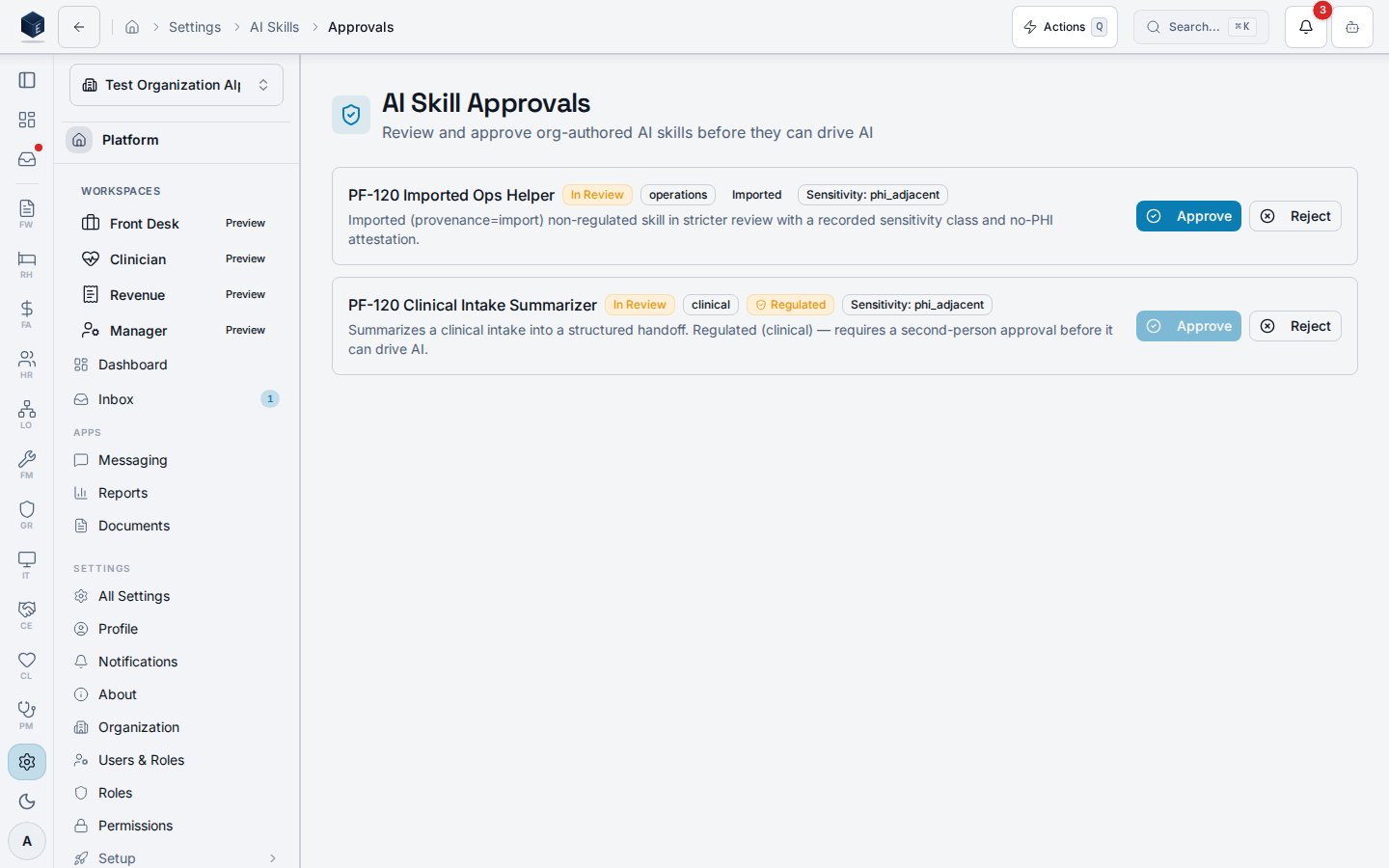
Reach the queue at `/settings/ai-skills/approvals` (heading **AI Skill Approvals**), guarded
by the `pf.ai_skills.approve` permission. Regulated categories (clinical, compliance, HR,
housing) require **second-person** approval — a `pf.ai_skills.approve` holder who is **not**
the submitter — so a skill cannot drive AI until someone else signs off. Non-regulated skills
self-activate at submission; imported skills route to review with a mandatory sensitivity
class and a no-PHI attestation.
 ## Version history and rollback
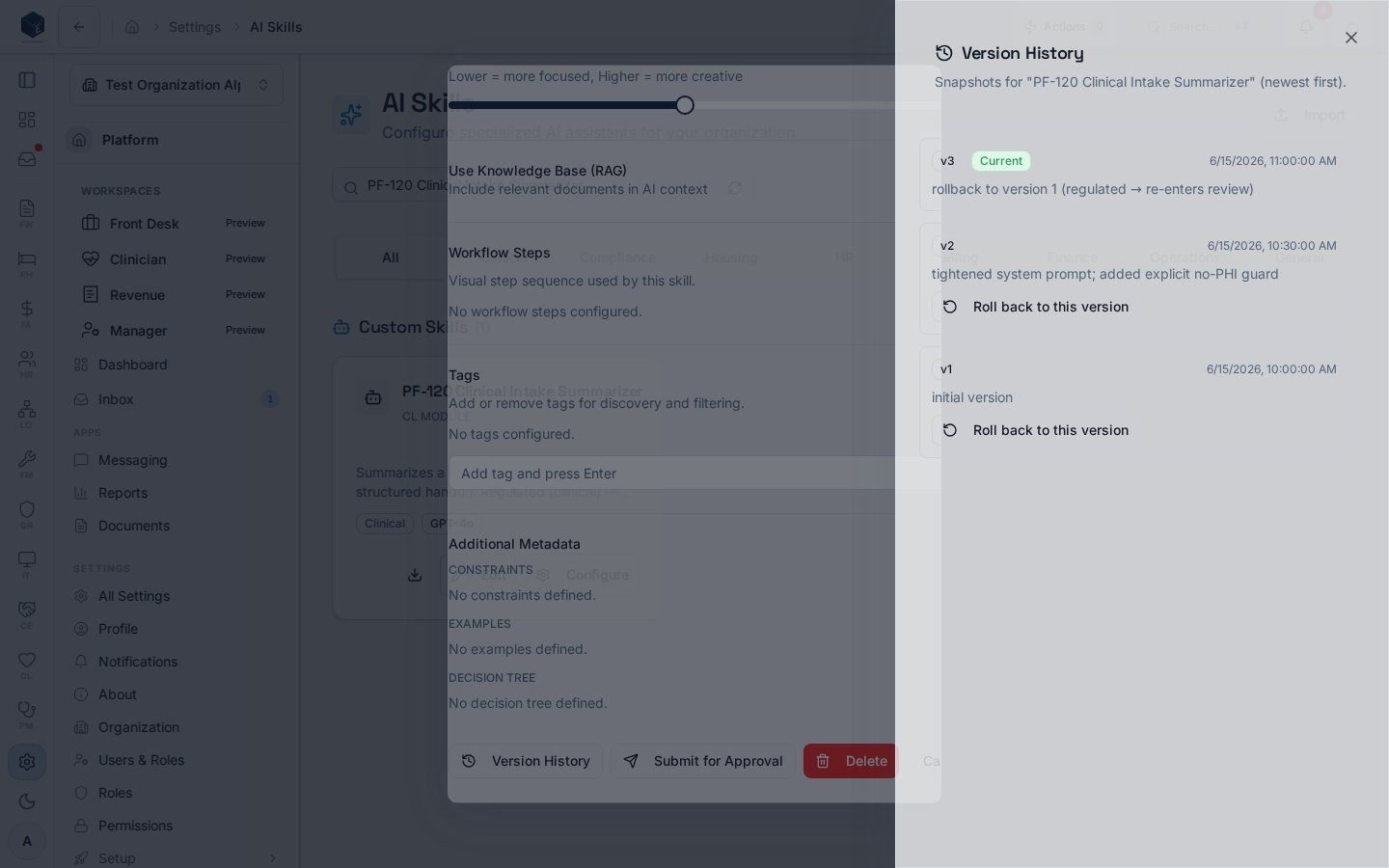
Every create and every prompt/config edit inserts an **immutable** snapshot into
`pf_ai_skill_versions` (insert-only — no update or delete). Open the version-history drawer
from a skill's **Configure** dialog on `/settings/ai-skills`. **Rollback** writes a *new
forward* version capturing the rolled-back state — history is never rewound — and a
rolled-back regulated skill re-enters review and needs fresh approval.
## Version history and rollback
Every create and every prompt/config edit inserts an **immutable** snapshot into
`pf_ai_skill_versions` (insert-only — no update or delete). Open the version-history drawer
from a skill's **Configure** dialog on `/settings/ai-skills`. **Rollback** writes a *new
forward* version capturing the rolled-back state — history is never rewound — and a
rolled-back regulated skill re-enters review and needs fresh approval.
 ## What gets audited
Every lifecycle transition emits a platform audit entry — `pf.ai_skill.submitted`,
`pf.ai_skill.approved`, `pf.ai_skill.rejected`, `pf.ai_skill.rolled_back` — with actor, org,
skill id, and from/to state. Write access gates on `pf.ai_skills.manage` and approve/reject
on `pf.ai_skills.approve`, so the UI controls and the row-level security agree.
## See also
Author a net-new organization AI skill.
Browse, configure, and manage AI skills.
## What gets audited
Every lifecycle transition emits a platform audit entry — `pf.ai_skill.submitted`,
`pf.ai_skill.approved`, `pf.ai_skill.rejected`, `pf.ai_skill.rolled_back` — with actor, org,
skill id, and from/to state. Write access gates on `pf.ai_skills.manage` and approve/reject
on `pf.ai_skills.approve`, so the UI controls and the row-level security agree.
## See also
Author a net-new organization AI skill.
Browse, configure, and manage AI skills.