> ## Documentation Index
> Fetch the complete documentation index at: https://docs.encoreos.io/llms.txt
> Use this file to discover all available pages before exploring further.
# Tenant Provisioning
> Manage tenant provisioning requests, track their status, and initiate new organization provisioning workflows.
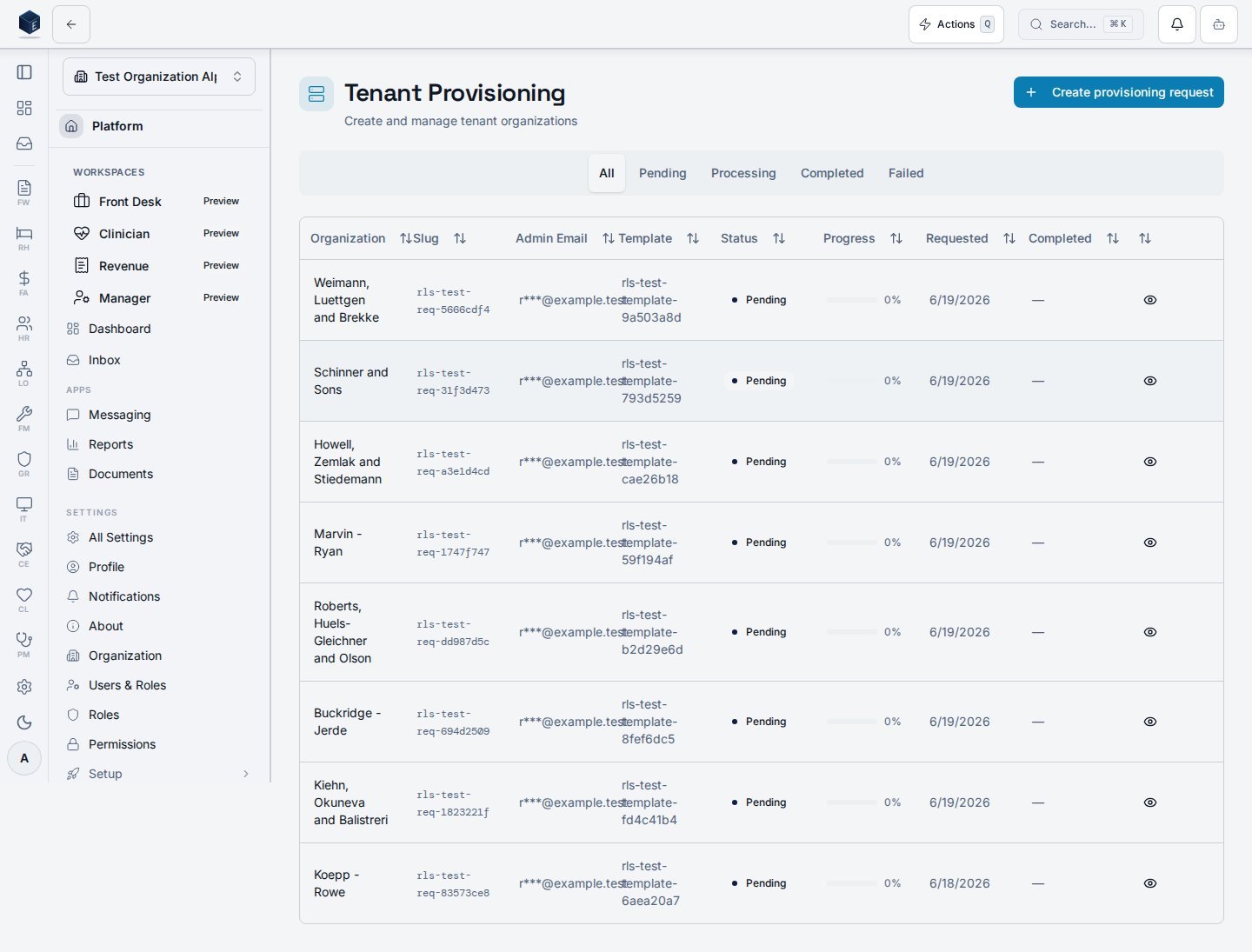
The Tenant Provisioning page is an administrative dashboard for managing tenant provisioning requests, including creating new requests, tracking status, and viewing request details. It is reached at `/admin/provisioning`.
## Overview
The page is wrapped in a `PermissionGate` for `platform.provisioning.view`. It shows a filterable data table of provisioning requests with columns for request details, template name, completed date, and status badge. The status filter tabs are: All / Pending / Processing / Completed / Failed.
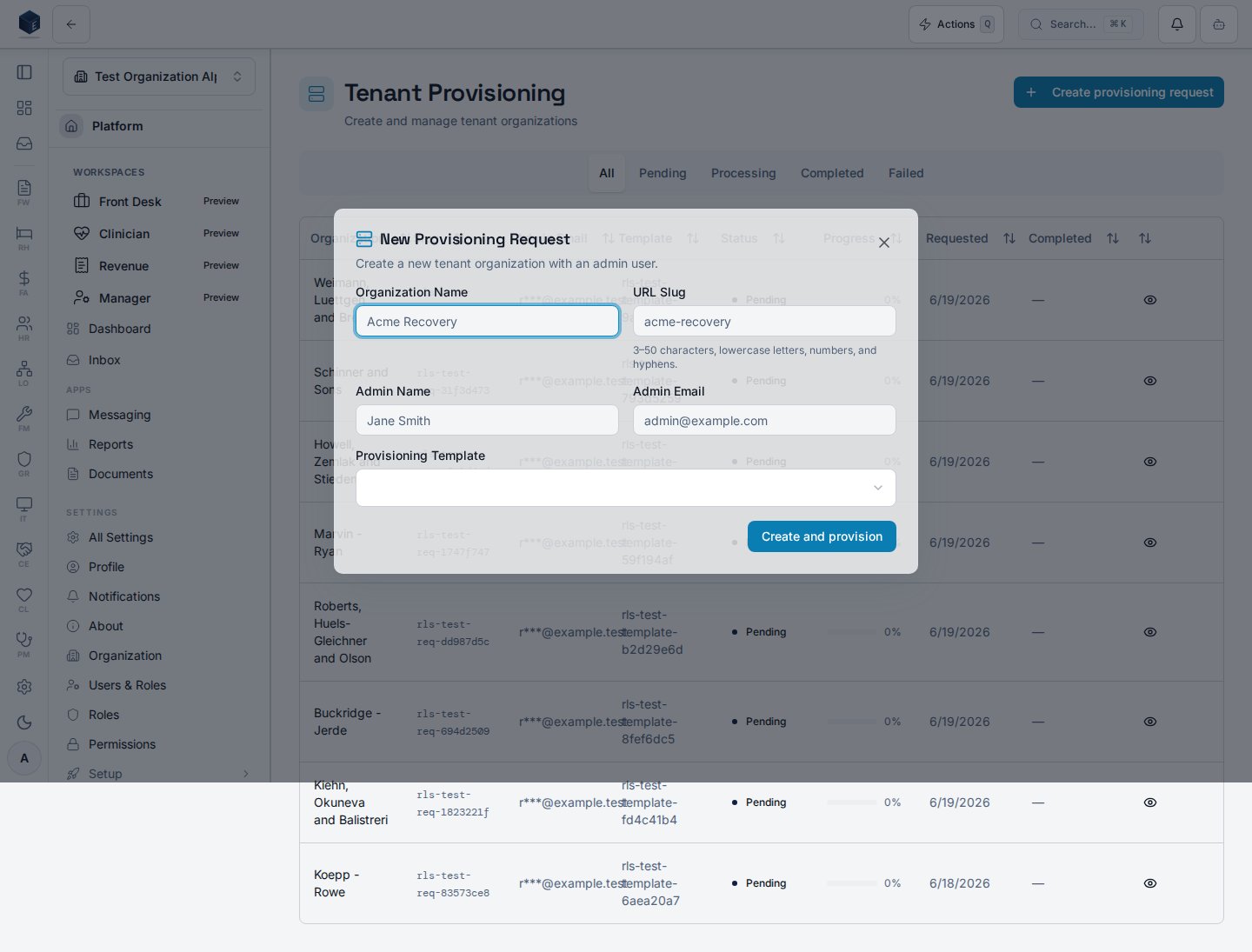
Clicking a row opens `ProvisioningRequestDetailSheet` for a full request view. The **New Request** button (requires `platform.provisioning.create`) opens `NewProvisioningRequestDialog`.
Email fields in the component are masked via `maskEmail` before display.
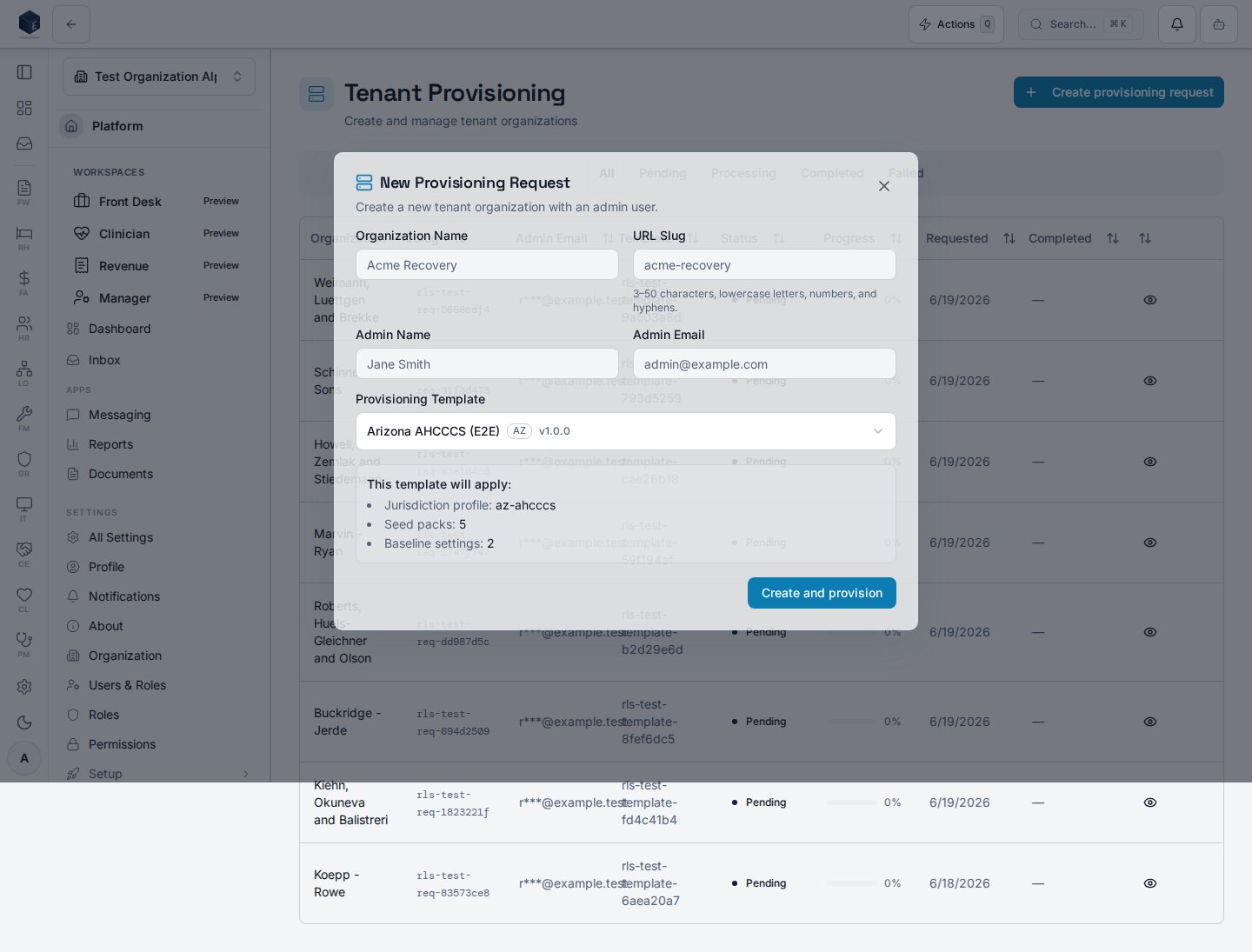
 The **New Request** button opens `NewProvisioningRequestDialog`, where you pick a template and (for a state-aware template) preview the jurisdiction bundle it will apply.
 ## Who it's for
Requires `platform.provisioning.view` (route guard and `PermissionGate`). Creating requests additionally requires `platform.provisioning.create`.
## Before you start
* Provisioning templates should exist at `/admin/provisioning/templates` before creating requests.
* Your account must have `platform.provisioning.view` to access this page.
## Steps
1. Navigate to **Admin → Provisioning** (`/admin/provisioning`).
2. Use the status tabs to filter requests.
3. Click a row to view full request details.
4. Click **New Request** to initiate a new tenant provisioning workflow.
## Key concepts
**Provisioning request** — a workflow record tracking the creation and configuration of a new organization tenant.
**Template** — a provisioning template pre-configures settings for new tenants (managed at `/admin/provisioning/templates`).
## Customize modules for a single request
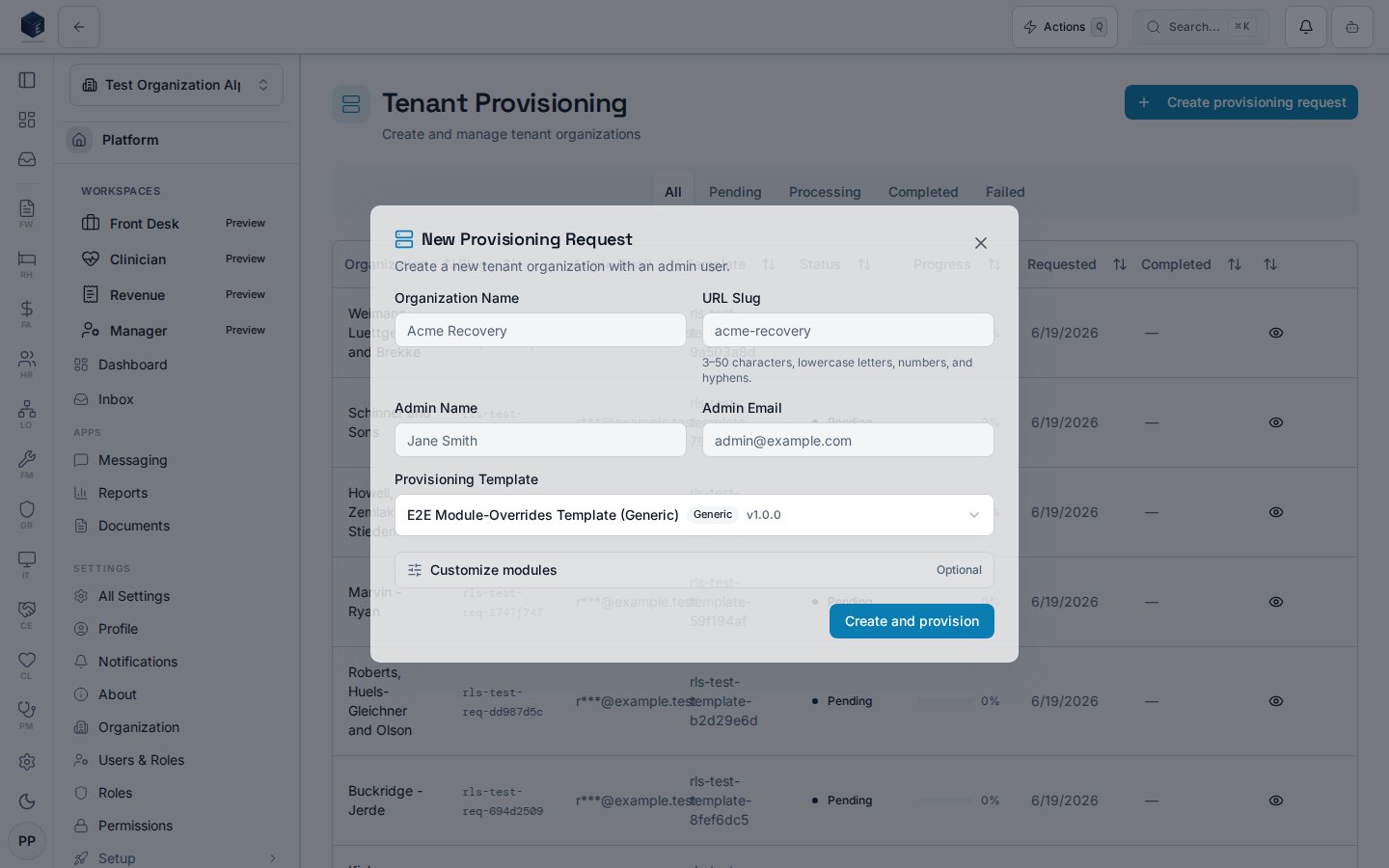
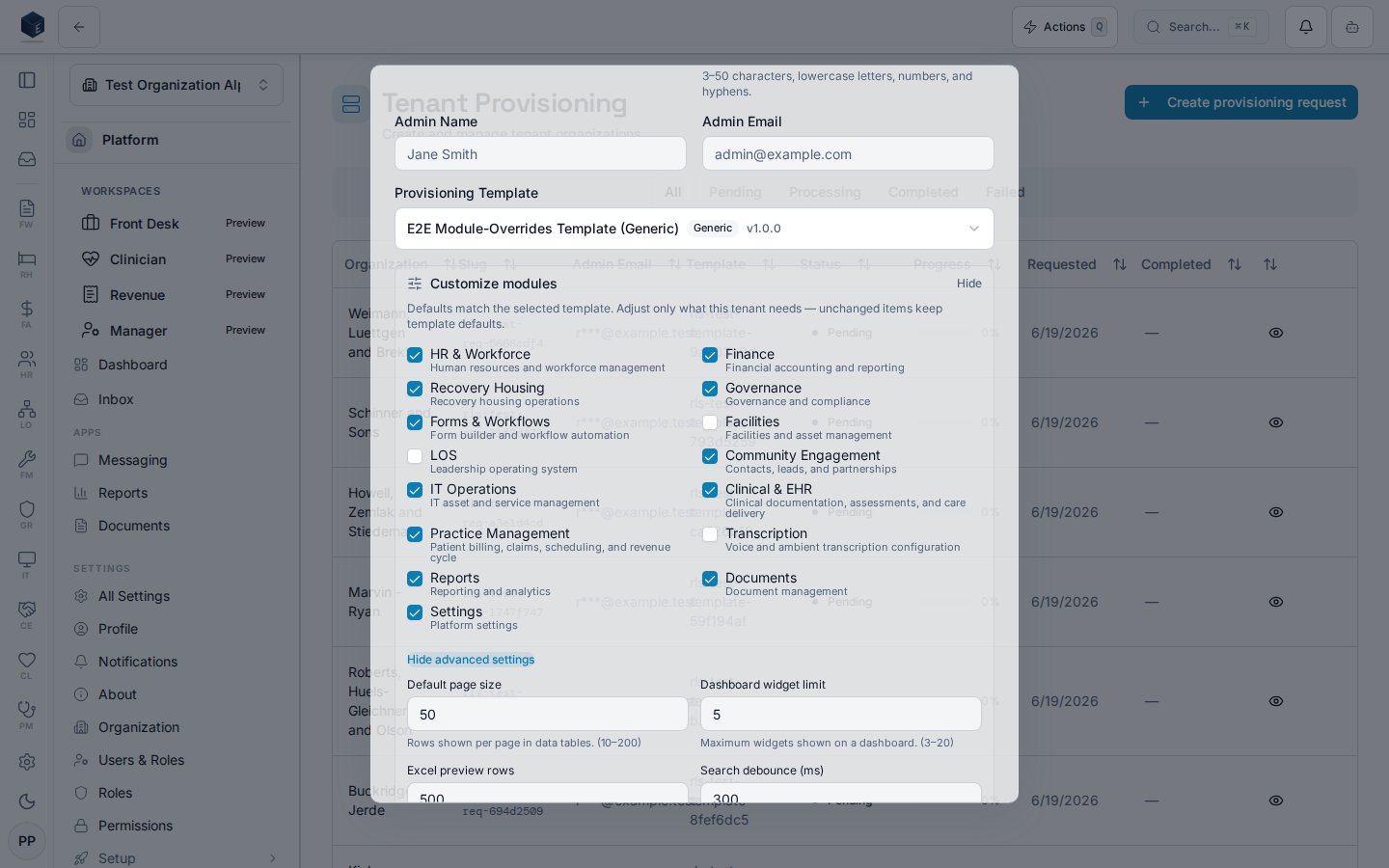
When you pick a template in the **New Provisioning Request** dialog, an optional **Customize modules** section (per-request module overrides) lets you override that template's module on/off state and a few scalar settings for **this request only**. Controls are seeded from the template's effective defaults, and **only values you change** are sent as overrides — leave everything untouched and provisioning uses pure template defaults.
## Who it's for
Requires `platform.provisioning.view` (route guard and `PermissionGate`). Creating requests additionally requires `platform.provisioning.create`.
## Before you start
* Provisioning templates should exist at `/admin/provisioning/templates` before creating requests.
* Your account must have `platform.provisioning.view` to access this page.
## Steps
1. Navigate to **Admin → Provisioning** (`/admin/provisioning`).
2. Use the status tabs to filter requests.
3. Click a row to view full request details.
4. Click **New Request** to initiate a new tenant provisioning workflow.
## Key concepts
**Provisioning request** — a workflow record tracking the creation and configuration of a new organization tenant.
**Template** — a provisioning template pre-configures settings for new tenants (managed at `/admin/provisioning/templates`).
## Customize modules for a single request
When you pick a template in the **New Provisioning Request** dialog, an optional **Customize modules** section (per-request module overrides) lets you override that template's module on/off state and a few scalar settings for **this request only**. Controls are seeded from the template's effective defaults, and **only values you change** are sent as overrides — leave everything untouched and provisioning uses pure template defaults.
 ### Enabled modules and advanced settings
Expanding **Customize modules** reveals the **Enabled modules** checkbox group and, behind **Show advanced settings**, scalar inputs such as *Default page size*. A “N changed” badge counts overrides, and **Reset to template defaults** clears them.
### Enabled modules and advanced settings
Expanding **Customize modules** reveals the **Enabled modules** checkbox group and, behind **Show advanced settings**, scalar inputs such as *Default page size*. A “N changed” badge counts overrides, and **Reset to template defaults** clears them.
 ## Related
Platform Foundation overview.
This page documents shipped product behavior. It is not medical, legal, or
billing advice. Verify against your organization's policies and applicable
regulations before using it for clinical, compliance, or billing decisions.
Protected health information (PHI) shown in the product is governed by your
tenant's access controls and is never exposed in this documentation.
* src/routes/platform.tsx
* src/platform/provisioning/pages/ProvisioningDashboardPage.tsx
* src/platform/provisioning/components/NewProvisioningRequestDialog.tsx
## Related
Platform Foundation overview.
This page documents shipped product behavior. It is not medical, legal, or
billing advice. Verify against your organization's policies and applicable
regulations before using it for clinical, compliance, or billing decisions.
Protected health information (PHI) shown in the product is governed by your
tenant's access controls and is never exposed in this documentation.
* src/routes/platform.tsx
* src/platform/provisioning/pages/ProvisioningDashboardPage.tsx
* src/platform/provisioning/components/NewProvisioningRequestDialog.tsx