> ## Documentation Index
> Fetch the complete documentation index at: https://docs.encoreos.io/llms.txt
> Use this file to discover all available pages before exploring further.
# AI Skills
> Browse, configure, create, import, and export specialized AI assistant skills for your organization.
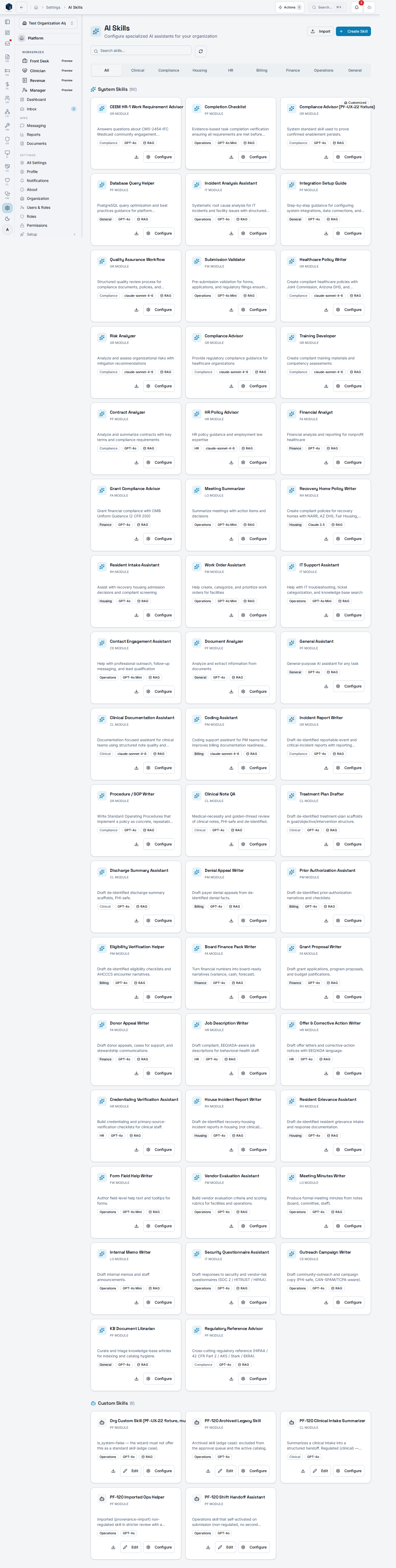
The AI Skills screen manages AI assistant skill definitions at the route `/settings/ai-skills`.
## Overview
The screen displays all AI skills (system-provided and custom) in a categorized tab layout covering All, Compliance, Housing, HR, Finance, Operations, and General. A search input filters by name, description, or skill code. Users with `pf.ai_skills.manage` can configure, edit, create (via wizard), import (SKILL.md format), and export skills. System and custom skills are grouped into separate sections within each tab.
 ## Who it's for
Required permission: `pf.ai_skills.view` (view); `pf.ai_skills.manage` (create/edit/import/export)
## Before you start
* You must hold the `pf.ai_skills.view` permission to access this screen.
* Management actions (Create, Import, Edit, Export) require `pf.ai_skills.manage`.
* Organization admins are granted both `pf.ai_skills.view` and `pf.ai_skills.manage` by default. If your admin account does not see AI Skills, ask a platform admin to re-sync your organization's permissions.
## Steps
Navigate to Settings → AI Skills.
Use the category tabs or search box to find a skill by name, description, or code.
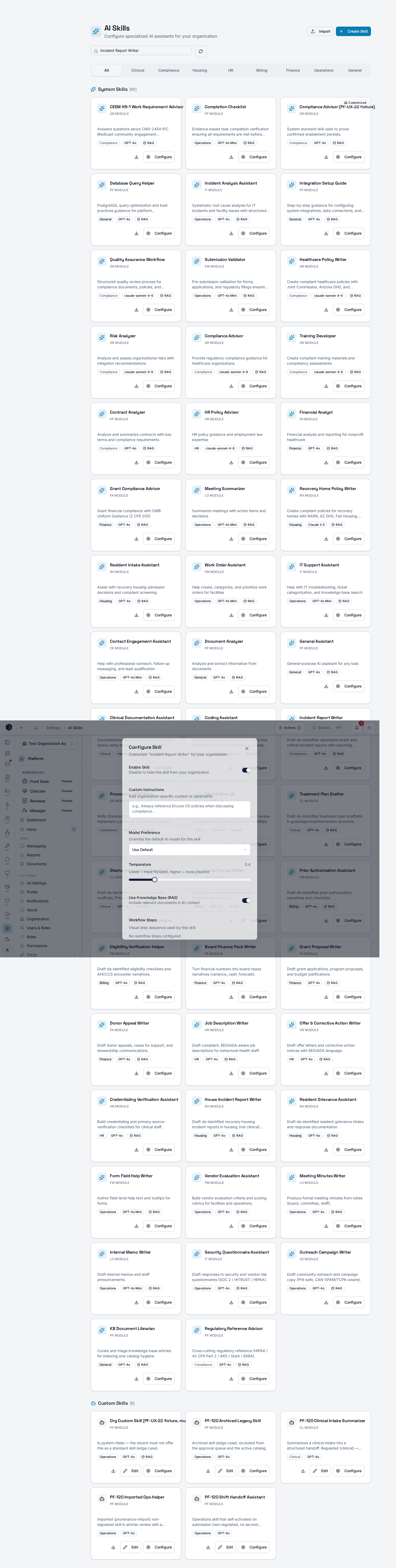
Click a skill card's configure action to open the configuration dialog and adjust settings.
Click "Create Skill" to open the creation wizard and define a new custom skill.
Click "Import" and upload a SKILL.md file to add an externally authored skill.
Use the export action on a skill card to download it as a `.SKILL.md` file.
## Configure a standard skill
From a standard skill's card, open **Configure** to apply an organization-specific override — enable/disable, custom instructions, model, and a knowledge-base RAG toggle — **without mutating the shared platform catalog**. The override is saved to `pf_ai_skill_overrides` and merged onto the base skill at runtime.
## Who it's for
Required permission: `pf.ai_skills.view` (view); `pf.ai_skills.manage` (create/edit/import/export)
## Before you start
* You must hold the `pf.ai_skills.view` permission to access this screen.
* Management actions (Create, Import, Edit, Export) require `pf.ai_skills.manage`.
* Organization admins are granted both `pf.ai_skills.view` and `pf.ai_skills.manage` by default. If your admin account does not see AI Skills, ask a platform admin to re-sync your organization's permissions.
## Steps
Navigate to Settings → AI Skills.
Use the category tabs or search box to find a skill by name, description, or code.
Click a skill card's configure action to open the configuration dialog and adjust settings.
Click "Create Skill" to open the creation wizard and define a new custom skill.
Click "Import" and upload a SKILL.md file to add an externally authored skill.
Use the export action on a skill card to download it as a `.SKILL.md` file.
## Configure a standard skill
From a standard skill's card, open **Configure** to apply an organization-specific override — enable/disable, custom instructions, model, and a knowledge-base RAG toggle — **without mutating the shared platform catalog**. The override is saved to `pf_ai_skill_overrides` and merged onto the base skill at runtime.
 ## Key concepts
* `skill_code` — unique identifier for each skill
* `is_system` — distinguishes platform-provided skills from organization-custom skills
* SKILL.md — serialized skill format for import/export
## Related
Platform Foundation overview.
Documentation coverage and governance.
This page documents shipped product behavior. It is not medical, legal, or
billing advice. Verify against your organization's policies and applicable
regulations before using it for clinical, compliance, or billing decisions.
Protected health information (PHI) shown in the product is governed by your
tenant's access controls and is never exposed in this documentation.
* src/routes/platform.tsx
* src/platform/ai/pages/AISkillsListPage.tsx
## Key concepts
* `skill_code` — unique identifier for each skill
* `is_system` — distinguishes platform-provided skills from organization-custom skills
* SKILL.md — serialized skill format for import/export
## Related
Platform Foundation overview.
Documentation coverage and governance.
This page documents shipped product behavior. It is not medical, legal, or
billing advice. Verify against your organization's policies and applicable
regulations before using it for clinical, compliance, or billing decisions.
Protected health information (PHI) shown in the product is governed by your
tenant's access controls and is never exposed in this documentation.
* src/routes/platform.tsx
* src/platform/ai/pages/AISkillsListPage.tsx