> ## Documentation Index
> Fetch the complete documentation index at: https://docs.encoreos.io/llms.txt
> Use this file to discover all available pages before exploring further.
# AI-assisted Proliant code mapping
> Use AI suggestions to map Proliant earning, deduction, and accrual codes to Encore values — review per-row or bulk-accept high-confidence mappings, with the manual flow always available.
## Overview
Mapping Proliant codes to Encore values is the most tedious part of setting up the
[Proliant HCM integration](/hr/proliant-setup): an admin hand-types an Encore value for
every Proliant code across roughly twenty code-type groups. The **Code mappings** tab on the
Proliant integration page (**HR Settings → Integrations → Proliant → Code mappings**) can
propose those values for you with AI, turning a long typing exercise into review-and-accept.
This feature is part of [HR-44-EN-02](https://github.com/Encore-OS/encoreos/blob/development/specs/hr/specs/HR-44-EN-02-ai-assisted-mapping-suggestions.md)
and is built on the reusable PF-118 AI mapping-suggestion service.
Code mappings are **reference/configuration data, not PHI** — the suggestion request carries
only earning/deduction/accrual code identifiers and the candidate Encore values, never any
employee data. The request runs on the standard model lane with a fail-closed PHI tripwire.
## Who it's for
HR administrators configuring the Proliant integration. The AI controls appear only when the
**HR AI module is enabled** for your organization and you hold the
`hr.proliant_integration.manage` permission. When the AI module is off — or the AI service is
unavailable — the controls are hidden and the manual sync → type → save flow is unchanged.
## The AI controls
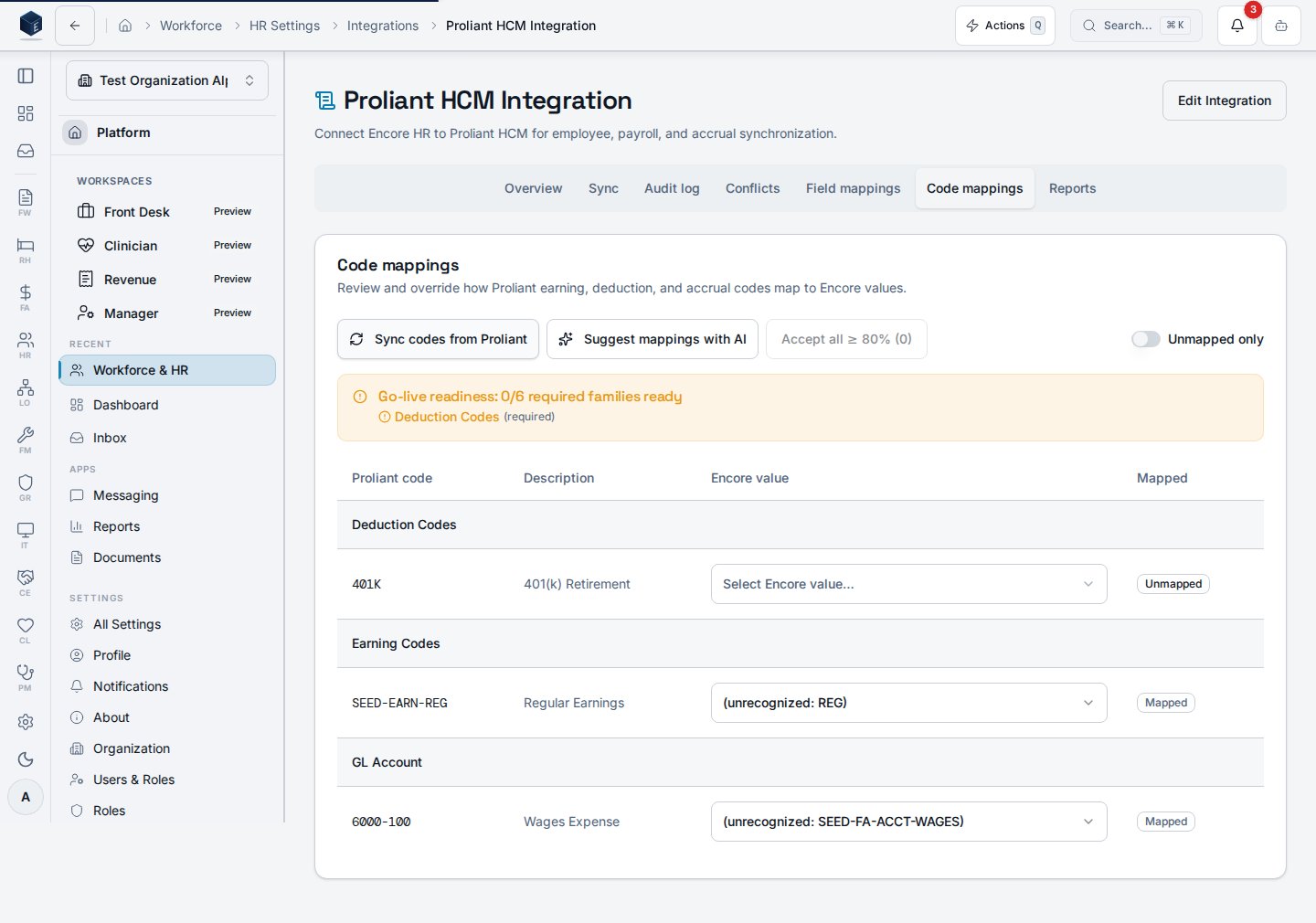
Once you have synced codes from Proliant, the Code mappings tab shows two AI controls in the
header: **Suggest mappings with AI** and **Accept all ≥ 80%**.
 Suggestions are offered only for **unmapped** codes whose code family has Encore candidate
values to draw from. Candidates come from the platform **Mapping Target Registry**, so every
go-live family has a source and the AI proposes a value for it:
| Proliant code family | Encore candidate source | Required for Activate? |
| -------------------- | ------------------------------------- | ---------------------- |
| `employee_status` | `hr_employment_status` picklist | ✅ blocking |
| `employee_type` | `employment_type` enum | ✅ blocking |
| `pay_frequency` | `hr_pay_frequency` picklist | ✅ blocking |
| `tax_form` | `hr_tax_form` picklist | ✅ blocking |
| `deduction` | HR-PAY-02 deduction types | ✅ blocking |
| `accrual` | HR-06 leave policies | ✅ blocking |
| `job` | `hr_positions` titles | ◑ recommended |
| `gender` | `hr_gender` picklist | ◑ recommended |
| `earning` | [HR Earning Types](/hr/earning-types) | ◑ recommended |
Because both the dropdown and the AI candidate list resolve from the same registry, the values
you see in the cell are exactly the values the AI can suggest — they cannot drift apart. If a
family has no candidate source for your organization (for example, you haven't defined any
[earning types](/hr/earning-types) yet), the cell falls back to manual entry and no suggestion
is shown.
## Reviewing and accepting a suggestion
Select **Suggest mappings with AI**. Each unmapped, candidate-backed code gains an inline
suggestion: the proposed Encore value, a confidence badge, and a rationale (hover the badge).
Nothing is applied automatically — accepting is always an explicit action.
Suggestions are offered only for **unmapped** codes whose code family has Encore candidate
values to draw from. Candidates come from the platform **Mapping Target Registry**, so every
go-live family has a source and the AI proposes a value for it:
| Proliant code family | Encore candidate source | Required for Activate? |
| -------------------- | ------------------------------------- | ---------------------- |
| `employee_status` | `hr_employment_status` picklist | ✅ blocking |
| `employee_type` | `employment_type` enum | ✅ blocking |
| `pay_frequency` | `hr_pay_frequency` picklist | ✅ blocking |
| `tax_form` | `hr_tax_form` picklist | ✅ blocking |
| `deduction` | HR-PAY-02 deduction types | ✅ blocking |
| `accrual` | HR-06 leave policies | ✅ blocking |
| `job` | `hr_positions` titles | ◑ recommended |
| `gender` | `hr_gender` picklist | ◑ recommended |
| `earning` | [HR Earning Types](/hr/earning-types) | ◑ recommended |
Because both the dropdown and the AI candidate list resolve from the same registry, the values
you see in the cell are exactly the values the AI can suggest — they cannot drift apart. If a
family has no candidate source for your organization (for example, you haven't defined any
[earning types](/hr/earning-types) yet), the cell falls back to manual entry and no suggestion
is shown.
## Reviewing and accepting a suggestion
Select **Suggest mappings with AI**. Each unmapped, candidate-backed code gains an inline
suggestion: the proposed Encore value, a confidence badge, and a rationale (hover the badge).
Nothing is applied automatically — accepting is always an explicit action.
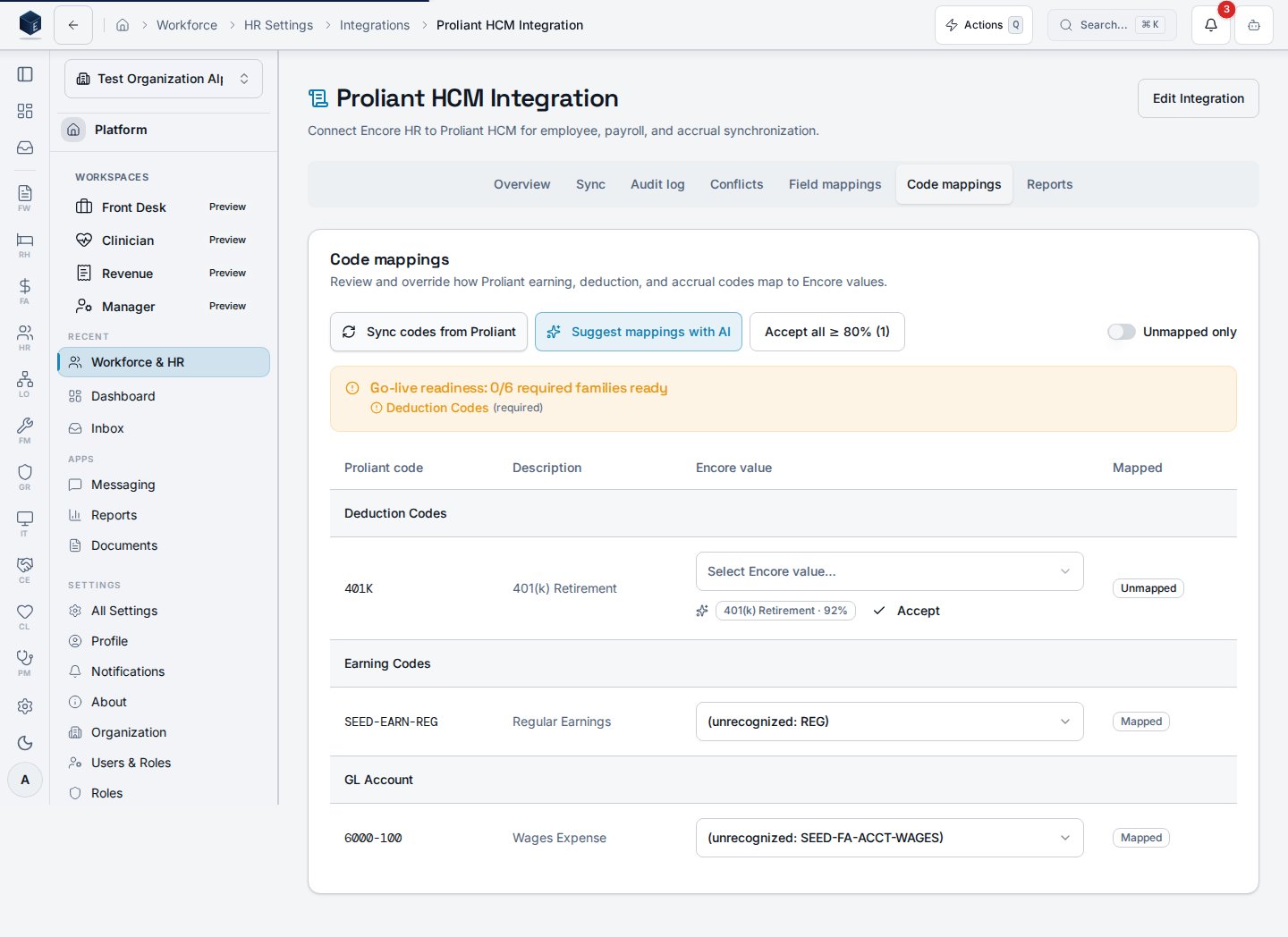 * **Accept** (per row) pre-fills the row's Encore value and saves it through the normal save
path, marking the code mapped.
* **Accept all ≥ 80%** applies every suggestion at or above the 80% confidence threshold for
the unmapped rows. The button shows how many rows qualify, so you always know the blast
radius before you click.
* Low-confidence suggestions are left for you to review and accept (or override) by hand.
## Graceful degradation
AI is strictly additive. If the suggestion service is unavailable, the tab surfaces an
"AI suggestions are unavailable" notice and the manual mapping flow continues to work exactly
as before — you can still sync codes, type an Encore value, and save. Turning the HR AI module
off hides the AI controls entirely.
## Related
This page documents shipped product behavior. It is not medical, legal, or
billing advice. Verify against your organization's policies and applicable
regulations before using it for clinical, compliance, or billing decisions.
Protected health information (PHI) shown in the product is governed by your
tenant's access controls and is never exposed in this documentation.
* **Accept** (per row) pre-fills the row's Encore value and saves it through the normal save
path, marking the code mapped.
* **Accept all ≥ 80%** applies every suggestion at or above the 80% confidence threshold for
the unmapped rows. The button shows how many rows qualify, so you always know the blast
radius before you click.
* Low-confidence suggestions are left for you to review and accept (or override) by hand.
## Graceful degradation
AI is strictly additive. If the suggestion service is unavailable, the tab surfaces an
"AI suggestions are unavailable" notice and the manual mapping flow continues to work exactly
as before — you can still sync codes, type an Encore value, and save. Turning the HR AI module
off hides the AI controls entirely.
## Related
This page documents shipped product behavior. It is not medical, legal, or
billing advice. Verify against your organization's policies and applicable
regulations before using it for clinical, compliance, or billing decisions.
Protected health information (PHI) shown in the product is governed by your
tenant's access controls and is never exposed in this documentation.