> ## Documentation Index
> Fetch the complete documentation index at: https://docs.encoreos.io/llms.txt
> Use this file to discover all available pages before exploring further.
# My Payroll
> Employee self-service payroll page with pay stub history and tax document access.
The My Payroll page, at route `/hr/me/pay`, provides employees with access to their pay history and tax documents.
## Overview
The page has two tabs: **Pay History** (a `PayStubList` component) and **Tax Documents** (a `TaxDocumentsSection` component). A back link returns to My HR at `/hr/me`. Individual pay stubs link to `/hr/me/pay/stubs/:id` for full detail. The page is limited to a `4xl` max width.
## Who it's for
Access follows your organization's role and module configuration. ## Before you start
* At least one completed payroll run is required for pay stubs to appear.
* Tax documents are generated by payroll tax form workflows; they appear once processed.
## Steps
1. Go to **HR → My HR → My Payroll** (or navigate to `/hr/me/pay`).
2. Review the **Pay History** tab for recent pay stubs.
3. Select a pay stub to open its detail view.
4. Switch to the **Tax Documents** tab to view and download tax forms.
## Payroll-provider tax documents
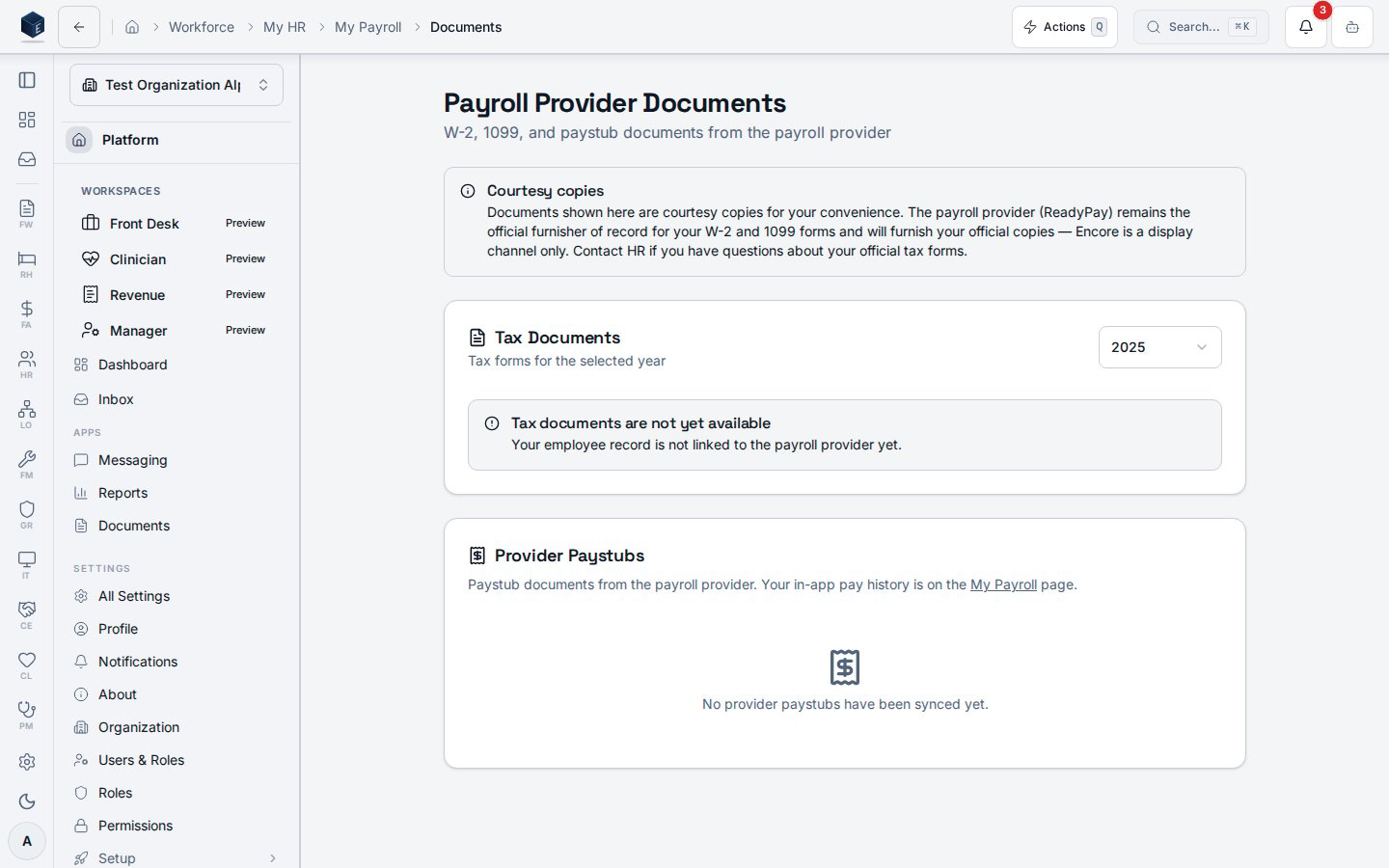
When your organization runs payroll through Proliant (ReadyPay), the **Tax Documents** tab also
links to `/hr/me/pay/documents` — a courtesy copy of your provider-issued documents (W-2, 1095-C,
pay stubs). ReadyPay remains the furnisher of record, and the page always shows a non-dismissable
disclaimer saying so. Until the payroll vendor grants document access (`PayHistory`) for your
organization's credentials — and your employee record is linked to a Proliant employee — the page
shows an explicit "not yet available" notice instead of an empty or broken list.
 ## Related
Human Resources core overview.
This page documents shipped product behavior. It is not medical, legal, or
billing advice. Verify against your organization's policies and applicable
regulations before using it for clinical, compliance, or billing decisions.
Protected health information (PHI) shown in the product is governed by your
tenant's access controls and is never exposed in this documentation.
* src/routes/hr/self-service-routes.tsx
* src/cores/hr/self-service/pages/MyPayrollPage.tsx
* src/cores/hr/self-service/components/PayStubList.tsx
* src/cores/hr/self-service/components/TaxDocumentsSection.tsx
## Related
Human Resources core overview.
This page documents shipped product behavior. It is not medical, legal, or
billing advice. Verify against your organization's policies and applicable
regulations before using it for clinical, compliance, or billing decisions.
Protected health information (PHI) shown in the product is governed by your
tenant's access controls and is never exposed in this documentation.
* src/routes/hr/self-service-routes.tsx
* src/cores/hr/self-service/pages/MyPayrollPage.tsx
* src/cores/hr/self-service/components/PayStubList.tsx
* src/cores/hr/self-service/components/TaxDocumentsSection.tsx