> ## Documentation Index
> Fetch the complete documentation index at: https://docs.encoreos.io/llms.txt
> Use this file to discover all available pages before exploring further.
# Proliant HCM integration — admin guide
> Configure the Proliant HCM integration: credentials, sandbox URL, sync scopes, code mappings, run outcomes, and payroll permissions.
## Overview
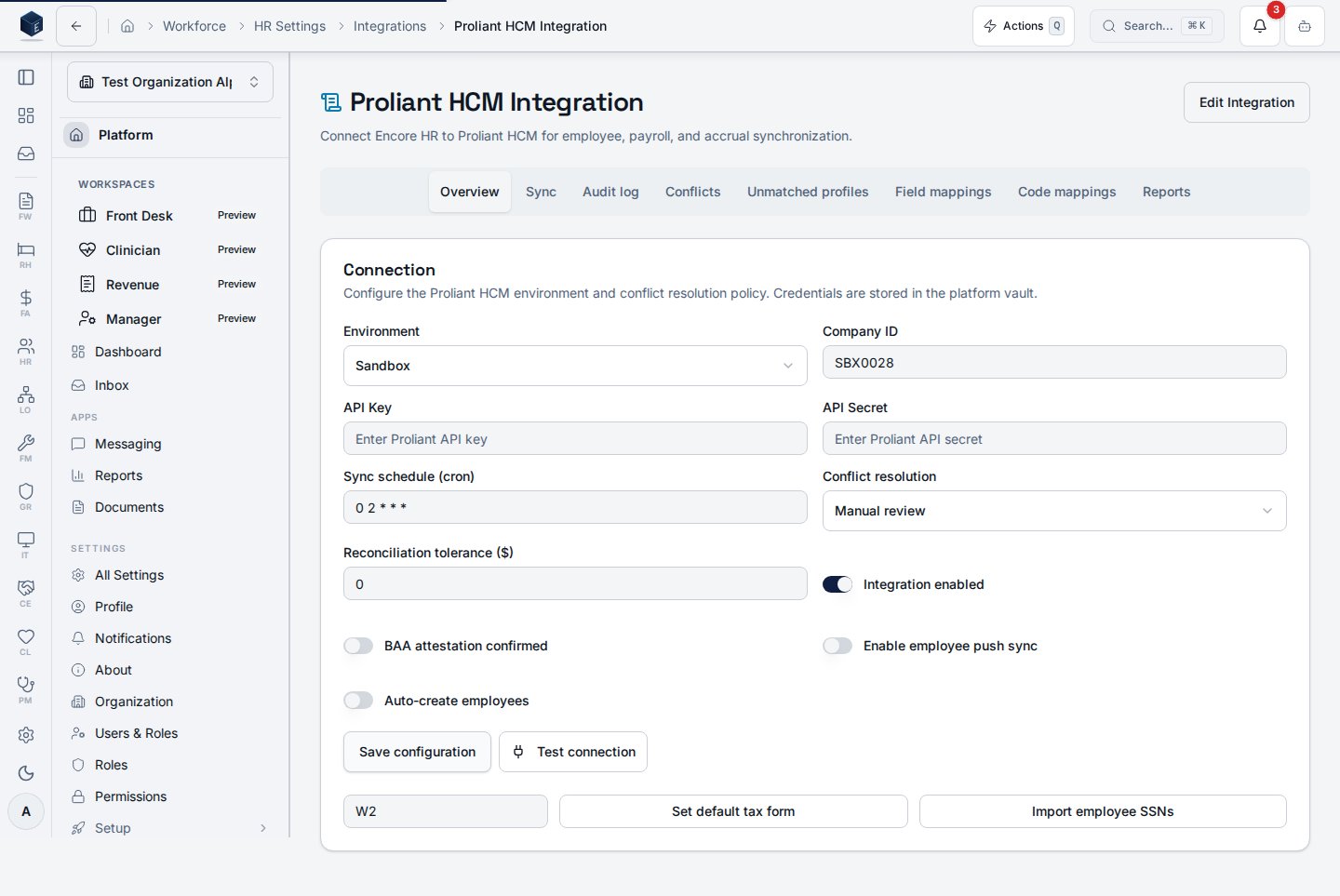
The Proliant HCM integration syncs employees, payroll, accruals, and rates from Proliant ReadyPay into Encore, and pushes timesheets back to Proliant. It runs on a polling schedule (Proliant does not expose webhooks) and writes every operation to the sync log for audit.
This guide covers what you configure as a tenant admin, how to interpret sync run outcomes, and what to do when a run reports a failure.
## Initial setup
* Proliant sandbox credentials (client ID + secret) issued by your Proliant account manager.
* The **sandbox base URL** Proliant provisioned for your organization at onboarding. Proliant assigns this per client — there is no shared sandbox host.
* Feature flag `proliant_integration_enabled` turned on for your organization.
* Role `hr.proliant-integration.manage` on the admin user.
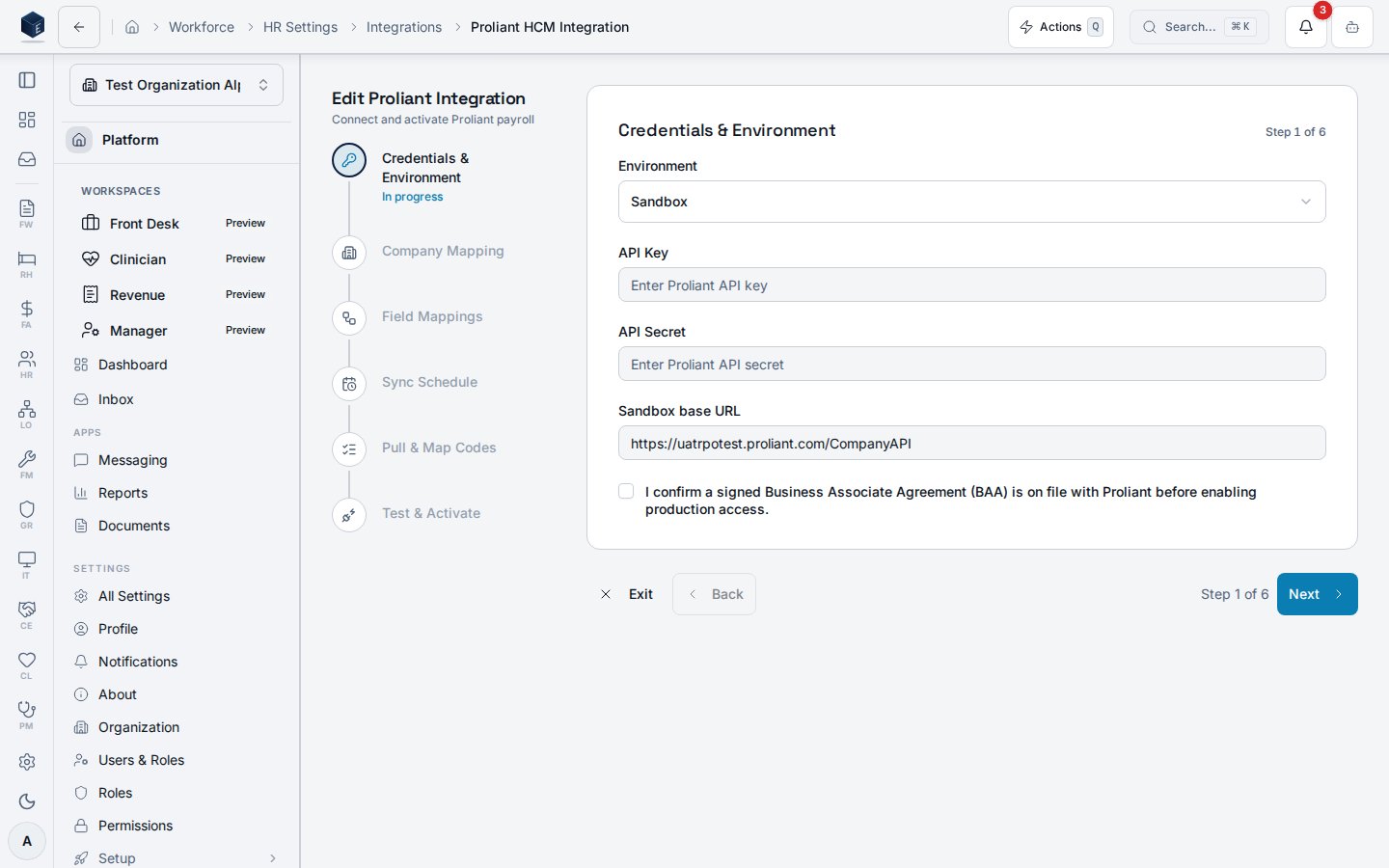
Open **HR → Integrations → Proliant** and create the integration row. Leave `environment` set to `sandbox` until cutover.
Paste the per-org sandbox URL Proliant gave you into the **Sandbox base URL** field (column `sandbox_base_url` on `hr_proliant_integrations`). A sandbox integration cannot be activated until this is set — the integration no longer falls back to a hardcoded host.
Production integrations leave this field empty; the production base URL is fixed in code.
Save the client ID and secret to the credential vault through the integration settings, then run **Test connection**.
Test connection now performs a live OAuth token exchange against Proliant before returning the company list. A green result confirms that the credentials are valid and that the sandbox base URL is reachable. If Proliant rejects the credentials, the test surfaces the specific failure (for example, `invalid_client`) instead of a generic error. A successful test returns the Proliant company list — pick the company that maps to your tenant.
Toggle the scopes you want active:
* `sync_employees` — pull employee demographics, status, and supervisor links.
* `sync_payroll` — pull pay history runs and per-line detail rows.
* `sync_accruals` — pull PTO, sick, and other accrual balances.
* `push_timesheets` — push approved timesheets back to Proliant through the `TimeImport` endpoint.
## Configuration options
| Setting | Where | Notes |
| ----------------------------------------------------------------------- | ------------------------------------------- | -------------------------------------------------------------------------------------------------------------------------------------------------------------------------------------------------------- |
| `environment` | `hr_proliant_integrations.environment` | `sandbox` or `production`. Changing this is the cutover step — see the [cutover runbook](https://github.com/Encore-OS/encoreos/blob/development/docs/integrations/proliant/HR-44-PRODUCTION-CUTOVER.md). |
| `sandbox_base_url` | `hr_proliant_integrations.sandbox_base_url` | Per-org sandbox CompanyAPI base URL. Required for sandbox; leave null for production-only integrations. |
| `sync_employees` / `sync_payroll` / `sync_accruals` / `push_timesheets` | Integration settings UI | Independent scope toggles. |
| `sync_schedule` | Integration settings UI | Cron-style schedule for automated runs. |
| Company mapping | `hr_proliant_company_mappings` | Maps Encore organization to one or more Proliant `companyId` values. |
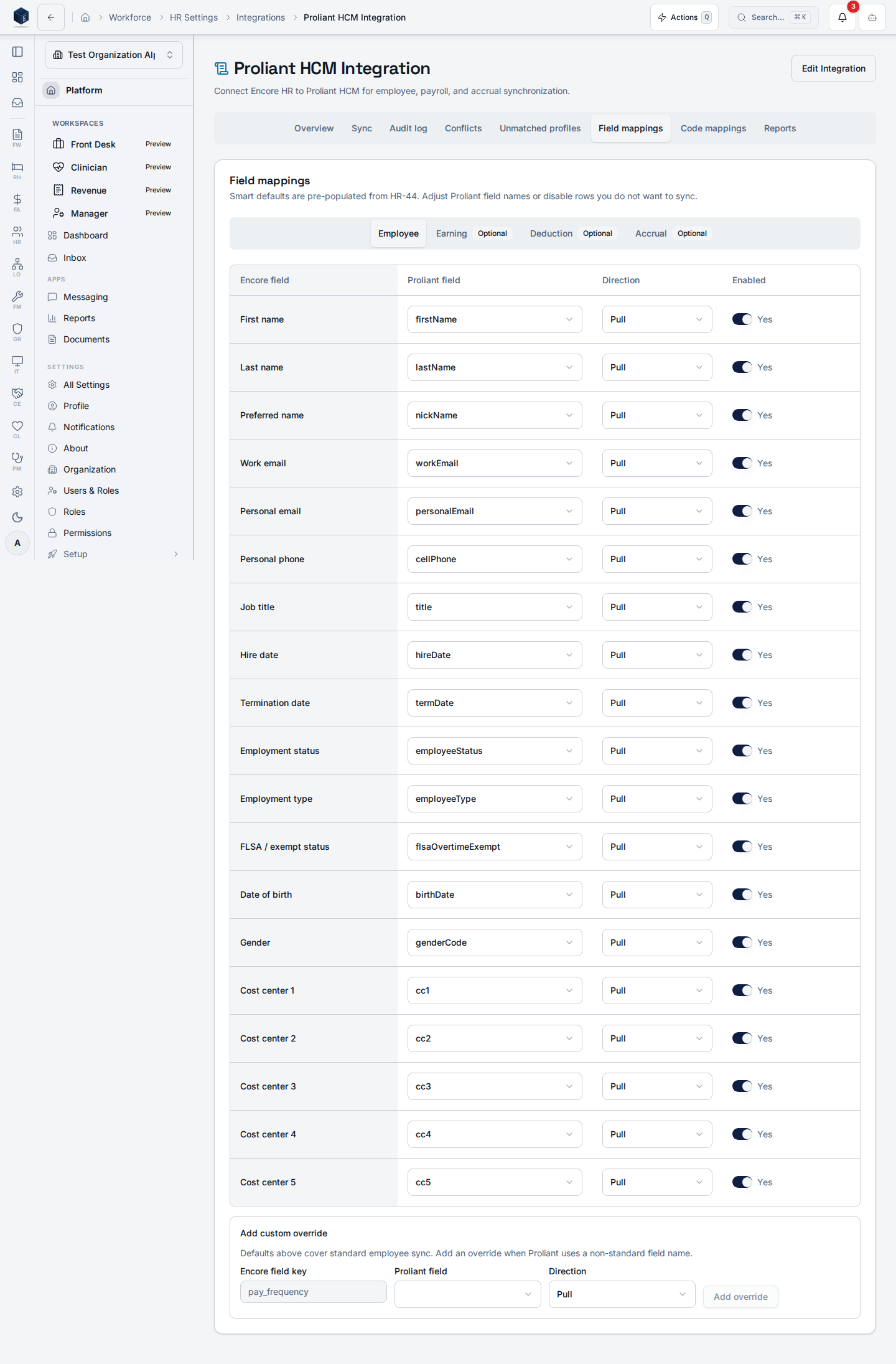
| Field mapping | `hr_proliant_field_mappings` | Optional per-tenant overrides. Defaults match Proliant's verified field names (for example, `hireDate`, `birthDate`, `cellPhone`, `flsaOvertimeExempt`). |
## Sync run outcomes
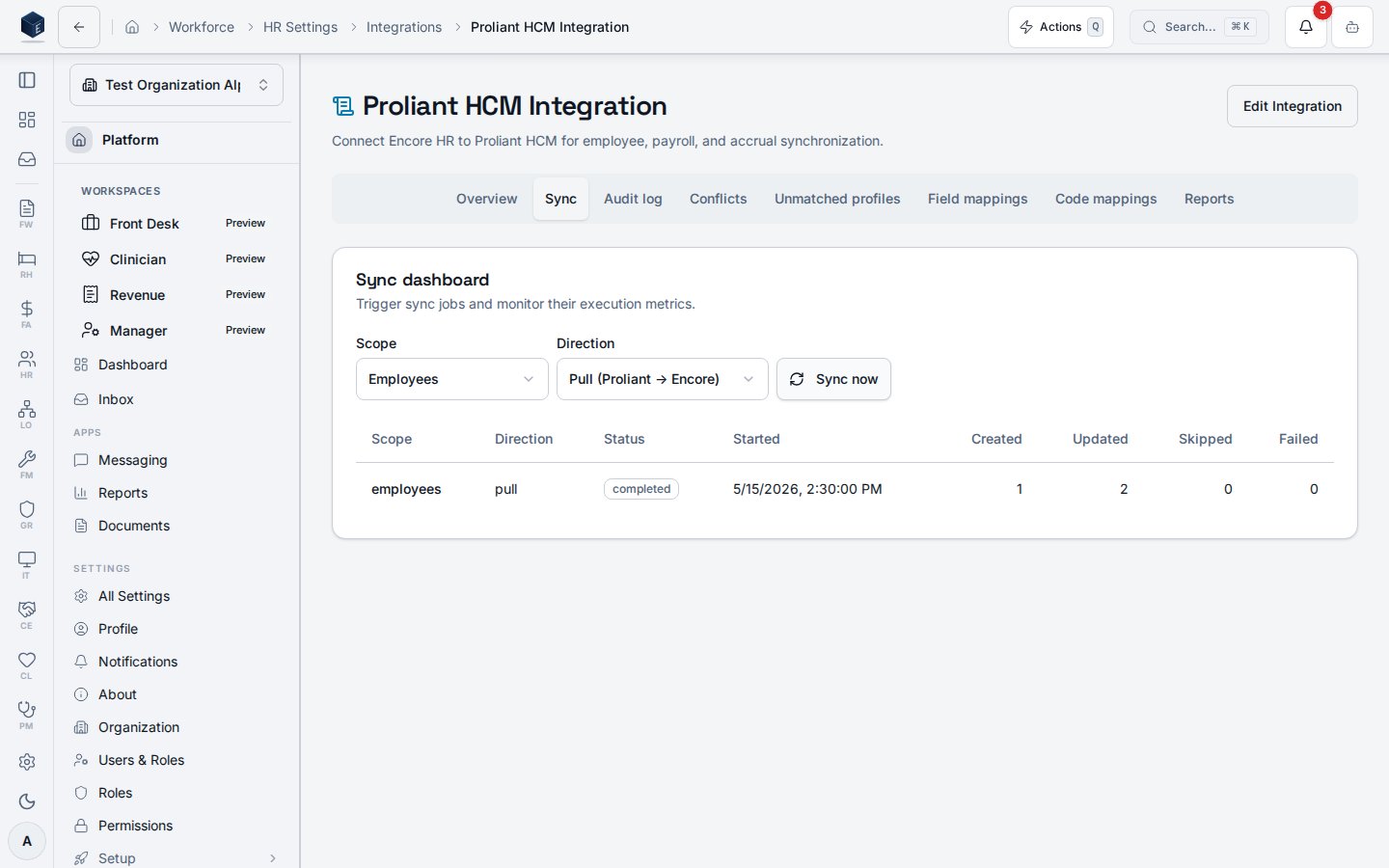
Every run is classified into one of three outcomes and written to `hr_proliant_sync_runs`:
| Outcome | Meaning | Action |
| ----------- | ----------------------------------------------------------------------------------------------------------------- | ------------------------------------------------------------------------------------------------------------------------------------------------------- |
| `completed` | All records the API reported were processed without errors. | None. |
| `partial` | Some records were processed, but at least one row failed **or** the run hit its per-invocation budget mid-roster. | Review `hr_proliant_sync_log` for the failed rows. For budget-bounded runs, no action is needed — the next scheduled tick resumes from the checkpoint. |
| `failed` | The run hit a contract error, or Proliant reported records exist but none were processed. | Treat as a hard failure. Check the run's `error_message`, the audit log, and the run scopes. Do not re-enable the schedule until the cause is resolved. |
Previously, a run that pulled zero records — even when Proliant reported records exist — would silently finalize as `completed`. As of HR-44 contract remediation, this case is surfaced as `failed` so that endpoint or mapping drift cannot hide behind an empty result.
### Bounded pulls and checkpoint resume
The employee pull is now bounded by a per-invocation record budget and a wall-clock deadline. When a large roster exceeds the budget, the run finalizes as `partial` and writes a structured checkpoint to `hr_proliant_sync_runs.checkpoint` (company index, next page, running totals). The next scheduled `employees` tick resumes from exactly that checkpoint, so no rows are reprocessed and no `running` row is left orphaned by a timeout. The full roster drains across consecutive ticks and the final tick reports `completed`. Checkpoint resume applies to scope `employees`; a `scope=all` tick re-starts the employee pull from the top on the next invocation (the pull is idempotent, so no rows are double-applied).
### Scheduled-sync dispatcher fairness
The hourly `proliant-scheduled-sync` dispatcher attempts orgs in least-recently-run order, enforces a wall-clock deadline below the edge limit, and applies an abort timeout per org fetch. The dispatcher returns `{dispatched, skipped, failed, deferred}`. Orgs it could not start before the deadline are reported as `deferred` and picked up on the next hourly tick — a single slow tenant can no longer consume the whole window.
## Code mappings (earnings, deductions, accruals, GL accounts)
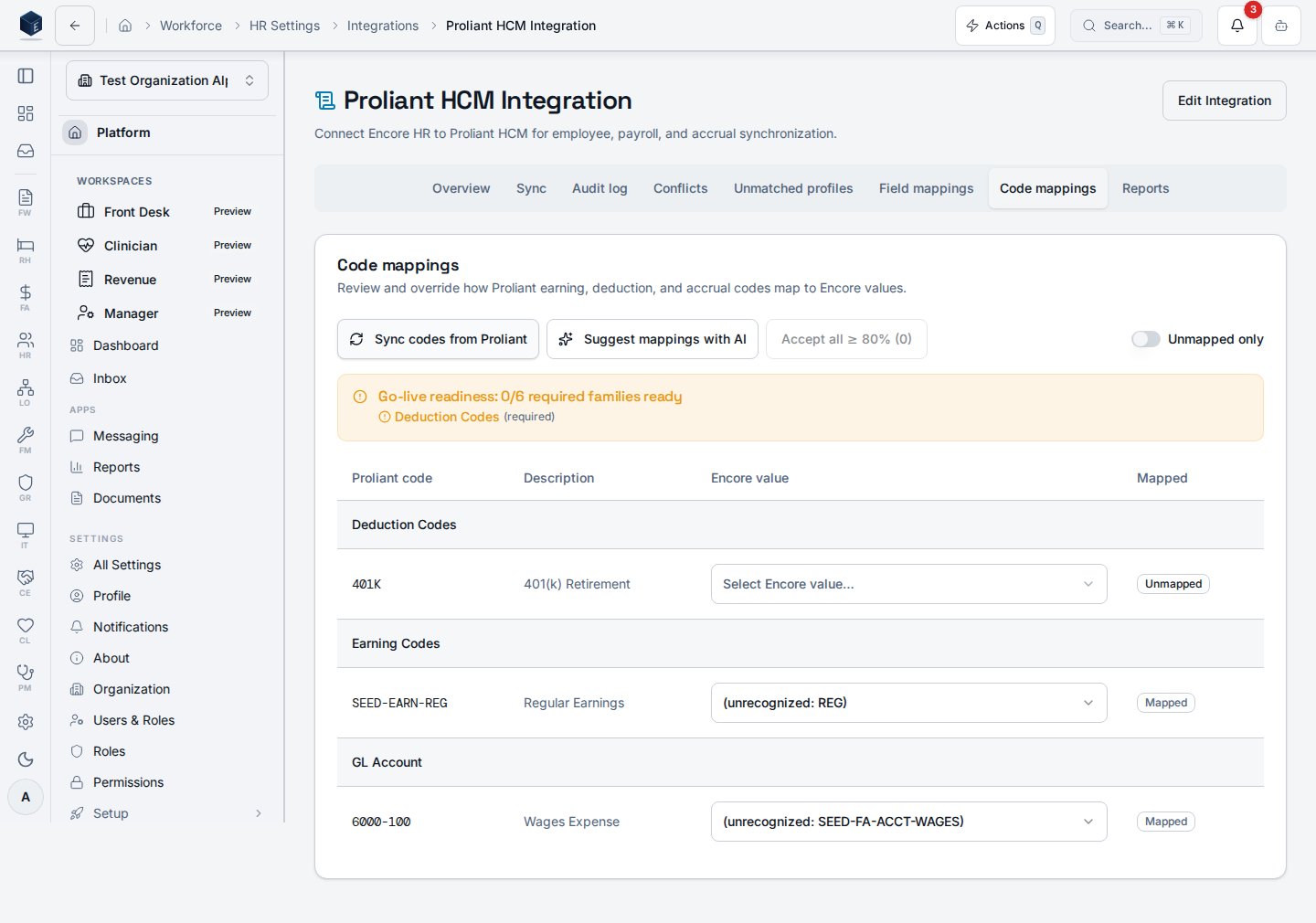
The **Code mappings** tab on the Proliant integration page lets an admin pull the latest earning, deduction, accrual, and GL-account codes from Proliant and assign each one to the matching Encore value.
Select **Sync codes from Proliant**. The integration calls the `proliant-code-lookup` edge function and writes results to `hr_proliant_code_mappings`, grouped by `code_type` (`earning`, `deduction`, `accrual`, `gl_account`).
Toggle **Unmapped only** to focus on codes that still need an Encore value. Each row shows the Proliant code, description, and the Encore value field.
The Encore-value cell is a **constrained dropdown** populated from the platform mapping-target registry, so you cannot mistype a value that silently breaks payroll. If a code does not apply to your organization, choose **N/A — skip this code**. The row is stored with `is_mapped=true` and a NULL Encore value, and the family-readiness gate counts it as satisfied.
Saved rows are marked mapped; cleared rows revert to unmapped and route to the exception queue on the next payroll JE.
A **readiness banner** at the top of the table reports `N/6 required families ready` across `employee_status`, `employee_type`, `pay_frequency`, `tax_form`, `deduction`, and `accrual`. `job`, `gender`, and `earning` are recommended but don't block — the `earning` family resolves from your [Earning Types](/hr/earning-types) catalog. Activate in the setup wizard is hard-gated on this readiness check — see the [setup walkthrough](/hr/proliant-setup).
Existing free-text values saved before the constrained dropdown shipped are preserved; any that fall outside the dropdown's value set are flagged read-only so you can re-pick them.
Unmapped earning, deduction, or accrual codes block the affected lines from posting. Unmapped `gl_account` codes route the related journal entry line to the FA-43 exception queue rather than auto-posting — review the queue in Finance & Accounting and back-fill the mapping.
## Unmatched profiles
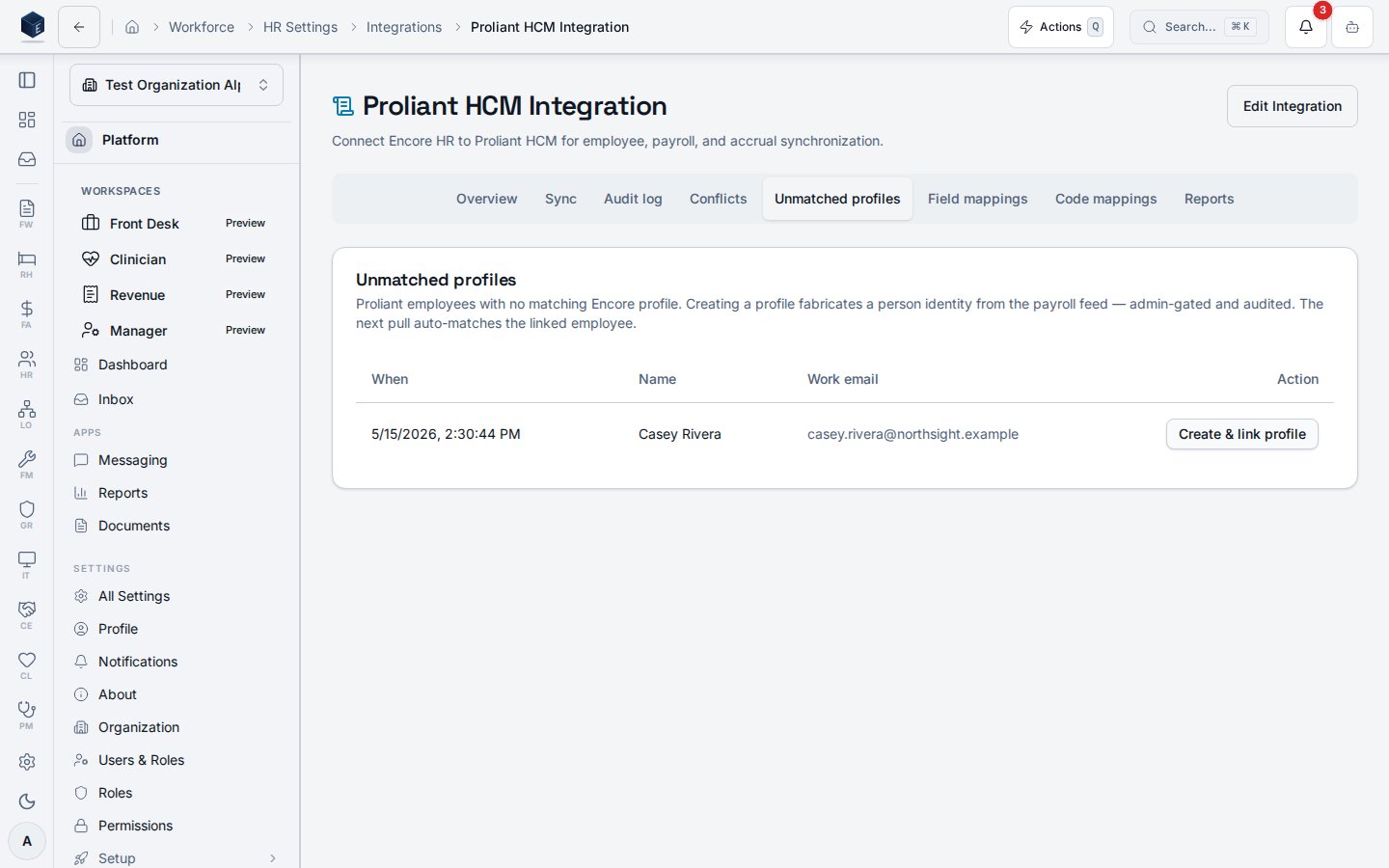
The **Unmatched profiles** tab lists payroll employees that Proliant returned but Encore could not link to an existing profile by work email. These rows are kept separate from the **Conflicts** tab. Conflicts is for field-level disagreements between the two systems; Unmatched profiles is for people who have no Encore identity yet.
Each row shows only the minimum non-PHI identity needed to recognize the employee: Proliant employee ID, company ID, work email, first and last name, and employee number. SSN, date of birth, and address are never stored on these rows or displayed in the UI.
### Resolve an unmatched row
Use this workflow when the employee is real and should exist in Encore. Creating a profile from a payroll feed is a deliberate, audited action — every create is attributed to the admin who ran it.
You need `hr.proliant-integration.resolve-conflicts` on the same organization that owns the row. The action is rejected for any other tenant.
Confirm the work email and name match a person you expect to onboard. If the row looks wrong (for example, a test record or a terminated employee that should not exist in Encore), leave it alone — see *Skip an unmatched row* below.
Encore finds or creates an auth identity for the work email and creates the matching `pf_profiles` row. It then inserts an `hr_employees` row with the same defaults the inline pull path uses (`job_title` "Unspecified", `hire_date` today, `status` active) and writes a Proliant mapping marked `match_method = manual`. If an auth user already exists for that email, Encore reuses it instead of creating a duplicate.
On the next pull, the employee matches through the new mapping and no longer appears on the Unmatched profiles tab. Their record updates flow through the normal Conflicts queue from then on.
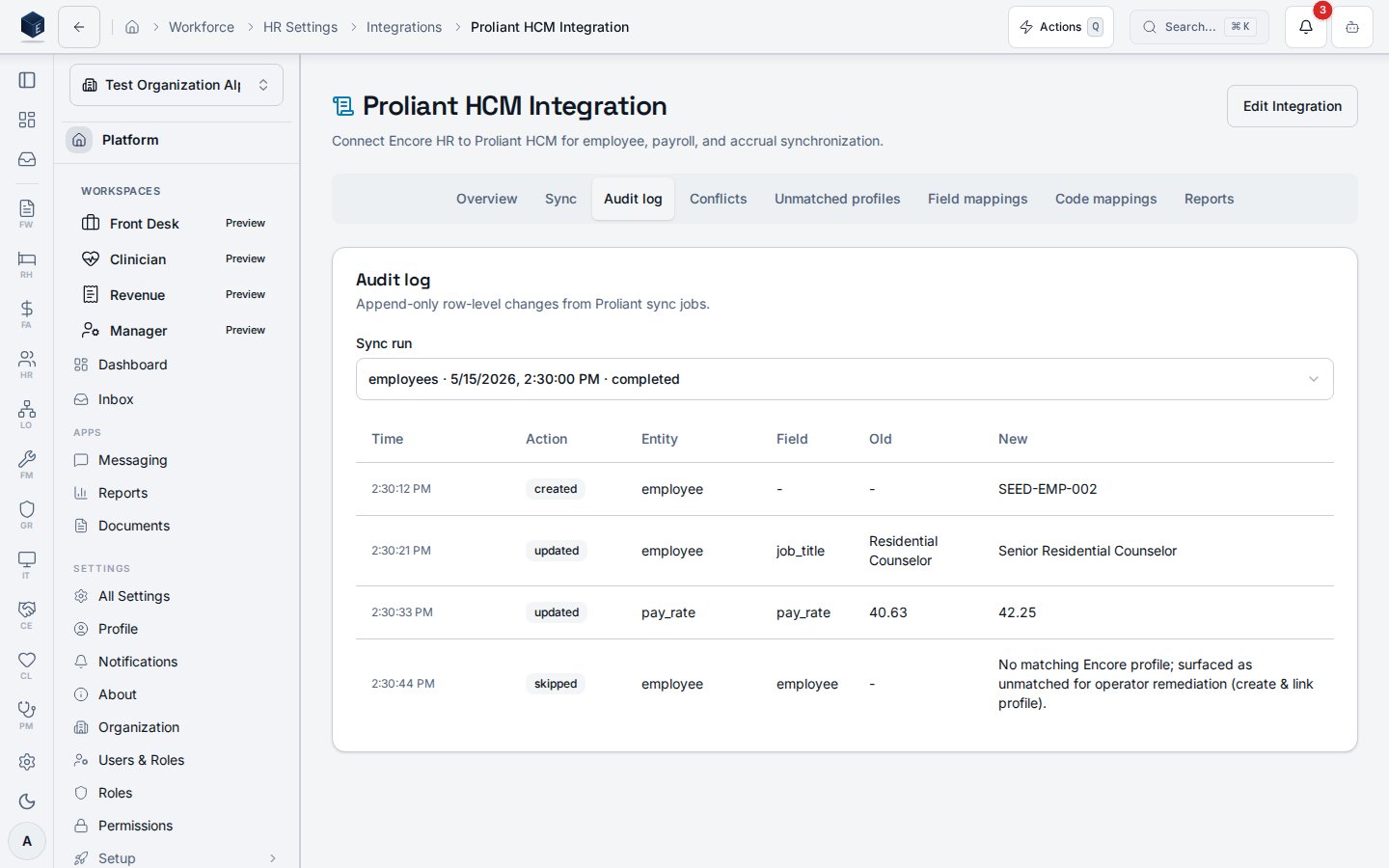
The action is idempotent — re-running **Create & link profile** on a row that is already linked reuses the existing employee and mapping instead of creating duplicates. The row is then marked `resolved_manual` with your user ID and a timestamp on `hr_proliant_sync_log`, which is append-only for audit.
### Skip an unmatched row
If the employee should not exist in Encore (test data, mis-keyed record, or an employee who is staying payroll-only), leave the row in the Unmatched profiles tab and do not run **Create & link profile**. Unmatched rows are excluded from the Conflicts resolver and do not block payroll runs for other employees.
## Permissions
| Permission | Grants |
| --------------------------------------------- | -------------------------------------------------------------------------------------------------------------------------------------------------------------------------------- |
| `hr.proliant-integration.manage` | Create and edit the integration record, credentials, mappings, and scopes. |
| `hr.proliant-integration.sync` | Trigger manual sync runs. |
| `hr.proliant-integration.resolve-conflicts` | Resolve rows in the **Conflicts** tab and create + link Encore profiles from the **Unmatched profiles** tab. Required for both actions — without it the buttons render disabled. |
| `hr.proliant-payroll.run` | Open the [ReadyPay payroll run wizard](/hr/proliant-payroll-run) and drive a run start → submit. |
| `hr.proliant-payroll.override-reconciliation` | Override a reconciliation breach in the wizard. Audit-logged with profile ID and timestamp. |
All five permissions are tenant-scoped; assignment is configurable per organization (constitution §5.2.3). The `resolve-conflicts` permission is granted to `org_admin` by default.
## Auditing & monitoring
* Every outbound Proliant call is recorded in `pf_integration_audit_log` with actor, organization, endpoint, status code, and a SHA-256 hash of any PII identifier (never the raw value).
* Sync runs write summary rows to `hr_proliant_sync_runs` and per-record entries to `hr_proliant_sync_log`.
* The sync dashboard surfaces counts for `completed`, `partial`, and `failed` runs per scope.
* 4xx/5xx responses that contain PHI trigger an `IT-incident.create` event instead of a UI toast.
## Troubleshooting
* **Sandbox integration won't activate.** Confirm `sandbox_base_url` is populated. Sandbox runs no longer fall back to a default host.
* **Test connection or sync fails with `invalid_client`.** Proliant rejected the OAuth credentials. The UI message reads "Proliant rejected the credentials (invalid\_client). Re-save API key and secret for this integration." Open the integration settings, re-enter the client ID and secret from your Proliant account manager, save, and run **Test connection** again. The integration automatically retries the token exchange with HTTP Basic auth when Proliant returns `invalid_client`. A persistent failure means the credentials themselves are wrong or revoked — not the auth style.
* **Run finalized as `failed` with zero records.** Proliant reported records in scope, but the integration processed none. This is almost always a credential, company-mapping, or endpoint-contract problem. Verify the `companyId` mapping and re-run the **Test connection** flow.
* **Run finalized as `partial`.** Open `hr_proliant_sync_log`, filter to the failed rows, and check the per-record error messages. Common causes: missing required Proliant fields on the source record, or an Encore employee that does not match by `proliantEmployeeId`.
* **Timesheet push returns 404.** The push path now uses `POST /Company/{companyId}/TimeImport/{calendarId}` against an open calendar. If no open calendar is returned by `GET /Company/{companyId}/Earnings/calendars`, no push is attempted — confirm the pay period is open in Proliant.
* **Configuration changes don't take effect.** Some settings require a session refresh; sign out and back in.
## The integration UI
The integration is managed at **HR Settings → Integrations → Proliant**. When an integration is
active the page shows the **Manage** view with eight tabs: Overview, Sync, Audit log, Conflicts,
Unmatched profiles, Field mappings, Code mappings, and Reports. (To connect a brand-new integration,
see the [setup walkthrough](/hr/proliant-setup).)
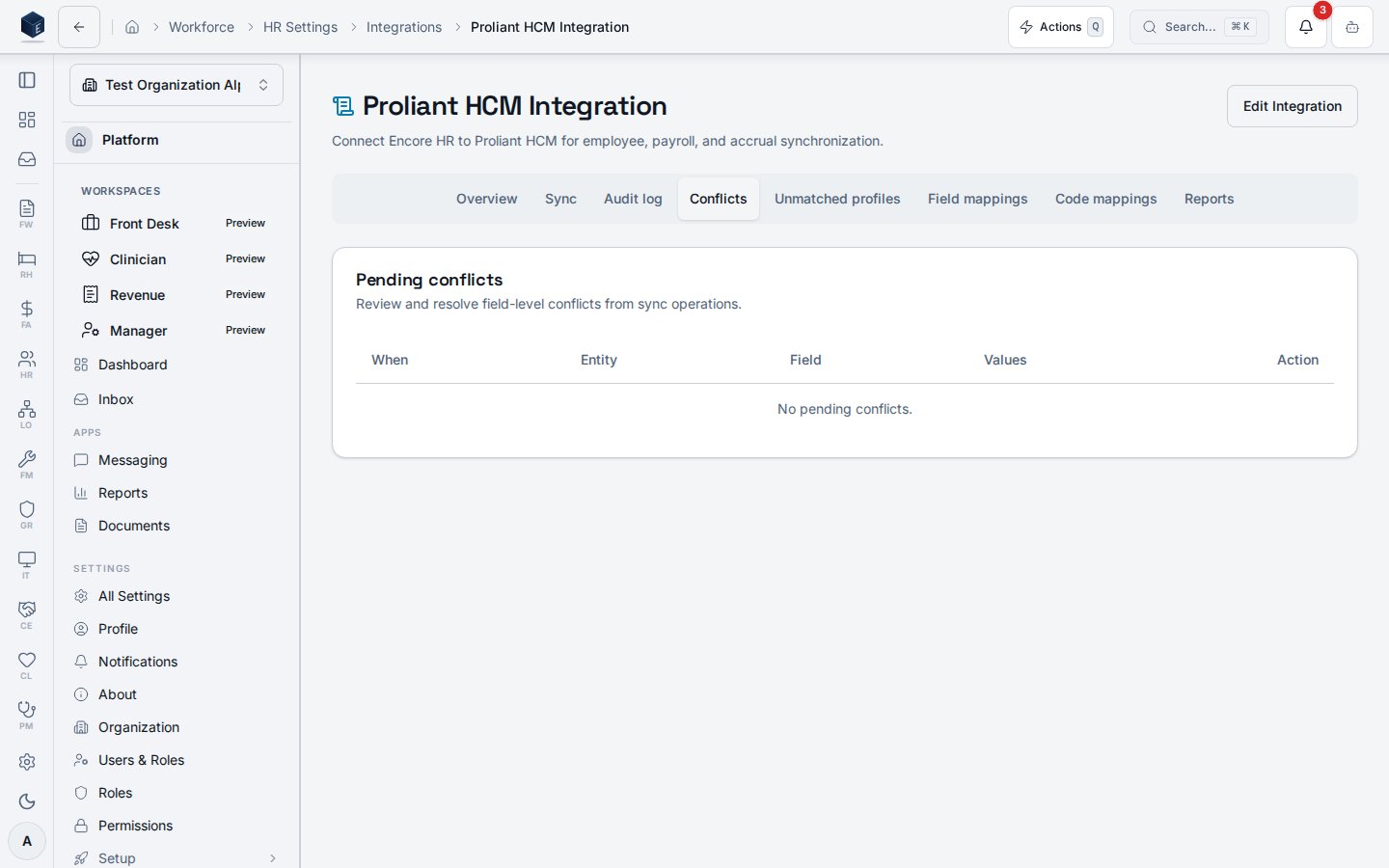
 The **Conflicts** tab now lists up to 1,000 pending rows (previously 200) and excludes unmatched
employees. **Accept Proliant**, **Keep Encore**, and **Edit** actions are gated on
`hr.proliant-integration.resolve-conflicts`; resolutions are recorded with the resolving user and
timestamp.
The **Unmatched profiles** tab lists Proliant employees whose work email did not match any Encore
profile during the most recent pulls — these rows used to land in **Conflicts** and crowd out real
data conflicts. Each row shows the captured name and work email, with a **Create & link profile**
action that:
1. Creates an Encore auth identity and `pf_profiles` row for the work email (existing identities are
reused).
2. Inserts an `hr_employees` row using the same fallbacks as the inline pull (`employee_number`,
`job_title = 'Unspecified'`, `hire_date = today`, `status = active`).
3. Links the Proliant mapping (`match_method = manual`) so the next pull auto-matches the employee.
4. Marks the log row `resolved_manual` with `resolved_by = auth.uid()` and `resolved_at`.
The action requires `hr.proliant-integration.resolve-conflicts` and a valid work email on the
captured row; rows with no email render the button disabled. Only non-PHI identity fields
(`work_email`, `first_name`, `last_name`, `employee_number`, Proliant `employeeId`/`companyId`) are
ever persisted to the audit payload — SSN, DOB, and address are never written.
Creating a profile from a payroll feed is a meaningful data-provenance change for a regulated core.
Use it deliberately, and confirm the captured work email matches the intended person before
selecting **Create & link profile**.
The **Conflicts** tab now lists up to 1,000 pending rows (previously 200) and excludes unmatched
employees. **Accept Proliant**, **Keep Encore**, and **Edit** actions are gated on
`hr.proliant-integration.resolve-conflicts`; resolutions are recorded with the resolving user and
timestamp.
The **Unmatched profiles** tab lists Proliant employees whose work email did not match any Encore
profile during the most recent pulls — these rows used to land in **Conflicts** and crowd out real
data conflicts. Each row shows the captured name and work email, with a **Create & link profile**
action that:
1. Creates an Encore auth identity and `pf_profiles` row for the work email (existing identities are
reused).
2. Inserts an `hr_employees` row using the same fallbacks as the inline pull (`employee_number`,
`job_title = 'Unspecified'`, `hire_date = today`, `status = active`).
3. Links the Proliant mapping (`match_method = manual`) so the next pull auto-matches the employee.
4. Marks the log row `resolved_manual` with `resolved_by = auth.uid()` and `resolved_at`.
The action requires `hr.proliant-integration.resolve-conflicts` and a valid work email on the
captured row; rows with no email render the button disabled. Only non-PHI identity fields
(`work_email`, `first_name`, `last_name`, `employee_number`, Proliant `employeeId`/`companyId`) are
ever persisted to the audit payload — SSN, DOB, and address are never written.
Creating a profile from a payroll feed is a meaningful data-provenance change for a regulated core.
Use it deliberately, and confirm the captured work email matches the intended person before
selecting **Create & link profile**.
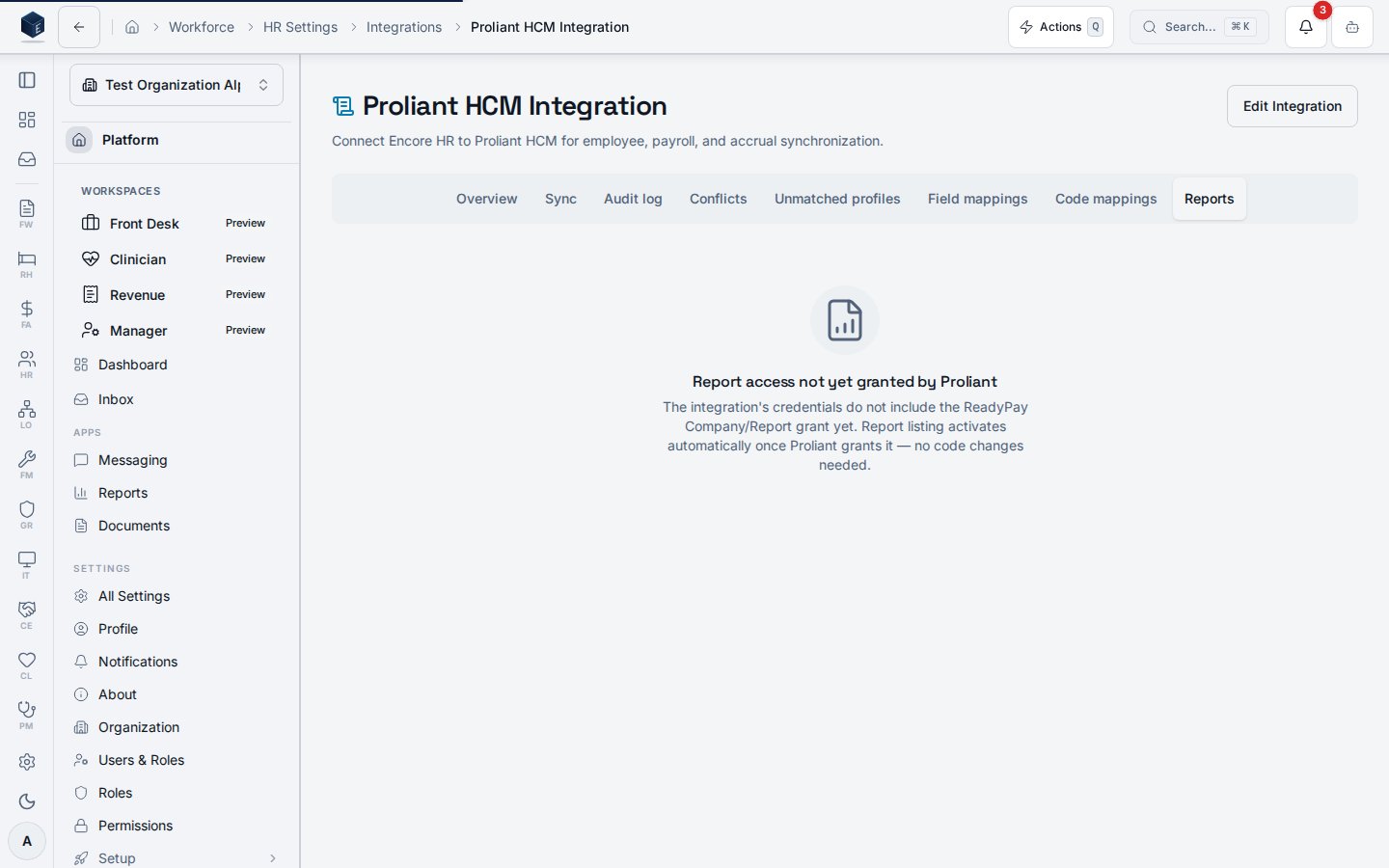
 The **Reports** tab is a read-only listing of the native ReadyPay reports available for your
company (title, category, format, description) — reports are run and exported in ReadyPay itself.
The listing is gated on the vendor's own `Company/Report` grant: until Proliant provisions it for
your credentials, the tab says exactly that, and the listing activates automatically once granted —
no configuration or code change needed.
The **Reports** tab is a read-only listing of the native ReadyPay reports available for your
company (title, category, format, description) — reports are run and exported in ReadyPay itself.
The listing is gated on the vendor's own `Company/Report` grant: until Proliant provisions it for
your credentials, the tab says exactly that, and the listing activates automatically once granted —
no configuration or code change needed.
 To change credentials, company, schedule, or mappings later, use **Edit Integration**, which reopens
the setup wizard pre-filled with the current configuration.
To change credentials, company, schedule, or mappings later, use **Edit Integration**, which reopens
the setup wizard pre-filled with the current configuration.
 ## Related
* [Setup walkthrough](/hr/proliant-setup)
* [User guide](https://github.com/Encore-OS/encoreos/blob/development/docs/hr/hr-44-user-guide.md)
* [Run payroll with ReadyPay](/hr/proliant-payroll-run)
* [Production cutover runbook](https://github.com/Encore-OS/encoreos/blob/development/docs/integrations/proliant/HR-44-PRODUCTION-CUTOVER.md)
* [Proliant API reference pack](https://github.com/Encore-OS/encoreos/blob/development/docs/integrations/proliant/README.md)
## Related
* [Setup walkthrough](/hr/proliant-setup)
* [User guide](https://github.com/Encore-OS/encoreos/blob/development/docs/hr/hr-44-user-guide.md)
* [Run payroll with ReadyPay](/hr/proliant-payroll-run)
* [Production cutover runbook](https://github.com/Encore-OS/encoreos/blob/development/docs/integrations/proliant/HR-44-PRODUCTION-CUTOVER.md)
* [Proliant API reference pack](https://github.com/Encore-OS/encoreos/blob/development/docs/integrations/proliant/README.md)