> ## Documentation Index
> Fetch the complete documentation index at: https://docs.encoreos.io/llms.txt
> Use this file to discover all available pages before exploring further.
# Employee Relations & Incidents
> The employee relations hub — log, filter, and track workplace incidents, with disciplinary actions, grievances, and investigations alongside.
## Overview
Employee Relations & Incident Management (HR-14) is where the organization records
and tracks workplace incidents — accidents, injuries, safety violations, and
property damage — alongside disciplinary actions, grievances, and investigations.
Open the incident list from **HR → Employee Relations → Incidents** (route
`/hr/employee-relations/incidents`).
## The incident list
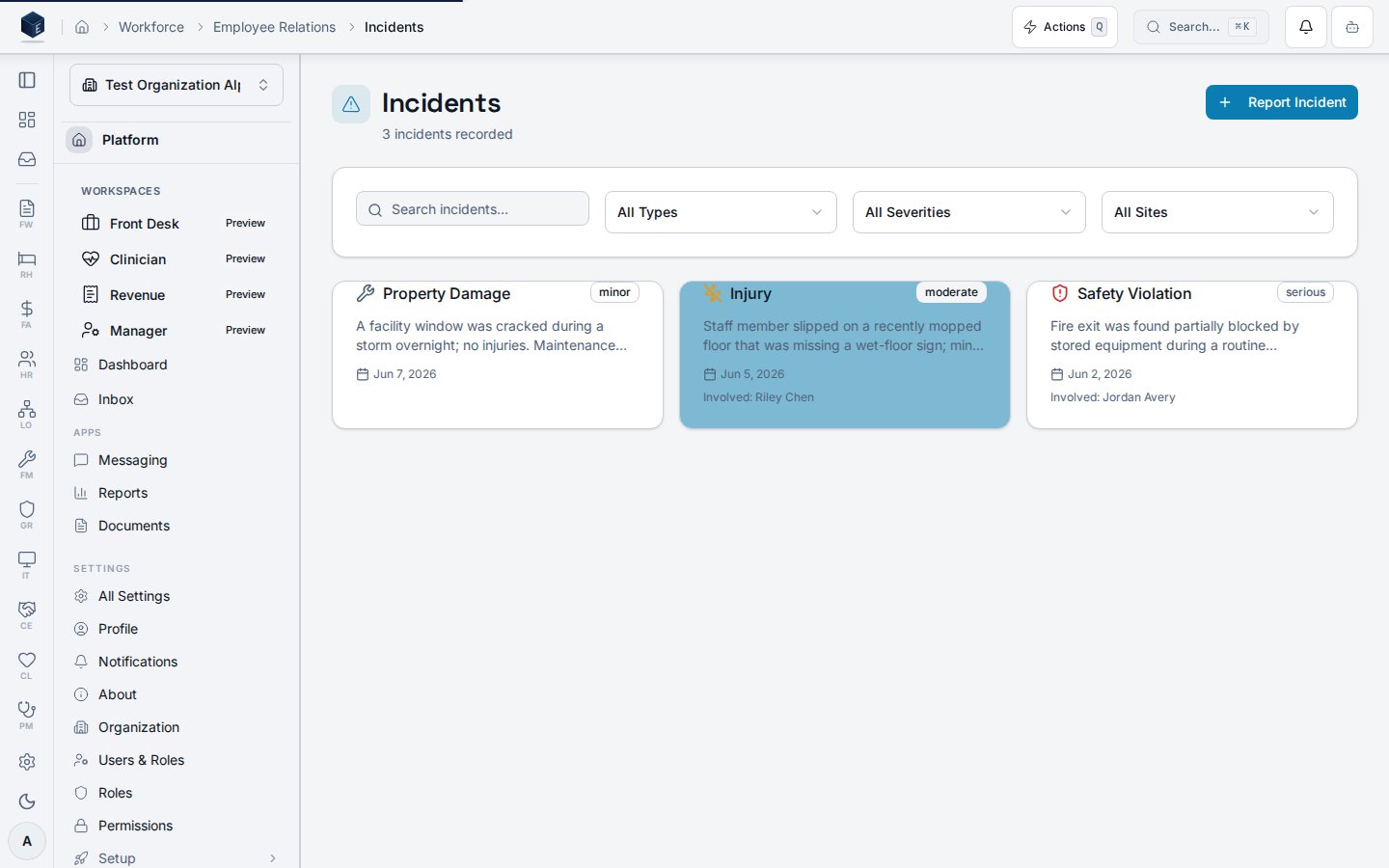
The incident list (`/hr/employee-relations/incidents`) shows every recorded incident
as a card with its type, severity, description, date, site, and the involved
employee (when one is named). A header count summarizes how many incidents are
recorded, and filters narrow the list by search term, type, severity, or site.
 | Card field | What it shows |
| ----------- | ---------------------------------------------------------------------------------- |
| Type | The incident category (accident, injury, safety violation, property damage, other) |
| Severity | A badge: minor, moderate, serious, or critical |
| Description | A short summary of what happened |
| Date / Site | When and where the incident occurred |
| Involved | The employee involved, when the incident names one |
## Incident types & severity
Incidents are categorized so safety trends are easy to spot:
| Type | Examples |
| ---------------- | --------------------------------------------- |
| Accident | Slips, trips, equipment mishaps |
| Injury | Any incident resulting in physical harm |
| Safety Violation | Blocked exits, missing PPE, ignored protocols |
| Property Damage | Damage to facilities or equipment |
| Other | Anything that does not fit the above |
Severity (minor → critical) drives the badge color and feeds escalation: serious and
critical incidents can trigger notifications and auto-assigned investigations.
## Beyond incidents
The Employee Relations area also covers the cases that often follow an incident:
* **Disciplinary actions** — warnings, suspensions, and terminations, optionally
linked back to the originating incident.
* **Grievances** — employee-filed complaints (harassment, discrimination, wage
disputes, working conditions), scoped so employees see only their own.
* **Investigations** — structured cases linked to an incident or grievance, with an
assigned investigator, findings, and recommendations.
## Why a single hub
* **One record of safety events** — every incident in one filterable list, so HR can
see patterns by type, severity, or site.
* **Context that carries** — an incident can spawn a linked investigation or
disciplinary action without re-keying the details.
* **Accountability** — each incident names its reporter and, where applicable, the
involved employee.
## Permissions
| Capability | Required access |
| ---------------------------------------------- | ---------------------------------------------------------- |
| View the incident list | HR administrator / manager |
| Report an incident | HR administrator / manager (and employees, per org policy) |
| Manage disciplinary actions and investigations | HR administrator |
| View own grievances | The employee who filed them |
The screenshot above is generated automatically from the local end-to-end test
lane (`tests/e2e/hr/hr-14-incidents-docs-shots.spec.ts`, run via
`npm run docs:shots`) against synthetic seed data. That spec also runs an auto-heal
gate — it fails on any console error, page error, or HTTP ≥ 400 while driving the
surface — and verifies HR-14 acceptance criterion **AC-24** (an incident is visible
in the list showing the involved employee, with accessible details), so the image
reflects a clean, real render and is checked by the screenshot drift gate.
| Card field | What it shows |
| ----------- | ---------------------------------------------------------------------------------- |
| Type | The incident category (accident, injury, safety violation, property damage, other) |
| Severity | A badge: minor, moderate, serious, or critical |
| Description | A short summary of what happened |
| Date / Site | When and where the incident occurred |
| Involved | The employee involved, when the incident names one |
## Incident types & severity
Incidents are categorized so safety trends are easy to spot:
| Type | Examples |
| ---------------- | --------------------------------------------- |
| Accident | Slips, trips, equipment mishaps |
| Injury | Any incident resulting in physical harm |
| Safety Violation | Blocked exits, missing PPE, ignored protocols |
| Property Damage | Damage to facilities or equipment |
| Other | Anything that does not fit the above |
Severity (minor → critical) drives the badge color and feeds escalation: serious and
critical incidents can trigger notifications and auto-assigned investigations.
## Beyond incidents
The Employee Relations area also covers the cases that often follow an incident:
* **Disciplinary actions** — warnings, suspensions, and terminations, optionally
linked back to the originating incident.
* **Grievances** — employee-filed complaints (harassment, discrimination, wage
disputes, working conditions), scoped so employees see only their own.
* **Investigations** — structured cases linked to an incident or grievance, with an
assigned investigator, findings, and recommendations.
## Why a single hub
* **One record of safety events** — every incident in one filterable list, so HR can
see patterns by type, severity, or site.
* **Context that carries** — an incident can spawn a linked investigation or
disciplinary action without re-keying the details.
* **Accountability** — each incident names its reporter and, where applicable, the
involved employee.
## Permissions
| Capability | Required access |
| ---------------------------------------------- | ---------------------------------------------------------- |
| View the incident list | HR administrator / manager |
| Report an incident | HR administrator / manager (and employees, per org policy) |
| Manage disciplinary actions and investigations | HR administrator |
| View own grievances | The employee who filed them |
The screenshot above is generated automatically from the local end-to-end test
lane (`tests/e2e/hr/hr-14-incidents-docs-shots.spec.ts`, run via
`npm run docs:shots`) against synthetic seed data. That spec also runs an auto-heal
gate — it fails on any console error, page error, or HTTP ≥ 400 while driving the
surface — and verifies HR-14 acceptance criterion **AC-24** (an incident is visible
in the list showing the involved employee, with accessible details), so the image
reflects a clean, real render and is checked by the screenshot drift gate.