> ## Documentation Index
> Fetch the complete documentation index at: https://docs.encoreos.io/llms.txt
> Use this file to discover all available pages before exploring further.
# Skills & Competencies
> Maintain a structured catalog of the clinical, regulatory, and technical skills your workforce needs — the foundation for proficiency tracking, verification, and gap analysis.
## Overview
Skills & Competencies (HR-13) is where you define the **skills catalog** for your
organization — the clinical, regulatory, certification, technical, and soft skills
that roles require. Open it from **HR → Skills**.
The catalog is the foundation the rest of the module builds on: each skill can be
assigned to employees at a proficiency level, required by a position, and rolled up
into coverage and **gap analysis**. Defining the library first gives every
proficiency record and requirement a consistent reference.
## Skills library
The Skills Library lists every skill in your catalog with its code, category, and
proficiency levels. Use **Add Skill** to define a new skill, or filter by category
to review a specific group (for example, all `regulatory` requirements).
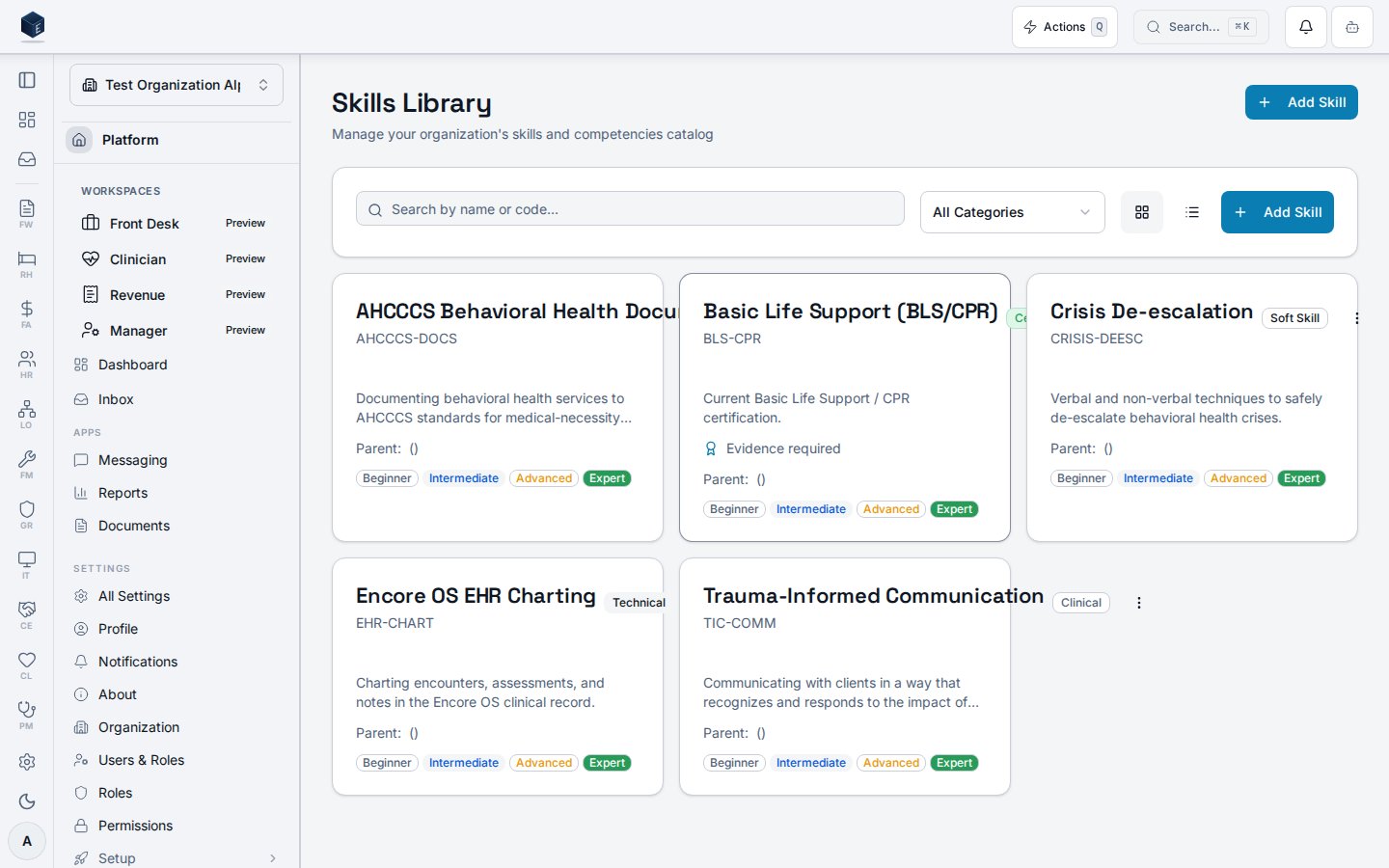 Each skill records:
| Field | Meaning |
| ------------------ | ------------------------------------------------------------------------------ |
| Name | The skill or competency (e.g. Trauma-Informed Communication) |
| Code | A short unique identifier per organization (e.g. `AHCCCS-DOCS`) |
| Category | One of `clinical`, `regulatory`, `certification`, `technical`, or `soft_skill` |
| Certification | Whether the skill is a formal certification that may carry an expiration |
| Evidence required | Whether verifying the skill requires supporting documentation |
| Proficiency levels | The scale used when assigning the skill (default: beginner → expert) |
## How skills are used
* **Proficiency tracking** — assign a skill to an employee at a proficiency level
(beginner, intermediate, advanced, expert) with a verification status.
* **Position requirements** — mark skills as required for a position, with a minimum
proficiency, so new hires inherit a clear competency target.
* **Gap analysis** — coverage of required skills is rolled up across the
organization to surface the skills your teams are lacking.
## Permissions
| Capability | Required access |
| ----------------------------------------- | --------------------------------------------------------- |
| View the skills library | `org_admin` / `hr_admin` / `hr_manager`, or `hr.skills.*` |
| Create and edit skills | `hr_admin` / skills manager |
| View and manage own skills (self-service) | The employee, via **My Skills** |
The screenshot above is generated automatically from the local end-to-end test
lane (`tests/e2e/hr/hr-13-skills-docs-shots.spec.ts`, run via
`npm run docs:shots`) against synthetic seed data. That spec also runs an
auto-heal gate — it fails on any console error, page error, or HTTP ≥ 400 while
driving the surface — so the image reflects a clean, real render and is checked
by the screenshot drift gate.
Each skill records:
| Field | Meaning |
| ------------------ | ------------------------------------------------------------------------------ |
| Name | The skill or competency (e.g. Trauma-Informed Communication) |
| Code | A short unique identifier per organization (e.g. `AHCCCS-DOCS`) |
| Category | One of `clinical`, `regulatory`, `certification`, `technical`, or `soft_skill` |
| Certification | Whether the skill is a formal certification that may carry an expiration |
| Evidence required | Whether verifying the skill requires supporting documentation |
| Proficiency levels | The scale used when assigning the skill (default: beginner → expert) |
## How skills are used
* **Proficiency tracking** — assign a skill to an employee at a proficiency level
(beginner, intermediate, advanced, expert) with a verification status.
* **Position requirements** — mark skills as required for a position, with a minimum
proficiency, so new hires inherit a clear competency target.
* **Gap analysis** — coverage of required skills is rolled up across the
organization to surface the skills your teams are lacking.
## Permissions
| Capability | Required access |
| ----------------------------------------- | --------------------------------------------------------- |
| View the skills library | `org_admin` / `hr_admin` / `hr_manager`, or `hr.skills.*` |
| Create and edit skills | `hr_admin` / skills manager |
| View and manage own skills (self-service) | The employee, via **My Skills** |
The screenshot above is generated automatically from the local end-to-end test
lane (`tests/e2e/hr/hr-13-skills-docs-shots.spec.ts`, run via
`npm run docs:shots`) against synthetic seed data. That spec also runs an
auto-heal gate — it fails on any console error, page error, or HTTP ≥ 400 while
driving the surface — so the image reflects a clean, real render and is checked
by the screenshot drift gate.