> ## Documentation Index
> Fetch the complete documentation index at: https://docs.encoreos.io/llms.txt
> Use this file to discover all available pages before exploring further.
# Employee Self-Service
> The employee "My HR" portal — a single place for staff to see their own HR information at a glance and keep their personal details current without contacting HR.
## Overview
Employee Self-Service (HR-12) gives every staff member a unified **"My HR"**
portal for their own information. Open it from **HR → My HR** (route `/hr/me`).
Unlike the admin-facing Employee Directory (HR-01), the self-service portal is
scoped to the **signed-in user**: it renders that person's own employee record
and personal information, so each employee sees only their own data.
The portal consolidates the self-service capabilities that live across the HR
modules — benefits, time off, payroll, compensation, performance — behind one
entry point, and adds personal-information management so employees can keep their
contact details, address, and emergency contacts current themselves.
## The My HR dashboard
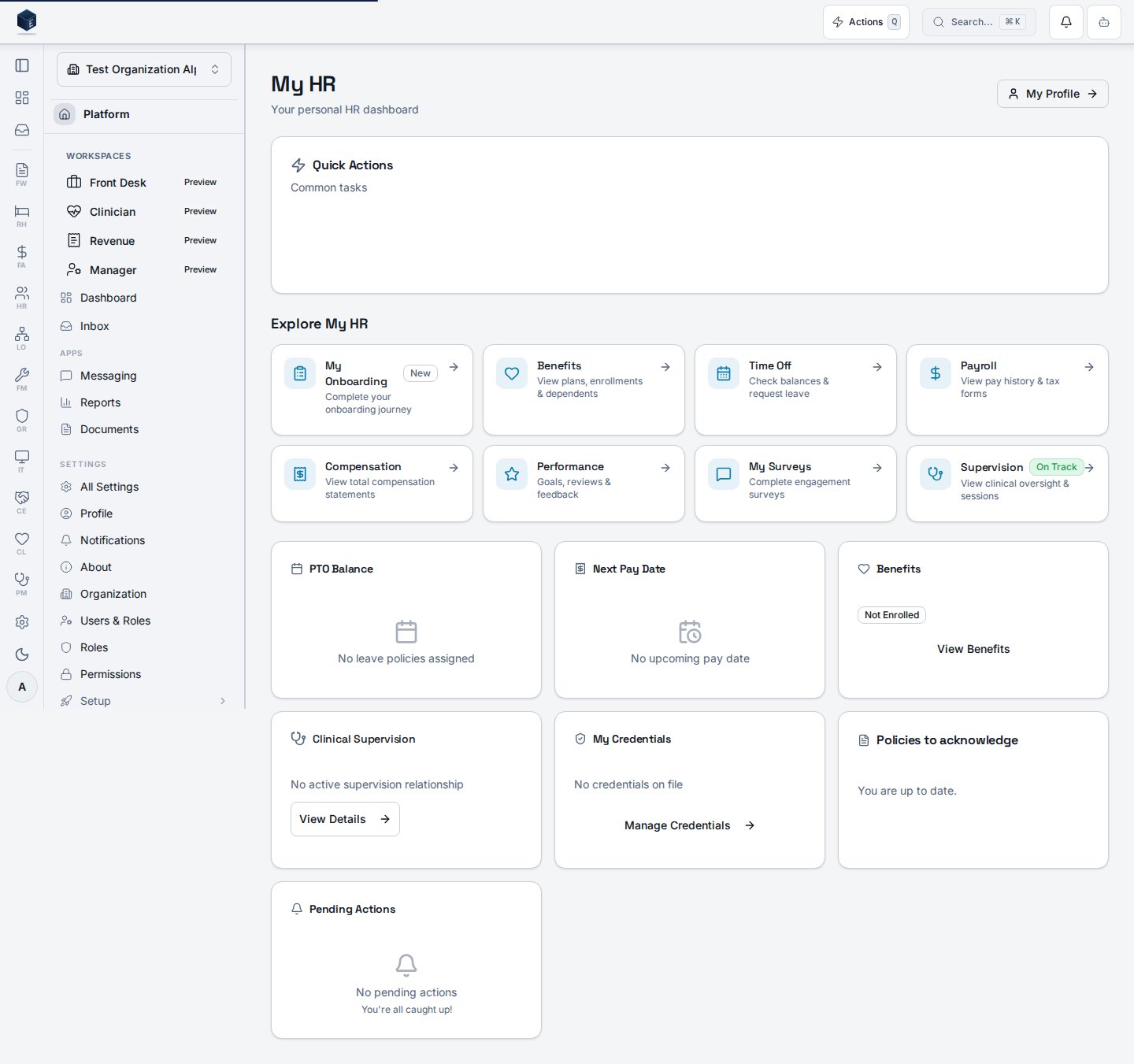
The dashboard (`/hr/me`) is the portal hub. It surfaces quick actions and a
**"Explore My HR"** grid that links out to each self-service area, alongside
at-a-glance widgets (PTO balance, next pay date, benefits enrollment, credentials,
pending actions). Widgets degrade gracefully — when a data source has nothing for
the employee yet, the widget shows a calm empty state rather than an error.
 | Area | Where it links | Module |
| ------------- | --------------------- | ------ |
| My Onboarding | `/hr/me/onboarding` | HR-03 |
| Benefits | `/hr/my-benefits` | HR-11 |
| Time Off | `/hr/leave` | HR-06 |
| Payroll | `/hr/me/pay` | HR-07 |
| Compensation | `/hr/me/compensation` | HR-15 |
| Performance | `/hr/my-performance` | HR-10 |
## My Profile — personal information
The profile page (`/hr/me/profile`) shows the employee's own record. A summary
card displays their job title, employee number, and hire date, and tabbed sections
let them view and update their own **Contact**, **Address**, and **Emergency
Contact** information.
| Area | Where it links | Module |
| ------------- | --------------------- | ------ |
| My Onboarding | `/hr/me/onboarding` | HR-03 |
| Benefits | `/hr/my-benefits` | HR-11 |
| Time Off | `/hr/leave` | HR-06 |
| Payroll | `/hr/me/pay` | HR-07 |
| Compensation | `/hr/me/compensation` | HR-15 |
| Performance | `/hr/my-performance` | HR-10 |
## My Profile — personal information
The profile page (`/hr/me/profile`) shows the employee's own record. A summary
card displays their job title, employee number, and hire date, and tabbed sections
let them view and update their own **Contact**, **Address**, and **Emergency
Contact** information.
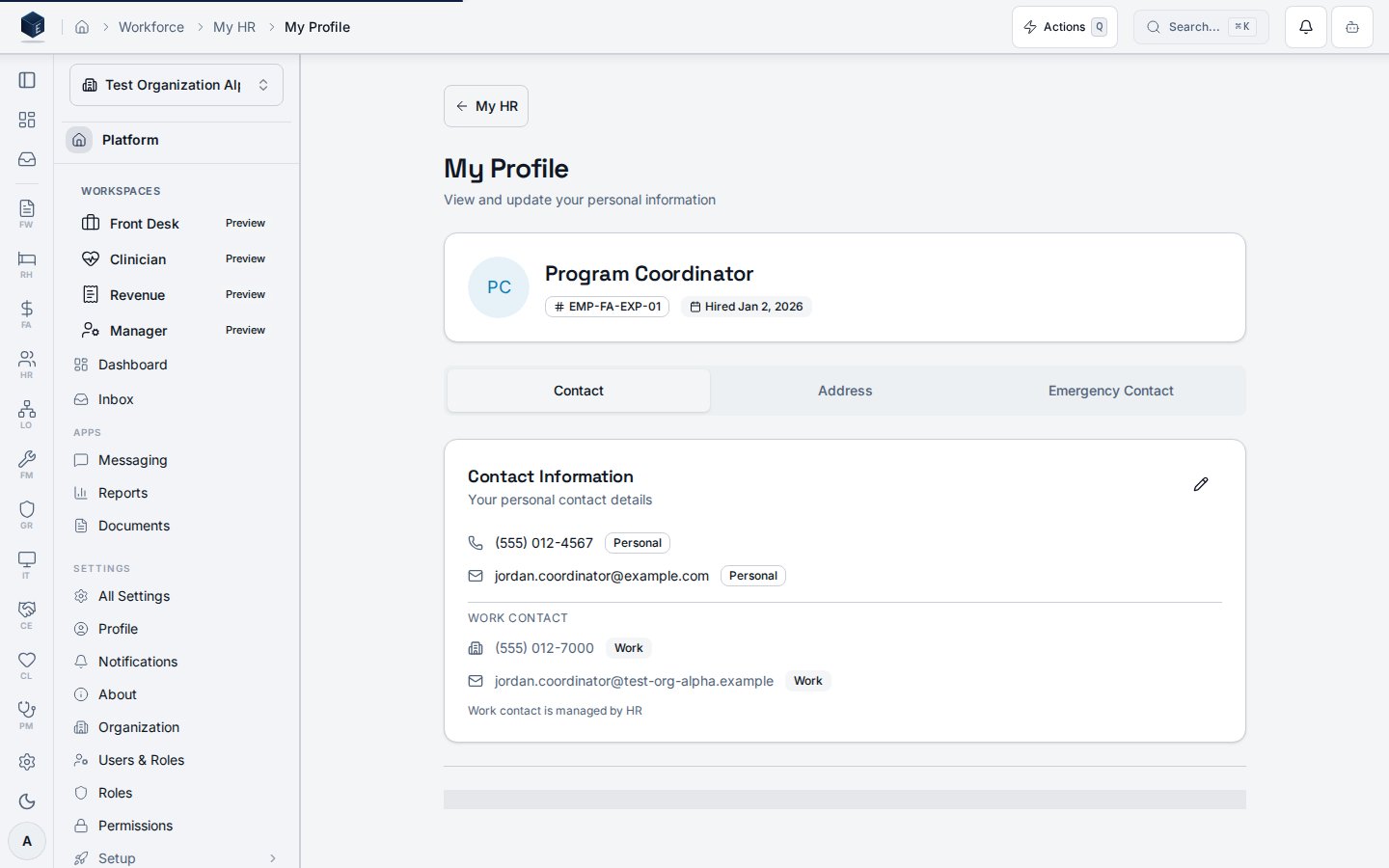 The Contact tab shows the employee's current contact information, separating
self-editable **personal** contact details (personal phone and email) from
read-only **work** contact details that are managed by HR:
| Field | Editable by employee | Notes |
| ------------------ | -------------------- | ------------------------------------------ |
| Personal phone | Yes | Immediate update |
| Personal email | Yes | Immediate update |
| Home address | Yes | Address changes can carry tax implications |
| Emergency contact | Yes | Name, relationship, and phone |
| Work phone / email | No | Managed by HR |
## Why self-service
* **Accurate records** — employees keep their own contact and emergency details
current, so HR records stay correct without a support request.
* **One destination** — a single "My HR" hub instead of hunting across modules.
* **Scoped to the person** — the portal reads the signed-in user's own employee
record, so an employee only ever sees their own information.
## Permissions
| Capability | Required access |
| ---------------------------------------------------------- | --------------------------------------------------- |
| View the My HR portal | Any authenticated employee (own data only) |
| View / update own personal info | The employee whose record it is |
| Update work contact, legal name, or other sensitive fields | HR administrator (some changes require HR approval) |
The screenshots above are generated automatically from the local end-to-end test
lane (`tests/e2e/hr/hr-12-self-service-docs-shots.spec.ts`, run via
`npm run docs:shots`) against synthetic seed data. That spec also runs an
auto-heal gate — it fails on any console error, page error, or HTTP ≥ 400 while
driving the surface — and verifies HR-12 acceptance criterion **AC-9** (the
profile page displays the employee's current contact information), so the images
reflect a clean, real render and are checked by the screenshot drift gate.
The Contact tab shows the employee's current contact information, separating
self-editable **personal** contact details (personal phone and email) from
read-only **work** contact details that are managed by HR:
| Field | Editable by employee | Notes |
| ------------------ | -------------------- | ------------------------------------------ |
| Personal phone | Yes | Immediate update |
| Personal email | Yes | Immediate update |
| Home address | Yes | Address changes can carry tax implications |
| Emergency contact | Yes | Name, relationship, and phone |
| Work phone / email | No | Managed by HR |
## Why self-service
* **Accurate records** — employees keep their own contact and emergency details
current, so HR records stay correct without a support request.
* **One destination** — a single "My HR" hub instead of hunting across modules.
* **Scoped to the person** — the portal reads the signed-in user's own employee
record, so an employee only ever sees their own information.
## Permissions
| Capability | Required access |
| ---------------------------------------------------------- | --------------------------------------------------- |
| View the My HR portal | Any authenticated employee (own data only) |
| View / update own personal info | The employee whose record it is |
| Update work contact, legal name, or other sensitive fields | HR administrator (some changes require HR approval) |
The screenshots above are generated automatically from the local end-to-end test
lane (`tests/e2e/hr/hr-12-self-service-docs-shots.spec.ts`, run via
`npm run docs:shots`) against synthetic seed data. That spec also runs an
auto-heal gate — it fails on any console error, page error, or HTTP ≥ 400 while
driving the surface — and verifies HR-12 acceptance criterion **AC-9** (the
profile page displays the employee's current contact information), so the images
reflect a clean, real render and are checked by the screenshot drift gate.