> ## Documentation Index
> Fetch the complete documentation index at: https://docs.encoreos.io/llms.txt
> Use this file to discover all available pages before exploring further.
# Benefits Administration
> Set up and manage the organization's benefit plans — health, dental, vision, retirement, life, and more — from a single administration dashboard.
## Overview
Benefits Administration (HR-11) is where HR administrators define and maintain the
organization's benefit offerings. Open it from **HR → Benefits → Plans** (route
`/hr/benefits/plans`). Each plan captures its type, provider, coverage levels,
premiums, deductibles, eligibility rules, and active status, so the same catalog
powers employee enrollment, eligibility checks, and compliance reporting downstream.
## The plans dashboard
The plans list (`/hr/benefits/plans`) is the administration hub. Summary cards at
the top give an at-a-glance count of **total**, **active**, and **inactive** plans
plus the number of distinct **plan types** offered, and the table below lists every
plan with its name, type, provider, effective date, and status.
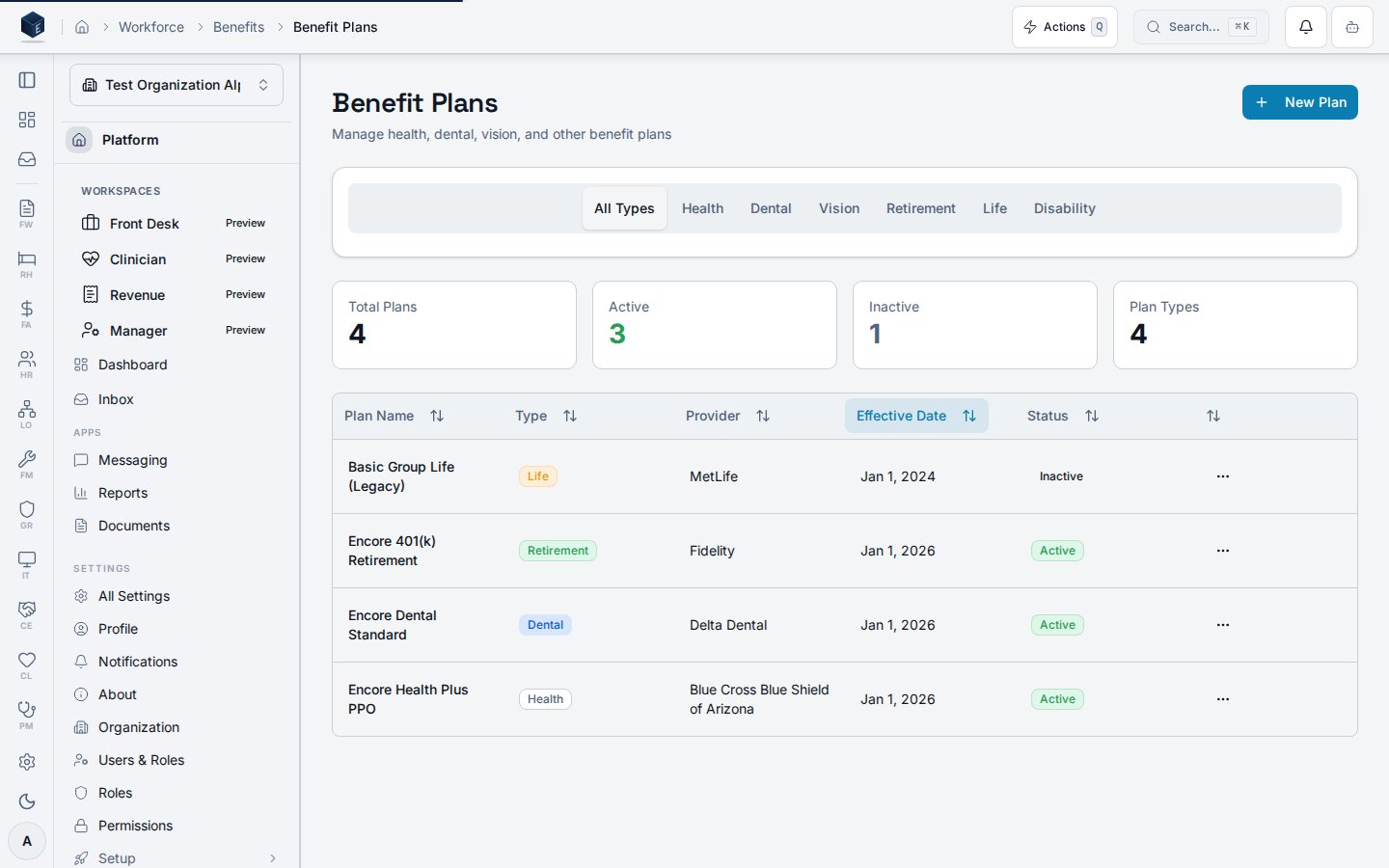 The type filter tabs (All Types, Health, Dental, Vision, Retirement, Life,
Disability) narrow the list to a single category, and the row actions menu lets an
administrator view a plan's details, edit it, or activate / deactivate it without
leaving the page.
| Column | What it shows |
| -------------- | ---------------------------------------------------------------------- |
| Plan Name | The plan's display name |
| Type | A badge for the benefit category (health, dental, retirement, life, …) |
| Provider | The carrier or administrator (e.g. the medical or dental network) |
| Effective Date | When the plan's terms take effect |
| Status | Active or Inactive — inactive plans are retained for records |
## Plan types
A single organization typically offers several categories of benefit, each modeled
as its own plan:
| Type | Typical configuration |
| ----------------- | ------------------------------------------------------------ |
| Health | Deductibles, copays, coinsurance, and per-tier premiums |
| Dental / Vision | Coverage tiers and preventive / basic / major coverage |
| Retirement (401k) | Employer match percentage, match limit, and vesting schedule |
| Life / Disability | Coverage multiples and employer contribution |
| HSA / FSA | Contribution limits and employer seed amounts |
Deactivating a legacy plan (for example a retired group-life policy) keeps it out of
new enrollment while preserving its history — the dashboard's **Inactive** card and
the row's status badge make the distinction clear.
## Why a single dashboard
* **One source of truth** — every plan the organization offers lives in one list,
so HR can see the full benefit landscape at a glance.
* **Type at a glance** — summary cards and type badges surface the mix of offerings
(how many health vs. retirement vs. life plans) without opening each plan.
* **Lifecycle without deletion** — plans are activated and deactivated rather than
deleted, so historical coverage stays auditable.
## Permissions
| Capability | Required access |
| -------------------------------------------------- | ---------------- |
| View the benefits administration dashboard | HR administrator |
| Create / edit / activate / deactivate plans | HR administrator |
| Configure eligibility rules and enrollment periods | HR administrator |
The screenshot above is generated automatically from the local end-to-end test
lane (`tests/e2e/hr/hr-11-benefits-docs-shots.spec.ts`, run via
`npm run docs:shots`) against synthetic seed data. That spec also runs an
auto-heal gate — it fails on any console error, page error, or HTTP ≥ 400 while
driving the surface — and verifies HR-11 acceptance criterion **AC-6** (the
administration dashboard lists all benefit plans with type, name, and status), so
the image reflects a clean, real render and is checked by the screenshot drift gate.
The type filter tabs (All Types, Health, Dental, Vision, Retirement, Life,
Disability) narrow the list to a single category, and the row actions menu lets an
administrator view a plan's details, edit it, or activate / deactivate it without
leaving the page.
| Column | What it shows |
| -------------- | ---------------------------------------------------------------------- |
| Plan Name | The plan's display name |
| Type | A badge for the benefit category (health, dental, retirement, life, …) |
| Provider | The carrier or administrator (e.g. the medical or dental network) |
| Effective Date | When the plan's terms take effect |
| Status | Active or Inactive — inactive plans are retained for records |
## Plan types
A single organization typically offers several categories of benefit, each modeled
as its own plan:
| Type | Typical configuration |
| ----------------- | ------------------------------------------------------------ |
| Health | Deductibles, copays, coinsurance, and per-tier premiums |
| Dental / Vision | Coverage tiers and preventive / basic / major coverage |
| Retirement (401k) | Employer match percentage, match limit, and vesting schedule |
| Life / Disability | Coverage multiples and employer contribution |
| HSA / FSA | Contribution limits and employer seed amounts |
Deactivating a legacy plan (for example a retired group-life policy) keeps it out of
new enrollment while preserving its history — the dashboard's **Inactive** card and
the row's status badge make the distinction clear.
## Why a single dashboard
* **One source of truth** — every plan the organization offers lives in one list,
so HR can see the full benefit landscape at a glance.
* **Type at a glance** — summary cards and type badges surface the mix of offerings
(how many health vs. retirement vs. life plans) without opening each plan.
* **Lifecycle without deletion** — plans are activated and deactivated rather than
deleted, so historical coverage stays auditable.
## Permissions
| Capability | Required access |
| -------------------------------------------------- | ---------------- |
| View the benefits administration dashboard | HR administrator |
| Create / edit / activate / deactivate plans | HR administrator |
| Configure eligibility rules and enrollment periods | HR administrator |
The screenshot above is generated automatically from the local end-to-end test
lane (`tests/e2e/hr/hr-11-benefits-docs-shots.spec.ts`, run via
`npm run docs:shots`) against synthetic seed data. That spec also runs an
auto-heal gate — it fails on any console error, page error, or HTTP ≥ 400 while
driving the surface — and verifies HR-11 acceptance criterion **AC-6** (the
administration dashboard lists all benefit plans with type, name, and status), so
the image reflects a clean, real render and is checked by the screenshot drift gate.