> ## Documentation Index
> Fetch the complete documentation index at: https://docs.encoreos.io/llms.txt
> Use this file to discover all available pages before exploring further.
# PTO & Leave Management
> The leave management hub — where employees see their own time-off balances and requests, and managers track pending approvals, team coverage, and FMLA cases.
## Overview
PTO & Leave Management (HR-06) is the organization's hub for paid time off, sick
leave, and protected leave. Open it from **HR → Leave** (route `/hr/leave`). The
dashboard combines the signed-in employee's own balances and requests with the
manager-facing views for approvals, team coverage, and FMLA, so the same surface
serves an individual checking their PTO and a manager planning around an absence.
## The leave dashboard
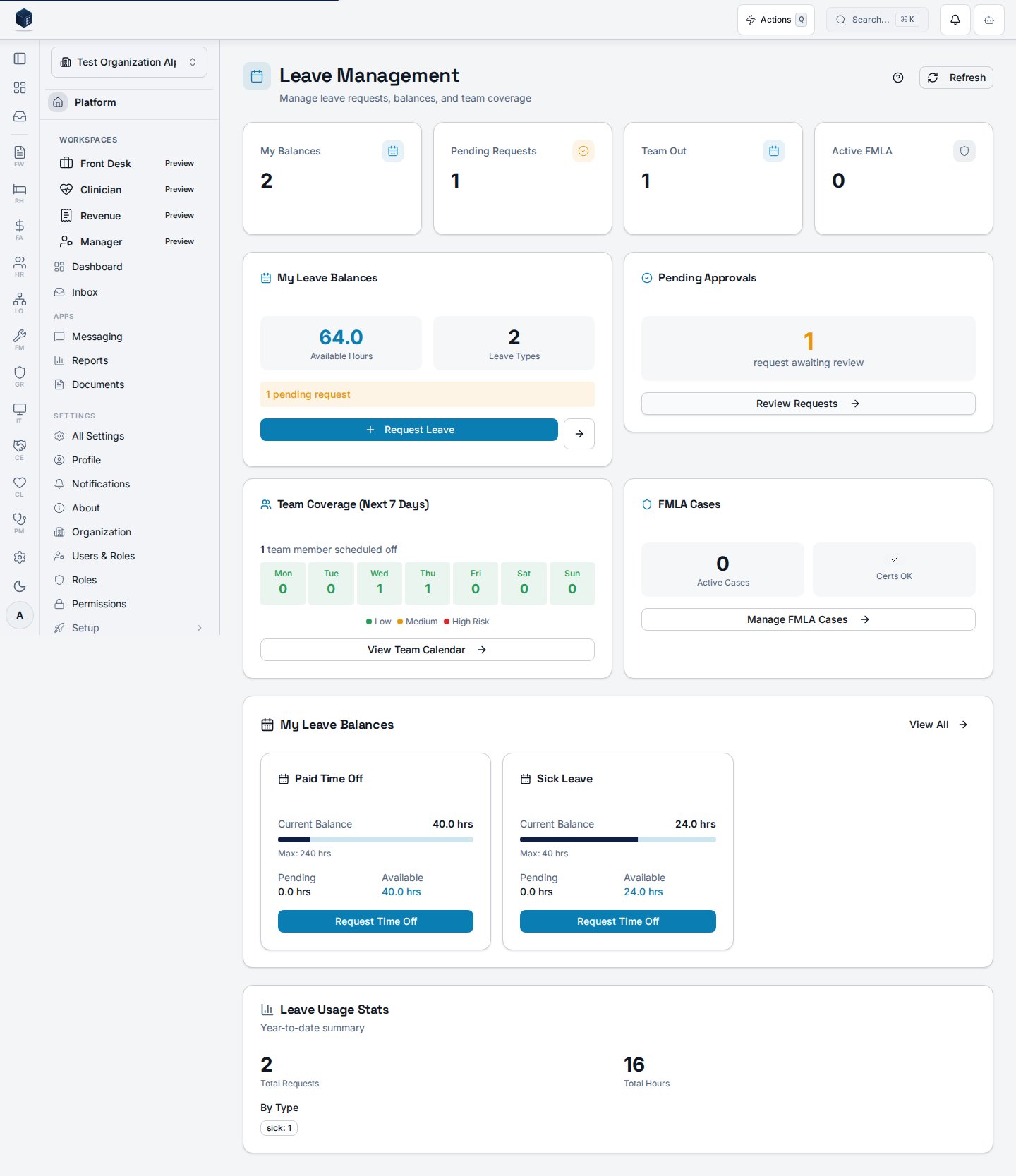
The dashboard (`/hr/leave`) opens with a row of stat cards — **My Balances**,
**Pending Requests**, **Team Out**, and **Active FMLA** — followed by widgets for
the signed-in user's balances, the approval queue, upcoming team coverage, and FMLA
summaries.
 ## My leave balances
The **My Leave Balances** widget shows the signed-in employee's own current balance
for each leave policy they accrue against — for example Paid Time Off and Sick
Leave — with the current balance, pending hours, and available hours per type. Each
card links straight into a new time-off request.
| Field | What it shows |
| --------------- | ---------------------------------------------------------- |
| Current Balance | Hours currently accrued for the policy |
| Pending | Hours tied up in not-yet-approved requests |
| Available | Current minus pending — the hours actually free to request |
| Max | The policy's accrual cap, when configured |
## Leave types & policies
Each leave type is modeled as a policy that defines how time accrues and when it can
be used:
| Type | Typical policy configuration |
| ----------------------- | ---------------------------------------------------------------------------------- |
| Paid Time Off | Per-pay-period or monthly accrual, a max balance, and a carryover limit |
| Sick Leave | Accrual per hours worked (e.g. Arizona Paid Sick Time), often no approval required |
| FMLA / Parental | Protected leave tracked as a case alongside the request |
| Bereavement / Jury Duty | Fixed-grant policies for specific qualifying events |
Policies carry approval requirements, minimum notice, and maximum consecutive days,
so the request workflow can enforce the organization's rules automatically.
## Why a unified hub
* **Self-service first** — employees see their own balances and submit requests
without contacting HR.
* **Coverage at a glance** — managers see pending approvals and who is out over the
next several days from the same dashboard.
* **Compliance built in** — FMLA cases and Arizona sick-time accrual are tracked
alongside ordinary PTO rather than in a separate system.
## Permissions
| Capability | Required access |
| --------------------------------------- | -------------------------- |
| View own balances and submit requests | Any authenticated employee |
| Approve / deny direct reports' requests | Manager |
| Configure leave policies and accrual | HR administrator |
| Create and manage FMLA cases | HR administrator |
The screenshot above is generated automatically from the local end-to-end test
lane (`tests/e2e/hr/hr-06-leave-docs-shots.spec.ts`, run via `npm run docs:shots`)
against synthetic seed data. That spec also runs an auto-heal gate — it fails on any
console error, page error, or HTTP ≥ 400 while driving the surface — and verifies
HR-06 acceptance criterion **AC-3** (the dashboard displays the employee's current
PTO balance per leave type), so the image reflects a clean, real render and is
checked by the screenshot drift gate.
## My leave balances
The **My Leave Balances** widget shows the signed-in employee's own current balance
for each leave policy they accrue against — for example Paid Time Off and Sick
Leave — with the current balance, pending hours, and available hours per type. Each
card links straight into a new time-off request.
| Field | What it shows |
| --------------- | ---------------------------------------------------------- |
| Current Balance | Hours currently accrued for the policy |
| Pending | Hours tied up in not-yet-approved requests |
| Available | Current minus pending — the hours actually free to request |
| Max | The policy's accrual cap, when configured |
## Leave types & policies
Each leave type is modeled as a policy that defines how time accrues and when it can
be used:
| Type | Typical policy configuration |
| ----------------------- | ---------------------------------------------------------------------------------- |
| Paid Time Off | Per-pay-period or monthly accrual, a max balance, and a carryover limit |
| Sick Leave | Accrual per hours worked (e.g. Arizona Paid Sick Time), often no approval required |
| FMLA / Parental | Protected leave tracked as a case alongside the request |
| Bereavement / Jury Duty | Fixed-grant policies for specific qualifying events |
Policies carry approval requirements, minimum notice, and maximum consecutive days,
so the request workflow can enforce the organization's rules automatically.
## Why a unified hub
* **Self-service first** — employees see their own balances and submit requests
without contacting HR.
* **Coverage at a glance** — managers see pending approvals and who is out over the
next several days from the same dashboard.
* **Compliance built in** — FMLA cases and Arizona sick-time accrual are tracked
alongside ordinary PTO rather than in a separate system.
## Permissions
| Capability | Required access |
| --------------------------------------- | -------------------------- |
| View own balances and submit requests | Any authenticated employee |
| Approve / deny direct reports' requests | Manager |
| Configure leave policies and accrual | HR administrator |
| Create and manage FMLA cases | HR administrator |
The screenshot above is generated automatically from the local end-to-end test
lane (`tests/e2e/hr/hr-06-leave-docs-shots.spec.ts`, run via `npm run docs:shots`)
against synthetic seed data. That spec also runs an auto-heal gate — it fails on any
console error, page error, or HTTP ≥ 400 while driving the surface — and verifies
HR-06 acceptance criterion **AC-3** (the dashboard displays the employee's current
PTO balance per leave type), so the image reflects a clean, real render and is
checked by the screenshot drift gate.