> ## Documentation Index
> Fetch the complete documentation index at: https://docs.encoreos.io/llms.txt
> Use this file to discover all available pages before exploring further.
# Employee Directory
> Search, filter, and browse your organization's employees — the centralized, role-aware roster that anchors departments, positions, credentialing, scheduling, and payroll.
## Overview
The Employee Directory (HR-01) is the single source of truth for your
organization's people. Open it from **HR → Employees** (route `/hr/employees`,
gated by the `hr.employees.view` permission).
The directory lists every employee as a card or row showing their name, job
title, department, and employment status. It is the foundation the rest of HR
builds on — credentialing, onboarding/offboarding, scheduling, time tracking, and
payroll all reference the employee records maintained here.
## Browsing and searching
The directory defaults to **active** employees and gives you several ways to find
people:
* **Search** by name, job title, work email, or employee number — results update
as you type.
* **Filter** by employment status, department, and level.
* **Switch views** between a card **grid** and a compact **list**.
* **Add** a new employee, launch the **Onboarding Wizard**, or **import / export**
the roster as CSV.
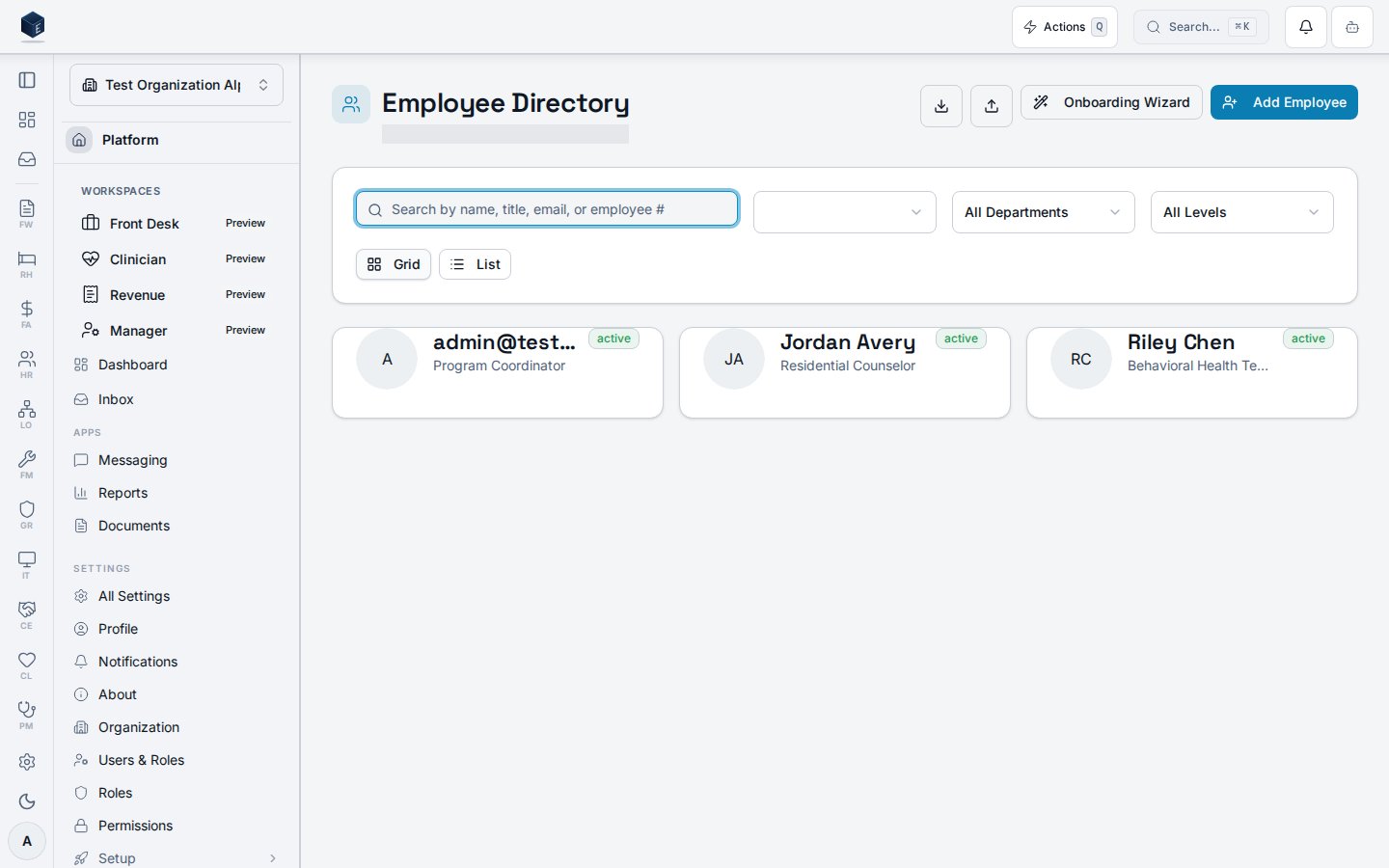 Each employee card records:
| Field | Meaning |
| --------------- | ---------------------------------------------------------------------------------------------------- |
| Name | The employee's full name (from their linked profile) |
| Job title | The employee's role (e.g. Residential Counselor, Behavioral Health Technician) |
| Department | The department the employee belongs to, when assigned |
| Status | `active`, `on_leave`, `terminated`, or `suspended` — the directory shows active employees by default |
| Employee number | The org-specific identifier, shown in list view |
## Active-only by default
The directory's status filter defaults to **active**, so searching the roster
surfaces only current employees. Terminated employees drop out of the default
view and remain visible to HR administrators through the status filter, preserving
employment history without cluttering everyday lookups.
## How the directory is used
* **Departments & positions** — employees are assigned to a department and a
position from the org structure, keeping classifications consistent.
* **Org chart** — manager relationships between employees roll up into the
reporting hierarchy.
* **Downstream cores** — credentialing, scheduling, time tracking, and payroll all
read the employee record as their anchor for a person.
## Permissions
| Capability | Required access |
| --------------------------------- | --------------------------------------------------------------------------------------- |
| View the directory | `hr.employees.view` (`org_admin` / `hr_admin` / `hr_manager`, or staff with org access) |
| Add, edit, or terminate employees | `hr.employees.create` / HR admin |
| Export the roster to CSV | HR admin (the export is RLS-scoped to the admin's organization) |
The screenshot above is generated automatically from the local end-to-end test
lane (`tests/e2e/hr/hr-01-employee-directory-docs-shots.spec.ts`, run via
`npm run docs:shots`) against synthetic seed data. That spec also runs an
auto-heal gate — it fails on any console error, page error, or HTTP ≥ 400 while
driving the surface — and verifies HR-01 acceptance criterion **AC-5** (a search
of the directory returns matching active employees only), so the image reflects a
clean, real render and is checked by the screenshot drift gate.
Each employee card records:
| Field | Meaning |
| --------------- | ---------------------------------------------------------------------------------------------------- |
| Name | The employee's full name (from their linked profile) |
| Job title | The employee's role (e.g. Residential Counselor, Behavioral Health Technician) |
| Department | The department the employee belongs to, when assigned |
| Status | `active`, `on_leave`, `terminated`, or `suspended` — the directory shows active employees by default |
| Employee number | The org-specific identifier, shown in list view |
## Active-only by default
The directory's status filter defaults to **active**, so searching the roster
surfaces only current employees. Terminated employees drop out of the default
view and remain visible to HR administrators through the status filter, preserving
employment history without cluttering everyday lookups.
## How the directory is used
* **Departments & positions** — employees are assigned to a department and a
position from the org structure, keeping classifications consistent.
* **Org chart** — manager relationships between employees roll up into the
reporting hierarchy.
* **Downstream cores** — credentialing, scheduling, time tracking, and payroll all
read the employee record as their anchor for a person.
## Permissions
| Capability | Required access |
| --------------------------------- | --------------------------------------------------------------------------------------- |
| View the directory | `hr.employees.view` (`org_admin` / `hr_admin` / `hr_manager`, or staff with org access) |
| Add, edit, or terminate employees | `hr.employees.create` / HR admin |
| Export the roster to CSV | HR admin (the export is RLS-scoped to the admin's organization) |
The screenshot above is generated automatically from the local end-to-end test
lane (`tests/e2e/hr/hr-01-employee-directory-docs-shots.spec.ts`, run via
`npm run docs:shots`) against synthetic seed data. That spec also runs an
auto-heal gate — it fails on any console error, page error, or HTTP ≥ 400 while
driving the surface — and verifies HR-01 acceptance criterion **AC-5** (a search
of the directory returns matching active employees only), so the image reflects a
clean, real render and is checked by the screenshot drift gate.