> ## Documentation Index
> Fetch the complete documentation index at: https://docs.encoreos.io/llms.txt
> Use this file to discover all available pages before exploring further.
# HR Credentialing
> Central hub for credential tracking, verification, renewals, and audit readiness with tabbed navigation.
The Credentialing Hub is the central page for managing employee credentials across the organization. It is available at route `/hr/credentialing`.
## Overview
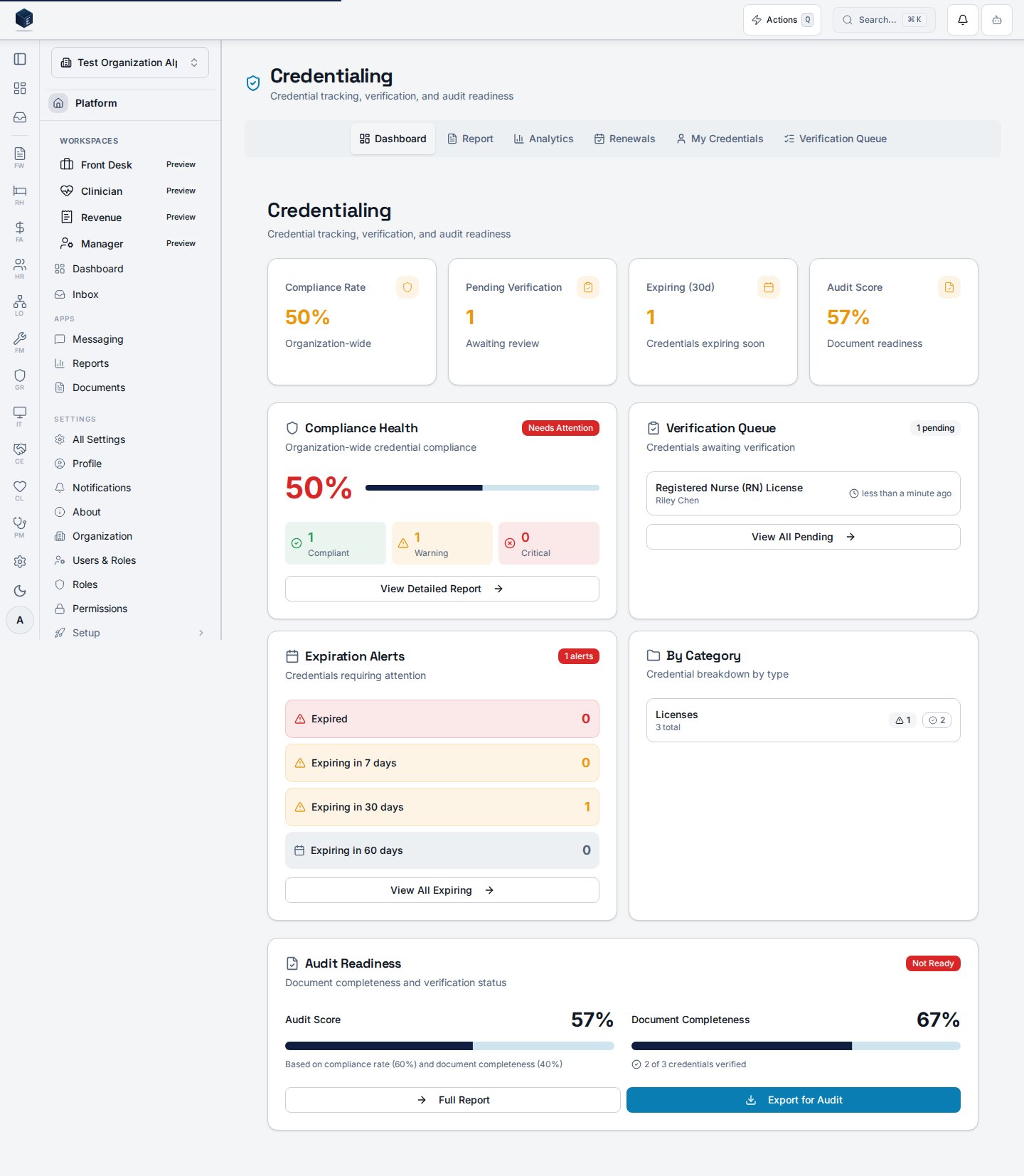
The hub page uses tab URL state (query param `tab`) to show one of six views: **Dashboard**, **Report**, **Analytics**, **Renewals**, **My Credentials**, and **Verification Queue**. The Verification Queue tab is only shown to users with `hr.credentials.verify`. The page header shows a count of credentials expiring within 30 days (from `useCredentialAlerts`) as a destructive-colored notice.
The routes `/hr/credentialing/report`, `/hr/credentialing/analytics`, `/hr/credentialing/renewals`, and `/hr/my-credentials` all redirect here with the corresponding `tab` parameter pre-set.
 ## Who it's for
Requires permission `HR_PERMISSIONS.CREDENTIALS_VIEW` (`hr.credentials.view`).
## Before you start
* Credential records and credential types must be configured.
* For the Verification Queue tab, the user must hold `hr.credentials.verify`.
## Steps
Navigate to **HR → Credentialing** or go to `/hr/credentialing`.
The default Dashboard tab shows the `ComplianceOverview` — a summary of current credential compliance.
Use the tab bar to navigate to Report, Analytics, Renewals, My Credentials, or Verification Queue (if permitted).
The header alert count guides you to the Renewals tab for credentials expiring within 30 days.
## Key concepts
* **Tab routing** — The active tab is stored in the URL as `?tab=`, enabling direct links and bookmarks to specific tabs.
* **Verification Queue** — Only visible to users with `hr.credentials.verify`. Used to approve or reject credential documentation.
## Related
Human Resources core overview.
This page documents shipped product behavior. It is not medical, legal, or
billing advice. Verify against your organization's policies and applicable
regulations before using it for clinical, compliance, or billing decisions.
Protected health information (PHI) shown in the product is governed by your
tenant's access controls and is never exposed in this documentation.
* src/routes/hr.tsx
* src/cores/hr/pages/CredentialingHubPage.tsx
* src/cores/hr/hooks/credentialing/useCredentialAlerts.ts
## Who it's for
Requires permission `HR_PERMISSIONS.CREDENTIALS_VIEW` (`hr.credentials.view`).
## Before you start
* Credential records and credential types must be configured.
* For the Verification Queue tab, the user must hold `hr.credentials.verify`.
## Steps
Navigate to **HR → Credentialing** or go to `/hr/credentialing`.
The default Dashboard tab shows the `ComplianceOverview` — a summary of current credential compliance.
Use the tab bar to navigate to Report, Analytics, Renewals, My Credentials, or Verification Queue (if permitted).
The header alert count guides you to the Renewals tab for credentials expiring within 30 days.
## Key concepts
* **Tab routing** — The active tab is stored in the URL as `?tab=`, enabling direct links and bookmarks to specific tabs.
* **Verification Queue** — Only visible to users with `hr.credentials.verify`. Used to approve or reject credential documentation.
## Related
Human Resources core overview.
This page documents shipped product behavior. It is not medical, legal, or
billing advice. Verify against your organization's policies and applicable
regulations before using it for clinical, compliance, or billing decisions.
Protected health information (PHI) shown in the product is governed by your
tenant's access controls and is never exposed in this documentation.
* src/routes/hr.tsx
* src/cores/hr/pages/CredentialingHubPage.tsx
* src/cores/hr/hooks/credentialing/useCredentialAlerts.ts