> ## Documentation Index
> Fetch the complete documentation index at: https://docs.encoreos.io/llms.txt
> Use this file to discover all available pages before exploring further.
# Capacity
> Monitor shift coverage, overtime alerts, and open shifts across sites for a configurable date range.
Capacity Dashboard is available at route `/hr/capacity`. Access follows your organization's role and module configuration.
## Overview
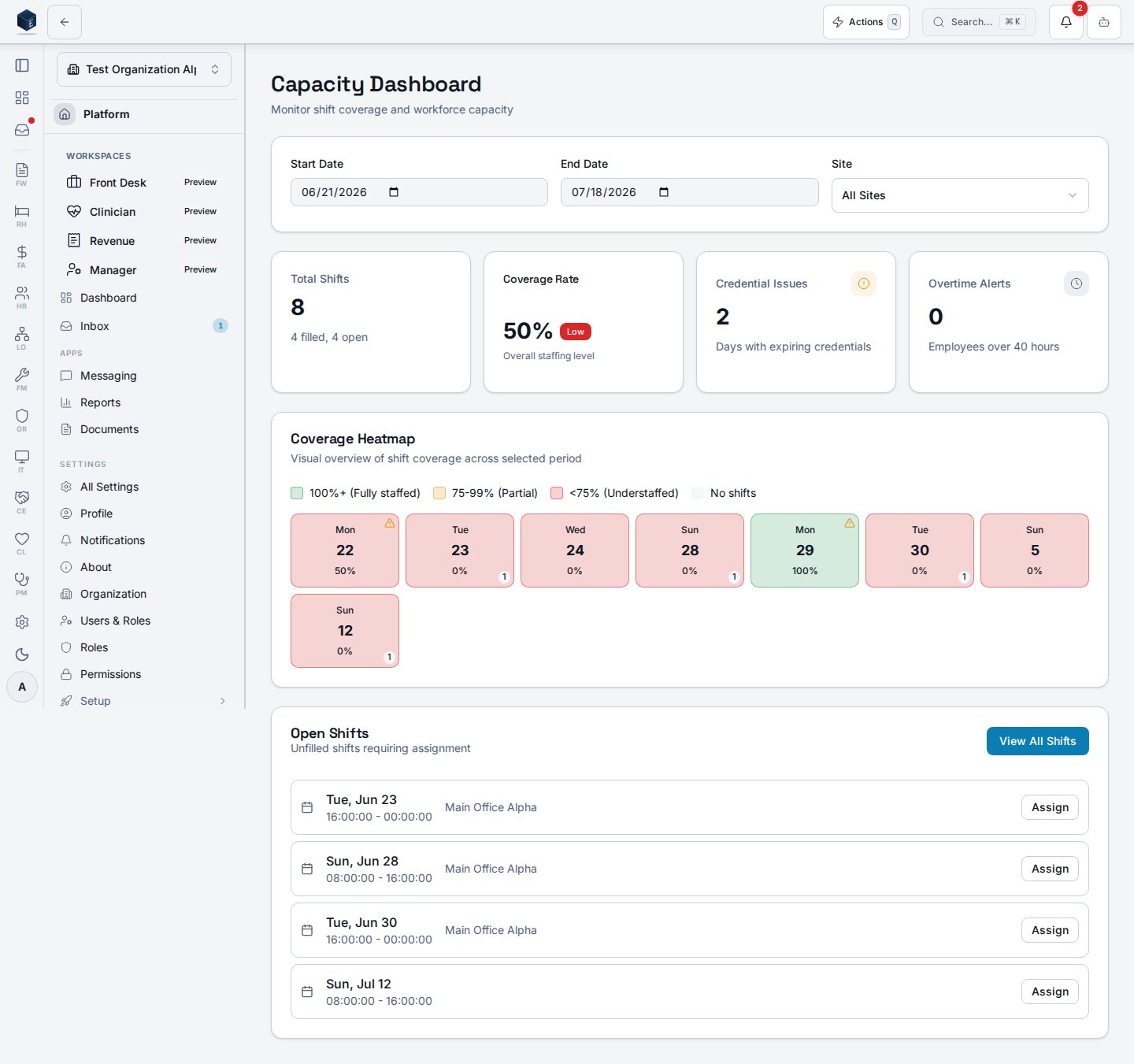
The Capacity Dashboard (`CapacityDashboard`) provides scheduling administrators with a workforce coverage view. Filters at the top allow selecting a start date, end date (defaulting to a 4-week window), and site. Four summary cards show total shifts, coverage rate (filled/total with a "Good"/"Low" badge at 90% threshold), days with credential issues, and employee overtime alerts. A `CoverageHeatmap` visualizes daily coverage intensity. An Open Shifts table shows the first 10 unfilled shifts with date, time, position, and site, with an Assign button. A "View all open shifts" link navigates to `/hr/open-shifts`.
 ## Who it's for
Access follows your organization's role and module configuration. ## Before you start
* Shifts must exist in the system for the date range to show meaningful data.
## Steps
Navigate to `/hr/capacity`.
Adjust start and end date inputs (default: current week through 4 weeks out).
Select a site from the dropdown or leave as "All Sites".
Check summary cards and the coverage heatmap for staffing level.
Review the open shifts table and click **Assign** or navigate to the full open shifts list.
## Key concepts
| Term | Meaning in code |
| ----------------------- | --------------------------------------------------------------------------------------- |
| `overallCoverage` | `(filledShifts / totalShifts) * 100`, rounded to integer |
| `has_credential_issues` | Boolean per day from `useCapacityDashboard` response indicating expiring credentials |
| `OvertimeAlertBanner` | Banner component shown when `overtimeData` contains entries with `is_over_limit = true` |
| `CoverageHeatmap` | Visual component rendering a date-by-date coverage intensity grid |
## Permissions
| Permission key | Grants |
| -------------------- | ----------------------------------------------------------------------------- |
| `hr.capacity.view` | View the Capacity Dashboard (coverage, heatmap, overtime alerts) |
| `hr.scheduling.view` | Required to view the open-shifts list and shift details linked from this page |
Permission keys are assigned to roles in the role editor.
## Related
Human Resources core overview.
Documentation coverage and governance.
This page documents shipped product behavior. It is not medical, legal, or
billing advice. Verify against your organization's policies and applicable
regulations before using it for clinical, compliance, or billing decisions.
Protected health information (PHI) shown in the product is governed by your
tenant's access controls and is never exposed in this documentation.
* src/routes/hr.tsx
* src/cores/hr/pages/CapacityDashboard.tsx
* src/cores/hr/hooks/scheduling/useCapacityDashboard.ts
* src/cores/hr/hooks/time/useOvertimeTracking.ts
## Who it's for
Access follows your organization's role and module configuration. ## Before you start
* Shifts must exist in the system for the date range to show meaningful data.
## Steps
Navigate to `/hr/capacity`.
Adjust start and end date inputs (default: current week through 4 weeks out).
Select a site from the dropdown or leave as "All Sites".
Check summary cards and the coverage heatmap for staffing level.
Review the open shifts table and click **Assign** or navigate to the full open shifts list.
## Key concepts
| Term | Meaning in code |
| ----------------------- | --------------------------------------------------------------------------------------- |
| `overallCoverage` | `(filledShifts / totalShifts) * 100`, rounded to integer |
| `has_credential_issues` | Boolean per day from `useCapacityDashboard` response indicating expiring credentials |
| `OvertimeAlertBanner` | Banner component shown when `overtimeData` contains entries with `is_over_limit = true` |
| `CoverageHeatmap` | Visual component rendering a date-by-date coverage intensity grid |
## Permissions
| Permission key | Grants |
| -------------------- | ----------------------------------------------------------------------------- |
| `hr.capacity.view` | View the Capacity Dashboard (coverage, heatmap, overtime alerts) |
| `hr.scheduling.view` | Required to view the open-shifts list and shift details linked from this page |
Permission keys are assigned to roles in the role editor.
## Related
Human Resources core overview.
Documentation coverage and governance.
This page documents shipped product behavior. It is not medical, legal, or
billing advice. Verify against your organization's policies and applicable
regulations before using it for clinical, compliance, or billing decisions.
Protected health information (PHI) shown in the product is governed by your
tenant's access controls and is never exposed in this documentation.
* src/routes/hr.tsx
* src/cores/hr/pages/CapacityDashboard.tsx
* src/cores/hr/hooks/scheduling/useCapacityDashboard.ts
* src/cores/hr/hooks/time/useOvertimeTracking.ts