> ## Documentation Index
> Fetch the complete documentation index at: https://docs.encoreos.io/llms.txt
> Use this file to discover all available pages before exploring further.
# Expense Policies
> Configure expense policy rules, spending limits, and category mappings for Finance & Revenue.
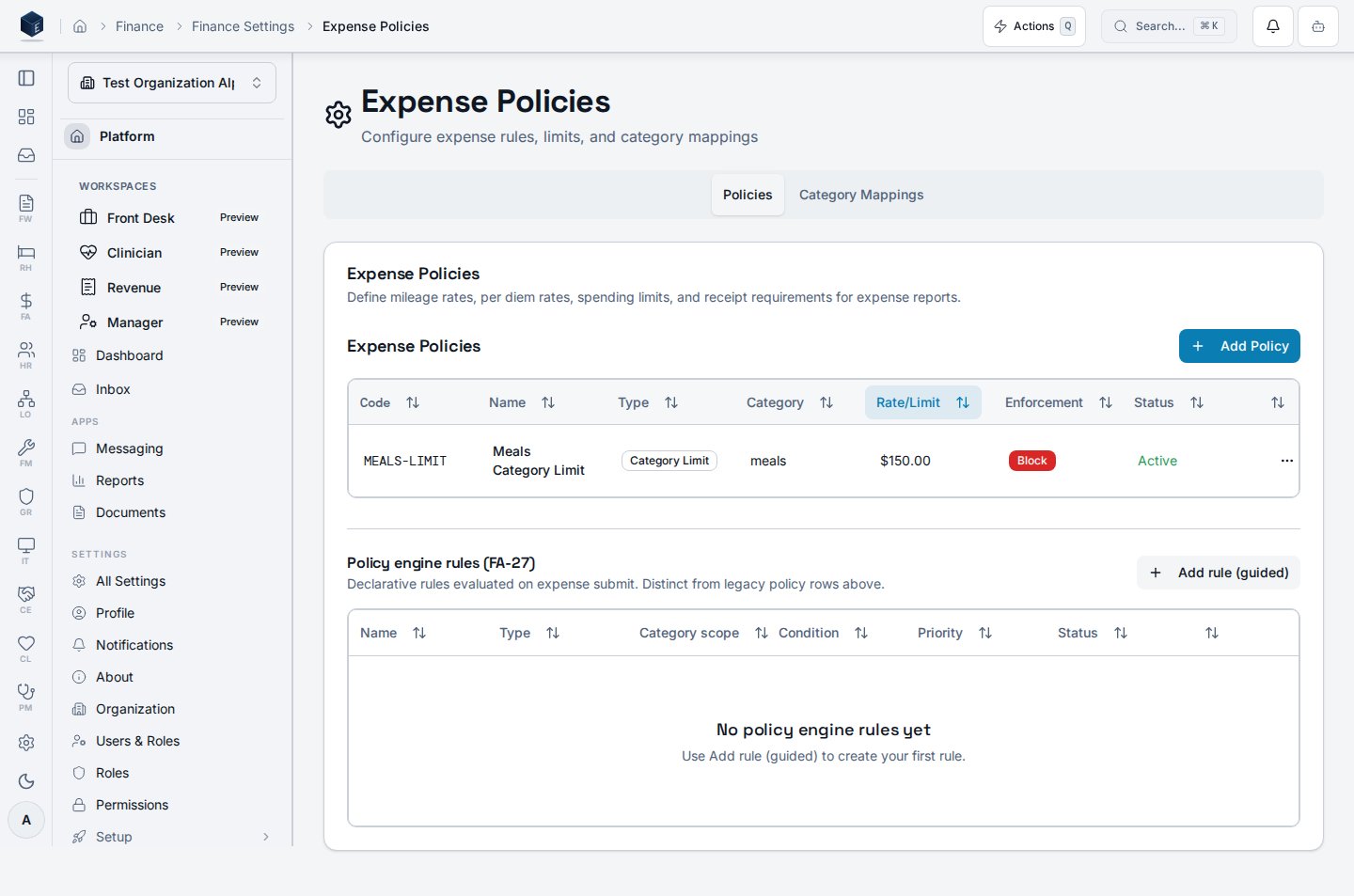
Expense Policies provides the administrative interface for configuring expense policy rules, limits, and GL category mappings applied during expense report submission and approval. Route: `/fa/settings/expense-policies`.
 ## Overview
The Expense Policies page is accessible at `/fa/settings/expense-policies` and requires permission `fa.expenses.admin` (route level) and `fa.expense_policies.view` (component level). The component (`ExpensePoliciesPage`) renders a two-tab interface via `ScrollableTabsList`:
* **Policies tab**: renders `ExpensePolicyTable` (listing configured policies) and `ExpensePolicyEngineRulesSection` (rule engine configuration).
* **Mappings tab**: renders `CategoryMappingTable` (GL category-to-account mappings).
## Who it's for
Requires permission `fa.expenses.admin` (route guard) and `fa.expense_policies.view` (component guard).
## Before you start
* You must have `fa.expenses.admin` permission.
* Review existing policies and mappings before making changes to avoid disrupting active expense reports.
## Steps
1. Navigate to **Finance → Settings → Expense Policies** (`/fa/settings/expense-policies`).
2. On the **Policies** tab:
* Review existing policies in `ExpensePolicyTable`.
* Configure rule engine settings in `ExpensePolicyEngineRulesSection`.
3. On the **Mappings** tab:
* Review and update GL category-to-account mappings in `CategoryMappingTable`.
4. Save changes as prompted by each section.
## Key concepts
| Concept | Description |
| --------------------------------- | ------------------------------------------------------------------- |
| `ExpensePolicyTable` | Displays configured expense policies |
| `ExpensePolicyEngineRulesSection` | Rule engine configuration for policy enforcement |
| `CategoryMappingTable` | Maps expense categories to GL accounts; SME: confirm mapping schema |
## Related
Finance & Revenue core overview.
This page documents shipped product behavior. It is not medical, legal, or
billing advice. Verify against your organization's policies and applicable
regulations before using it for clinical, compliance, or billing decisions.
Protected health information (PHI) shown in the product is governed by your
tenant's access controls and is never exposed in this documentation.
* src/routes/fa.tsx
* src/cores/fa/pages/ExpensePoliciesPage.tsx
## Overview
The Expense Policies page is accessible at `/fa/settings/expense-policies` and requires permission `fa.expenses.admin` (route level) and `fa.expense_policies.view` (component level). The component (`ExpensePoliciesPage`) renders a two-tab interface via `ScrollableTabsList`:
* **Policies tab**: renders `ExpensePolicyTable` (listing configured policies) and `ExpensePolicyEngineRulesSection` (rule engine configuration).
* **Mappings tab**: renders `CategoryMappingTable` (GL category-to-account mappings).
## Who it's for
Requires permission `fa.expenses.admin` (route guard) and `fa.expense_policies.view` (component guard).
## Before you start
* You must have `fa.expenses.admin` permission.
* Review existing policies and mappings before making changes to avoid disrupting active expense reports.
## Steps
1. Navigate to **Finance → Settings → Expense Policies** (`/fa/settings/expense-policies`).
2. On the **Policies** tab:
* Review existing policies in `ExpensePolicyTable`.
* Configure rule engine settings in `ExpensePolicyEngineRulesSection`.
3. On the **Mappings** tab:
* Review and update GL category-to-account mappings in `CategoryMappingTable`.
4. Save changes as prompted by each section.
## Key concepts
| Concept | Description |
| --------------------------------- | ------------------------------------------------------------------- |
| `ExpensePolicyTable` | Displays configured expense policies |
| `ExpensePolicyEngineRulesSection` | Rule engine configuration for policy enforcement |
| `CategoryMappingTable` | Maps expense categories to GL accounts; SME: confirm mapping schema |
## Related
Finance & Revenue core overview.
This page documents shipped product behavior. It is not medical, legal, or
billing advice. Verify against your organization's policies and applicable
regulations before using it for clinical, compliance, or billing decisions.
Protected health information (PHI) shown in the product is governed by your
tenant's access controls and is never exposed in this documentation.
* src/routes/fa.tsx
* src/cores/fa/pages/ExpensePoliciesPage.tsx