> ## Documentation Index
> Fetch the complete documentation index at: https://docs.encoreos.io/llms.txt
> Use this file to discover all available pages before exploring further.
# Entities
> Manage legal entity master records for multi-entity consolidation in Finance & Revenue.
Entities displays and manages legal entity master records used for multi-entity financial consolidation within the organization. Route: `/fa/entities`.
 ## Overview
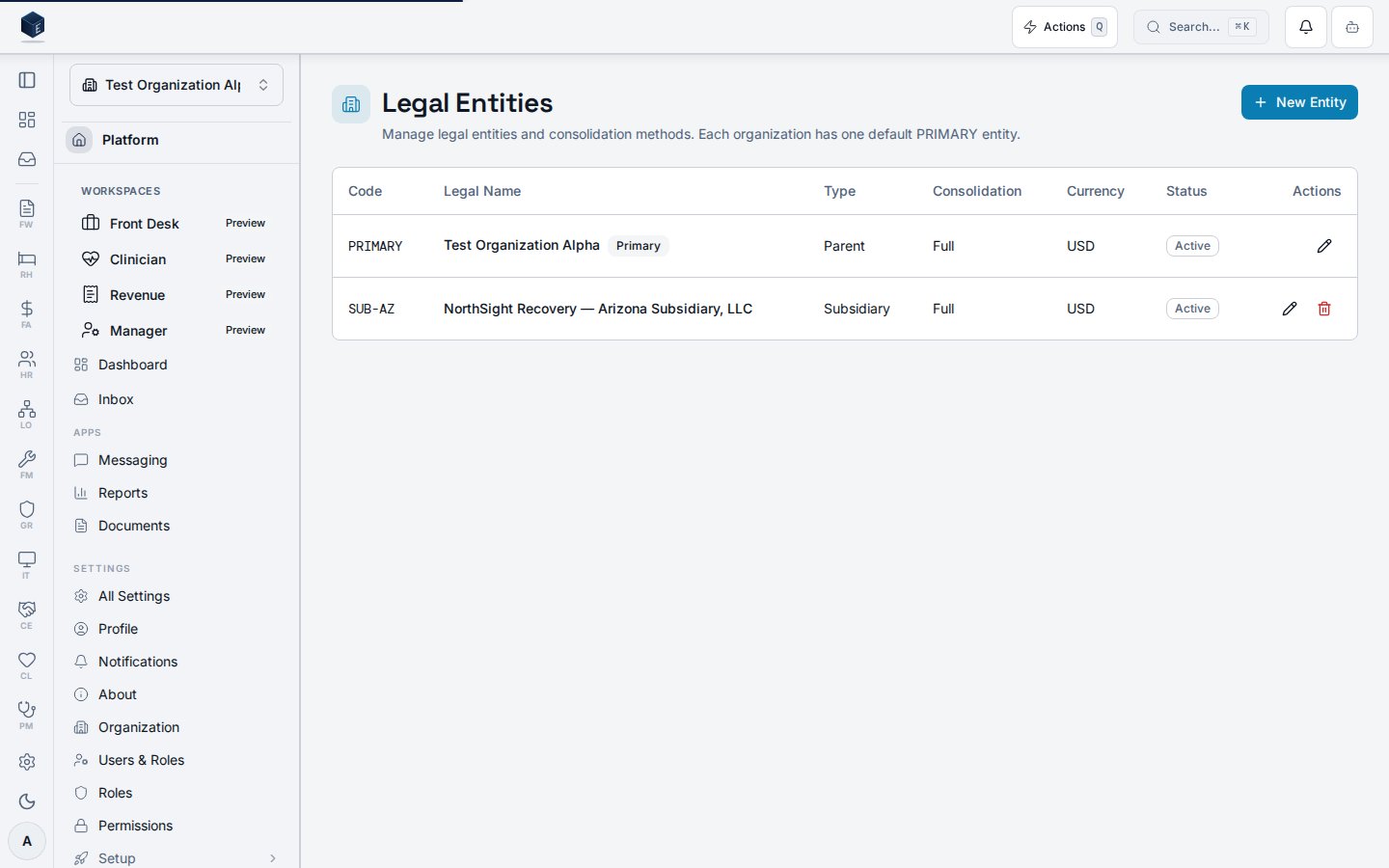
The Entities page is accessible at `/fa/entities` and requires permission `fa.entities.view`. The component (`FAEntitiesPage`) fetches entities via `useFAEntities(organizationId)` and displays them in a table with columns for Code, Legal Name, Type, Consolidation, and Currency. Each entity row supports edit (via `FAEntityDialog`) if the user has `fa.entities.edit`, and archive via `useArchiveFAEntity`. A **New Entity** button is gated behind `fa.entities.create`. The page description states: "Each organization has one default PRIMARY entity."
## Who it's for
Requires permission `fa.entities.view`. Edit requires `fa.entities.edit`. Create requires `fa.entities.create`.
## Before you start
* You must have `fa.entities.view` permission.
* To create or edit entities, the additional `fa.entities.create` or `fa.entities.edit` permissions are required.
## Steps
1. Navigate to **Finance → Entities** (`/fa/entities`).
2. Review the list of legal entities showing Code, Legal Name, Type, Consolidation method, and Currency.
3. To create a new entity, click **New Entity** (requires `fa.entities.create`).
4. To edit an entity, click the edit action in the row; `FAEntityDialog` opens.
5. To archive an entity, use the archive action (requires `fa.entities.edit`).
## Key concepts
| Concept | Description |
| -------------------- | ------------------------------------------------------------------------ |
| `useFAEntities` | Hook fetching legal entity records for the organization |
| `FAEntityDialog` | Dialog for creating or editing a legal entity |
| `useArchiveFAEntity` | Mutation hook for archiving an entity record |
| PRIMARY entity | Default entity for the organization; SME: confirm reporting implications |
## Related
Finance & Revenue core overview.
This page documents shipped product behavior. It is not medical, legal, or
billing advice. Verify against your organization's policies and applicable
regulations before using it for clinical, compliance, or billing decisions.
Protected health information (PHI) shown in the product is governed by your
tenant's access controls and is never exposed in this documentation.
* src/routes/fa.tsx
* src/cores/fa/pages/FAEntitiesPage.tsx
## Overview
The Entities page is accessible at `/fa/entities` and requires permission `fa.entities.view`. The component (`FAEntitiesPage`) fetches entities via `useFAEntities(organizationId)` and displays them in a table with columns for Code, Legal Name, Type, Consolidation, and Currency. Each entity row supports edit (via `FAEntityDialog`) if the user has `fa.entities.edit`, and archive via `useArchiveFAEntity`. A **New Entity** button is gated behind `fa.entities.create`. The page description states: "Each organization has one default PRIMARY entity."
## Who it's for
Requires permission `fa.entities.view`. Edit requires `fa.entities.edit`. Create requires `fa.entities.create`.
## Before you start
* You must have `fa.entities.view` permission.
* To create or edit entities, the additional `fa.entities.create` or `fa.entities.edit` permissions are required.
## Steps
1. Navigate to **Finance → Entities** (`/fa/entities`).
2. Review the list of legal entities showing Code, Legal Name, Type, Consolidation method, and Currency.
3. To create a new entity, click **New Entity** (requires `fa.entities.create`).
4. To edit an entity, click the edit action in the row; `FAEntityDialog` opens.
5. To archive an entity, use the archive action (requires `fa.entities.edit`).
## Key concepts
| Concept | Description |
| -------------------- | ------------------------------------------------------------------------ |
| `useFAEntities` | Hook fetching legal entity records for the organization |
| `FAEntityDialog` | Dialog for creating or editing a legal entity |
| `useArchiveFAEntity` | Mutation hook for archiving an entity record |
| PRIMARY entity | Default entity for the organization; SME: confirm reporting implications |
## Related
Finance & Revenue core overview.
This page documents shipped product behavior. It is not medical, legal, or
billing advice. Verify against your organization's policies and applicable
regulations before using it for clinical, compliance, or billing decisions.
Protected health information (PHI) shown in the product is governed by your
tenant's access controls and is never exposed in this documentation.
* src/routes/fa.tsx
* src/cores/fa/pages/FAEntitiesPage.tsx