> ## Documentation Index
> Fetch the complete documentation index at: https://docs.encoreos.io/llms.txt
> Use this file to discover all available pages before exploring further.
# Finance & Revenue Collections Queue
> Collections Queue provides a workflow view for managing accounts-receivable collection activity, with tabbed access to the new structured queue and legacy…
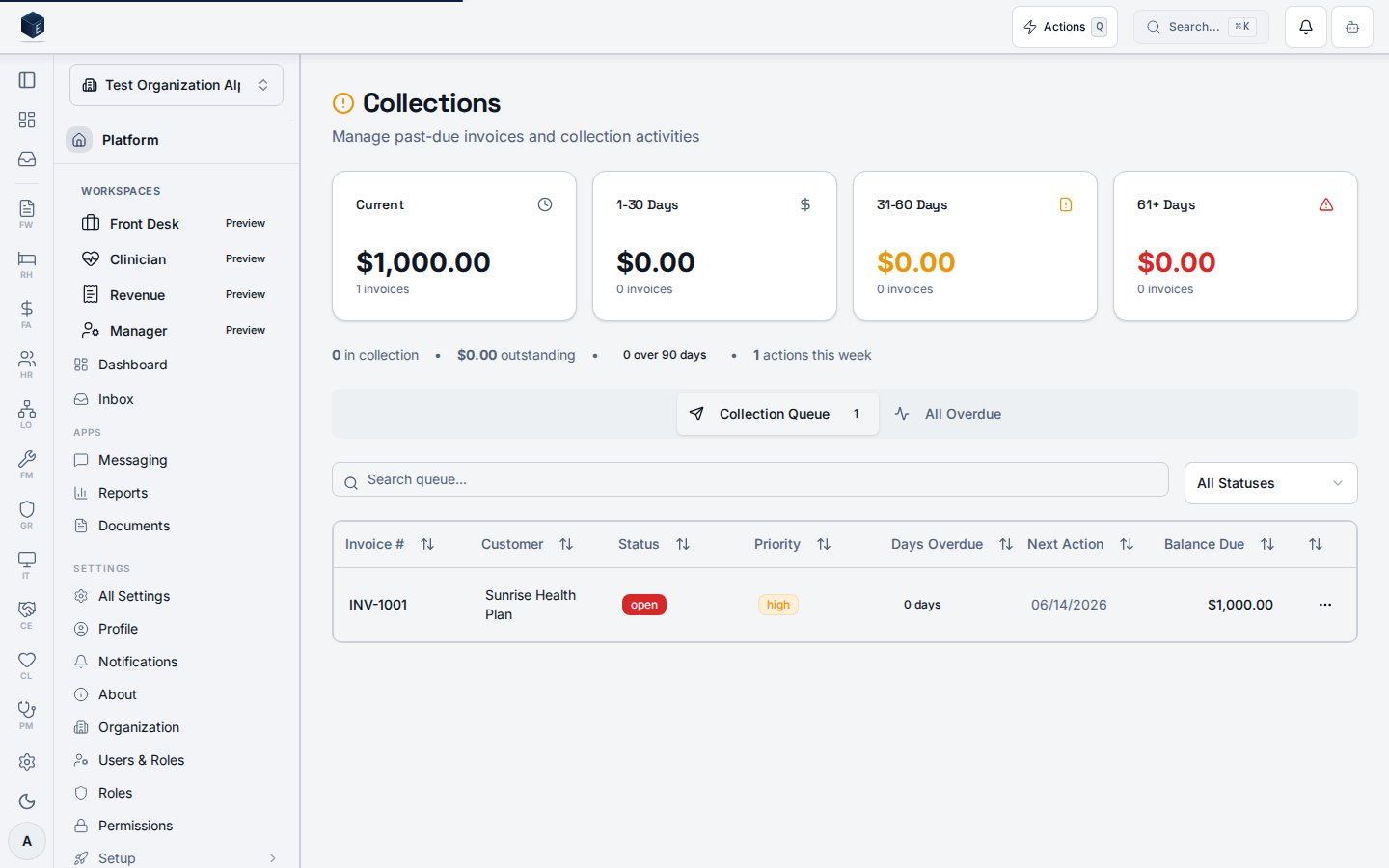
Collections Queue provides a workflow view for managing accounts-receivable collection activity, with tabbed access to the new structured queue and legacy in-collection invoices, AR aging bucket summaries, and status and search filters. Route: `/fa/collections`
 ## Overview
The page has two queue systems shown in separate tabs: the new structured queue (`fa_collection_queue`) accessed via `useCollectionQueueList` and rendered in `CollectionQueueWorkflowTable`; and the legacy queue (invoices flagged `in_collection`) accessed via `useCollectionQueue` and rendered in `CollectionQueueTable`. Collection stats are loaded via `useCollectionStats`. AR aging buckets are loaded via `useArAgingBuckets`. Independent search and filter state is maintained for each queue. `CollectionQueueStatus` filters the new queue.
## Who it's for
Requires permission: `fa.collections.view`
## Before you start
* Invoices must be outstanding and have been flagged for collection (legacy), or records must exist in `fa_collection_queue` (new queue).
* You must hold the `fa.collections.view` permission.
## Steps
Go to `/fa/collections`.
Stat cards at the top show summary counts from `useCollectionStats`.
Aging bucket cards show overdue balances by age bucket from `useArAgingBuckets`.
Use the tabbed interface to toggle between the new structured queue and the legacy in-collection view.
Each tab has independent search and status filter controls.
Select items in the queue to perform available collection workflow actions.
## Key concepts
* **`CollectionQueueStatus`** — Type for queue item status used to filter the new queue.
* **`useCollectionQueueList`** — Hook for the structured `fa_collection_queue` table.
* **`useCollectionQueue`** — Hook for legacy invoices flagged `in_collection`.
* **`useArAgingBuckets`** — Hook returning AR aging bucket totals.
## Related
Finance & Revenue core overview.
This page documents shipped product behavior. It is not medical, legal, or
billing advice. Verify against your organization's policies and applicable
regulations before using it for clinical, compliance, or billing decisions.
Protected health information (PHI) shown in the product is governed by your
tenant's access controls and is never exposed in this documentation.
* src/routes/fa.tsx
* src/cores/fa/pages/CollectionWorkflowPage.tsx
* src/cores/fa/hooks/useCollectionQueueList.ts
* src/cores/fa/hooks/useCollectionWorkflow\.ts
* src/cores/fa/hooks/useArAgingBuckets.ts
* src/cores/fa/types/collectionQueue.ts
## Overview
The page has two queue systems shown in separate tabs: the new structured queue (`fa_collection_queue`) accessed via `useCollectionQueueList` and rendered in `CollectionQueueWorkflowTable`; and the legacy queue (invoices flagged `in_collection`) accessed via `useCollectionQueue` and rendered in `CollectionQueueTable`. Collection stats are loaded via `useCollectionStats`. AR aging buckets are loaded via `useArAgingBuckets`. Independent search and filter state is maintained for each queue. `CollectionQueueStatus` filters the new queue.
## Who it's for
Requires permission: `fa.collections.view`
## Before you start
* Invoices must be outstanding and have been flagged for collection (legacy), or records must exist in `fa_collection_queue` (new queue).
* You must hold the `fa.collections.view` permission.
## Steps
Go to `/fa/collections`.
Stat cards at the top show summary counts from `useCollectionStats`.
Aging bucket cards show overdue balances by age bucket from `useArAgingBuckets`.
Use the tabbed interface to toggle between the new structured queue and the legacy in-collection view.
Each tab has independent search and status filter controls.
Select items in the queue to perform available collection workflow actions.
## Key concepts
* **`CollectionQueueStatus`** — Type for queue item status used to filter the new queue.
* **`useCollectionQueueList`** — Hook for the structured `fa_collection_queue` table.
* **`useCollectionQueue`** — Hook for legacy invoices flagged `in_collection`.
* **`useArAgingBuckets`** — Hook returning AR aging bucket totals.
## Related
Finance & Revenue core overview.
This page documents shipped product behavior. It is not medical, legal, or
billing advice. Verify against your organization's policies and applicable
regulations before using it for clinical, compliance, or billing decisions.
Protected health information (PHI) shown in the product is governed by your
tenant's access controls and is never exposed in this documentation.
* src/routes/fa.tsx
* src/cores/fa/pages/CollectionWorkflowPage.tsx
* src/cores/fa/hooks/useCollectionQueueList.ts
* src/cores/fa/hooks/useCollectionWorkflow\.ts
* src/cores/fa/hooks/useArAgingBuckets.ts
* src/cores/fa/types/collectionQueue.ts