> ## Documentation Index
> Fetch the complete documentation index at: https://docs.encoreos.io/llms.txt
> Use this file to discover all available pages before exploring further.
# Banking
> Tabbed hub for managing bank accounts, statements, reconciliations, and transactions in one URL-synced view.
Tabbed hub for managing bank accounts, statements, reconciliations, and transactions at the in-app route `/fa/banking`.
 ## Overview
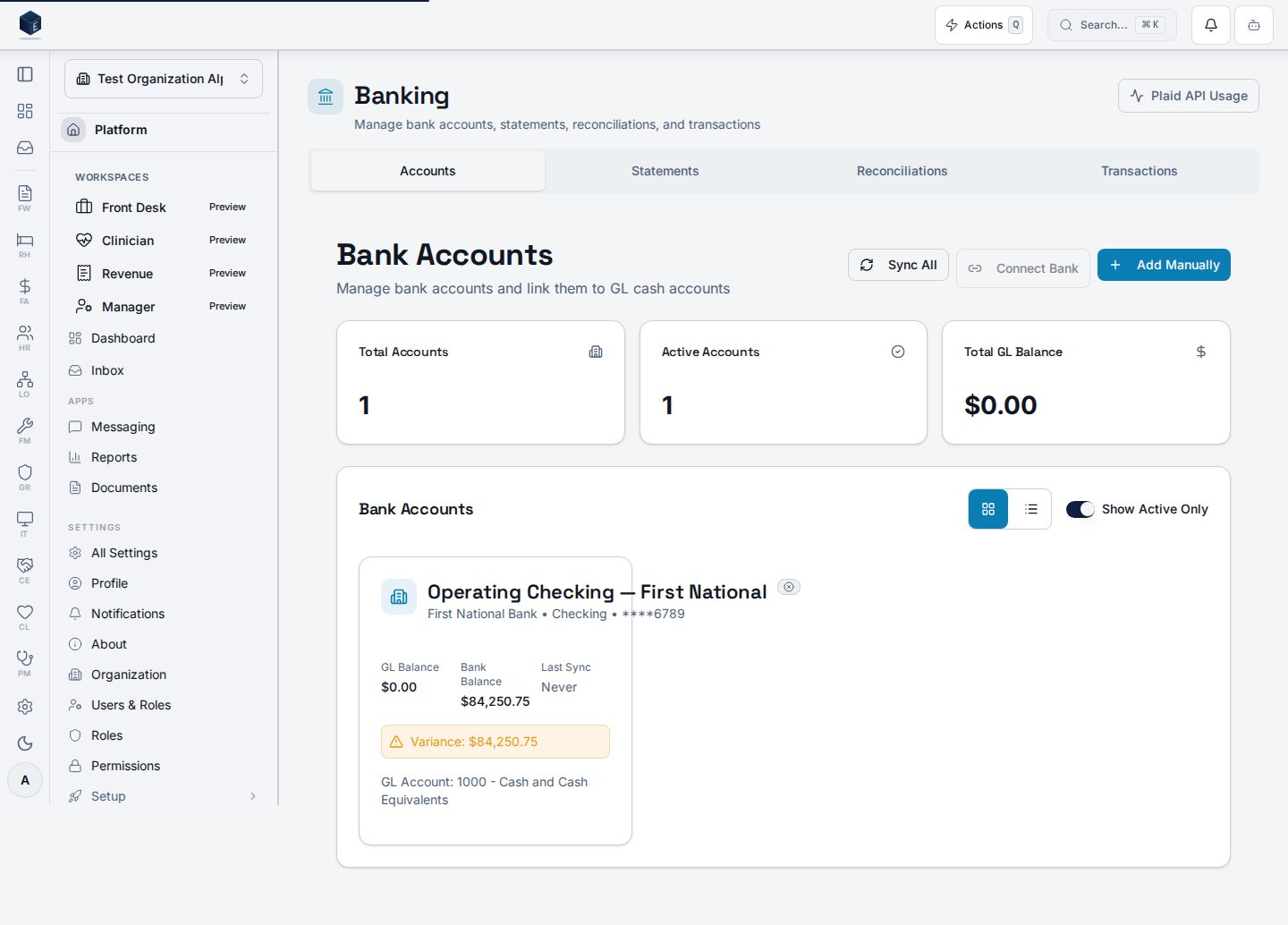
This screen is the Banking Hub, a tabbed page combining four sections: Accounts, Statements, Reconciliations, and Transactions. The active tab is controlled by the `?tab=` query parameter — valid values are `accounts`, `statements`, `reconciliations`, and `transactions`. The default tab is `accounts`. Each tab lazy-loads its respective page component. Users with `fa.banking.admin` permission see a Plaid API Usage link in the header. The hub title is "Banking" and the description is "Manage bank accounts, statements, reconciliations, and transactions." The legacy routes `/fa/bank-accounts`, `/fa/bank-statements`, and `/fa/reconciliations` all redirect to this hub with the appropriate `?tab=` parameter.
## Who it's for
Access follows your organization's role and module configuration. Individual tabs and child routes may require specific permissions. `fa.banking.admin` users additionally see a Plaid API Usage link.
## Before you start
* At least one bank account should be configured to see data in the Accounts tab.
* An organization must be selected.
## Steps
Go to `/fa/banking` via Finance & Revenue navigation.
Click Accounts, Statements, Reconciliations, or Transactions. The URL updates to reflect the active tab.
The Accounts tab shows all bank accounts for the organization.
The Statements tab shows uploaded bank statement records.
The Reconciliations tab lists reconciliation records.
The Transactions tab shows transaction-level data.
## Key concepts
* Tab URL state — `?tab=accounts|statements|reconciliations|transactions` persists the active tab
* Legacy redirects: `/fa/bank-accounts` → `?tab=accounts`, `/fa/bank-statements` → `?tab=statements`, `/fa/reconciliations` → `?tab=reconciliations`
* `fa.banking.admin` — permission that unlocks the Plaid API Usage link
## Related
Finance & Revenue core overview.
Documentation coverage and governance.
This page documents shipped product behavior. It is not medical, legal, or
billing advice. Verify against your organization's policies and applicable
regulations before using it for clinical, compliance, or billing decisions.
Protected health information (PHI) shown in the product is governed by your
tenant's access controls and is never exposed in this documentation.
* src/routes/fa.tsx
* src/cores/fa/pages/BankingHubPage.tsx
## Overview
This screen is the Banking Hub, a tabbed page combining four sections: Accounts, Statements, Reconciliations, and Transactions. The active tab is controlled by the `?tab=` query parameter — valid values are `accounts`, `statements`, `reconciliations`, and `transactions`. The default tab is `accounts`. Each tab lazy-loads its respective page component. Users with `fa.banking.admin` permission see a Plaid API Usage link in the header. The hub title is "Banking" and the description is "Manage bank accounts, statements, reconciliations, and transactions." The legacy routes `/fa/bank-accounts`, `/fa/bank-statements`, and `/fa/reconciliations` all redirect to this hub with the appropriate `?tab=` parameter.
## Who it's for
Access follows your organization's role and module configuration. Individual tabs and child routes may require specific permissions. `fa.banking.admin` users additionally see a Plaid API Usage link.
## Before you start
* At least one bank account should be configured to see data in the Accounts tab.
* An organization must be selected.
## Steps
Go to `/fa/banking` via Finance & Revenue navigation.
Click Accounts, Statements, Reconciliations, or Transactions. The URL updates to reflect the active tab.
The Accounts tab shows all bank accounts for the organization.
The Statements tab shows uploaded bank statement records.
The Reconciliations tab lists reconciliation records.
The Transactions tab shows transaction-level data.
## Key concepts
* Tab URL state — `?tab=accounts|statements|reconciliations|transactions` persists the active tab
* Legacy redirects: `/fa/bank-accounts` → `?tab=accounts`, `/fa/bank-statements` → `?tab=statements`, `/fa/reconciliations` → `?tab=reconciliations`
* `fa.banking.admin` — permission that unlocks the Plaid API Usage link
## Related
Finance & Revenue core overview.
Documentation coverage and governance.
This page documents shipped product behavior. It is not medical, legal, or
billing advice. Verify against your organization's policies and applicable
regulations before using it for clinical, compliance, or billing decisions.
Protected health information (PHI) shown in the product is governed by your
tenant's access controls and is never exposed in this documentation.
* src/routes/fa.tsx
* src/cores/fa/pages/BankingHubPage.tsx