> ## Documentation Index
> Fetch the complete documentation index at: https://docs.encoreos.io/llms.txt
> Use this file to discover all available pages before exploring further.
# Clinical Overview
> Overview of the Clinical & EHR core in Encore OS — purpose, scope, and key responsibilities.
The Clinical & EHR core (CL) provides the electronic health record and clinical documentation capabilities for Encore OS — patient charts, clinical notes, assessments, medication-assisted treatment (MAT/MOUD), orders, consents, lab results, population health reporting, and discharge planning.
**Architecture:** CL is downstream — no other core may depend on it. It integrates with **Practice Management** through the encounter entity (`pm_encounters`) for charge capture and billing, and with **Platform Foundation** for jurisdiction-aware assessment requirements.
## How clinical work flows
The patient chart is the hub: open it, document the encounter, route results and co-signs through the in-basket, then plan discharge — with the signed encounter flowing to **Practice Management** for billing.
```mermaid theme={null}
flowchart LR
Chart["Patient chart"] --> Note["Progress note
+ treatment plan"]
Note --> Sign["Sign / co-sign
(in-basket)"]
Sign --> Encounter["pm_encounters"]
Encounter --> Bill["Charge capture
→ Practice Management"]
Sign --> Discharge["Discharge &
aftercare"]
Chart -.-> Orders["Orders, labs
& MAT/MOUD"]
Orders -.-> Note
CDS["Decision support
(CDS / alerts)"] -.-> Note
```
 ## Key surfaces
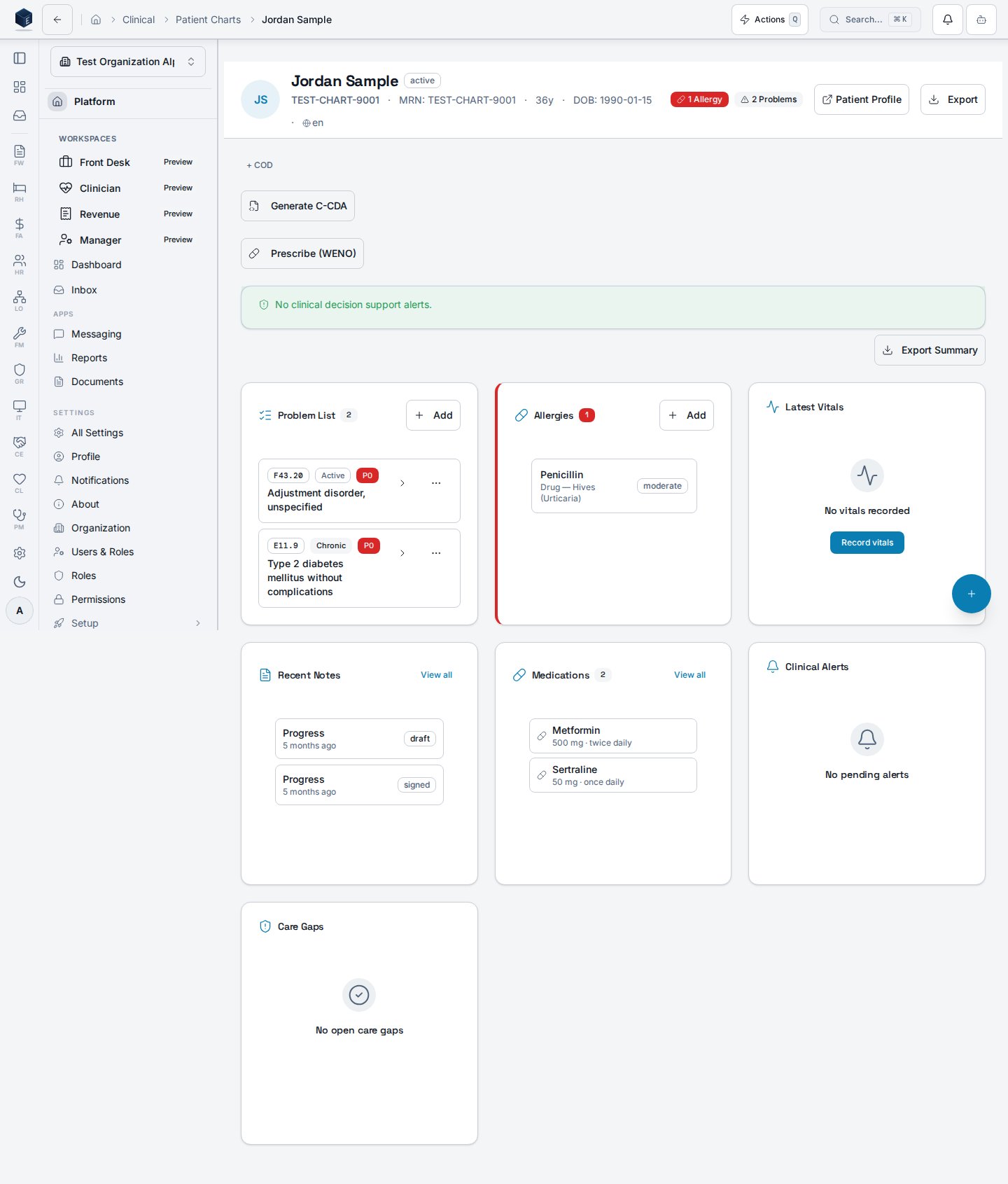
The core clinical UI — problems, medications, allergies, encounters, and history.
Structured documentation with templates and co-sign workflows.
Goal- and objective-driven care planning.
Provider messaging, results routing, and co-sign queues.
CDS rules, alerts, and quality-measure configuration.
Transition-of-care planning and post-discharge follow-up.
## Get oriented in CL
Start in the [patient chart](/cl/patient-charts) — the hub for problems, medications, encounters, and results.
Write a [progress note](/cl/progress-notes) and update the [treatment plan](/cl/treatment-plans) as goals change.
Triage results and co-signs in the [in-basket](/cl/in-basket-user-guide), then plan transitions with [discharge & aftercare](/cl/discharge-aftercare-admin-guide).
## By role
Daily charting, ordering, in-basket triage, and treatment planning. Start with the [patient chart](/cl/patient-charts) and [progress notes](/cl/progress-notes).
Assessment templates, order sets, pathway management, and [CDS rule tuning](/cl/cds-admin-guide). Configure [patient-reported outcomes](/cl/patient-reported-outcomes-admin-guide).
Consent audits, 42 CFR Part 2 segmentation, redisclosure tracking, and quality-measure attestation. See the [compliance tracker](/compliance/REGULATORY_COMPLIANCE_TRACKER).
## Scope at a glance
* **Charting & documentation** — patient chart, progress notes, treatment plans, encounter review and discharge, ambient review, C-CDA documents, multi-party encounters.
* **Orders, labs & medications** — order sets, MAT/MOUD enrollment, PDMP monitoring, lab results, controlled-substance inventory, reference ranges, e-prescribing.
* **Care coordination** — in-basket messaging, co-sign queues, panels, cohorts, pathway adherence and templates, follow-up dashboards.
* **Assessments & outcomes** — assessment templates, intake compliance, group and program outcomes, expiring assessments, patient-reported outcomes.
* **Decision support & quality** — CDS rules, concurrent review, utilization management, alert-fatigue dashboard, HEDIS / UDS / quality measures, population health.
* **Consent & compliance** — 42 CFR Part 2 consent management, electronic consent with redisclosure tracking, psychotherapy notes protection, DSI source attribution.
## Related
How encounters flow from clinical documentation to billing.
Source specifications for the CL core.
Regulatory crosswalk and evidence.
## Key surfaces
The core clinical UI — problems, medications, allergies, encounters, and history.
Structured documentation with templates and co-sign workflows.
Goal- and objective-driven care planning.
Provider messaging, results routing, and co-sign queues.
CDS rules, alerts, and quality-measure configuration.
Transition-of-care planning and post-discharge follow-up.
## Get oriented in CL
Start in the [patient chart](/cl/patient-charts) — the hub for problems, medications, encounters, and results.
Write a [progress note](/cl/progress-notes) and update the [treatment plan](/cl/treatment-plans) as goals change.
Triage results and co-signs in the [in-basket](/cl/in-basket-user-guide), then plan transitions with [discharge & aftercare](/cl/discharge-aftercare-admin-guide).
## By role
Daily charting, ordering, in-basket triage, and treatment planning. Start with the [patient chart](/cl/patient-charts) and [progress notes](/cl/progress-notes).
Assessment templates, order sets, pathway management, and [CDS rule tuning](/cl/cds-admin-guide). Configure [patient-reported outcomes](/cl/patient-reported-outcomes-admin-guide).
Consent audits, 42 CFR Part 2 segmentation, redisclosure tracking, and quality-measure attestation. See the [compliance tracker](/compliance/REGULATORY_COMPLIANCE_TRACKER).
## Scope at a glance
* **Charting & documentation** — patient chart, progress notes, treatment plans, encounter review and discharge, ambient review, C-CDA documents, multi-party encounters.
* **Orders, labs & medications** — order sets, MAT/MOUD enrollment, PDMP monitoring, lab results, controlled-substance inventory, reference ranges, e-prescribing.
* **Care coordination** — in-basket messaging, co-sign queues, panels, cohorts, pathway adherence and templates, follow-up dashboards.
* **Assessments & outcomes** — assessment templates, intake compliance, group and program outcomes, expiring assessments, patient-reported outcomes.
* **Decision support & quality** — CDS rules, concurrent review, utilization management, alert-fatigue dashboard, HEDIS / UDS / quality measures, population health.
* **Consent & compliance** — 42 CFR Part 2 consent management, electronic consent with redisclosure tracking, psychotherapy notes protection, DSI source attribution.
## Related
How encounters flow from clinical documentation to billing.
Source specifications for the CL core.
Regulatory crosswalk and evidence.