> ## Documentation Index
> Fetch the complete documentation index at: https://docs.encoreos.io/llms.txt
> Use this file to discover all available pages before exploring further.
# Documentation Blocks
> Compose clinical documentation from the resolved block set — jurisdiction-required, accreditation-overlay, and org-optional blocks with a completeness score.
The Clinical Block Library (CL-75) composes documentation surfaces — intake, progress note, crisis, and more — from reusable **clinical blocks** (Mental Status Exam, suicide/violence screening, ROS, physical exam, safety plan, …). Each block is defined once with an immutable, versioned field schema, and every surface that needs it renders the same block by reference instead of re-implementing the datum.
## The Documentation Blocks chart tab
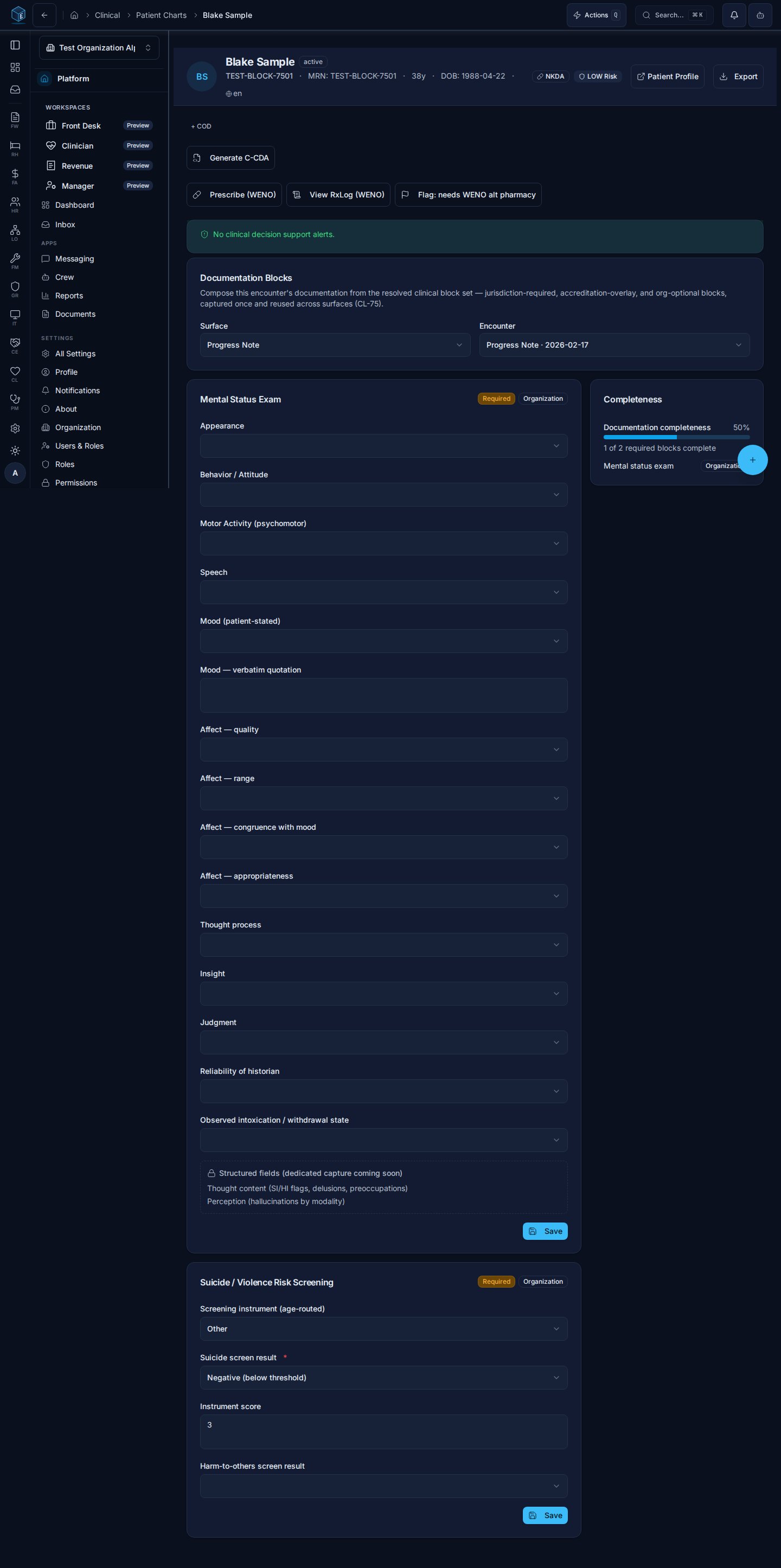
On a patient chart, the **Documentation Blocks** tab (`/cl/charts/:chartId?tab=documentation-blocks`) resolves the required block set for a selected encounter + surface and renders each block, required-first and source-tagged:
* **Jurisdiction** blocks come from the organization's PF-96 jurisdiction profile (for Arizona/AHCCCS orgs, e.g. the MSE on progress notes).
* **Accreditation** blocks appear when a CARF/TJC overlay is active for the organization.
* **Organization** blocks are the org's own optional additions, composed in the Surface Templates admin.
Typed blocks persist to their owning clinical table (the MSE to `cl_mse_exams`, the suicide/violence screen to `cl_risk_screenings`) — captured once, reused across surfaces. The **Completeness** panel (CL-59-EN-01) scores the same resolved required set the renderer draws, showing the completion percentage and the source-tagged list of still-missing required blocks.
 ## Who it's for
Requires permission: `cl.progress_note.view` (the tab); saving a block writes through the same clinical permissions as the owning record.
## Composing surfaces: Surface Templates admin
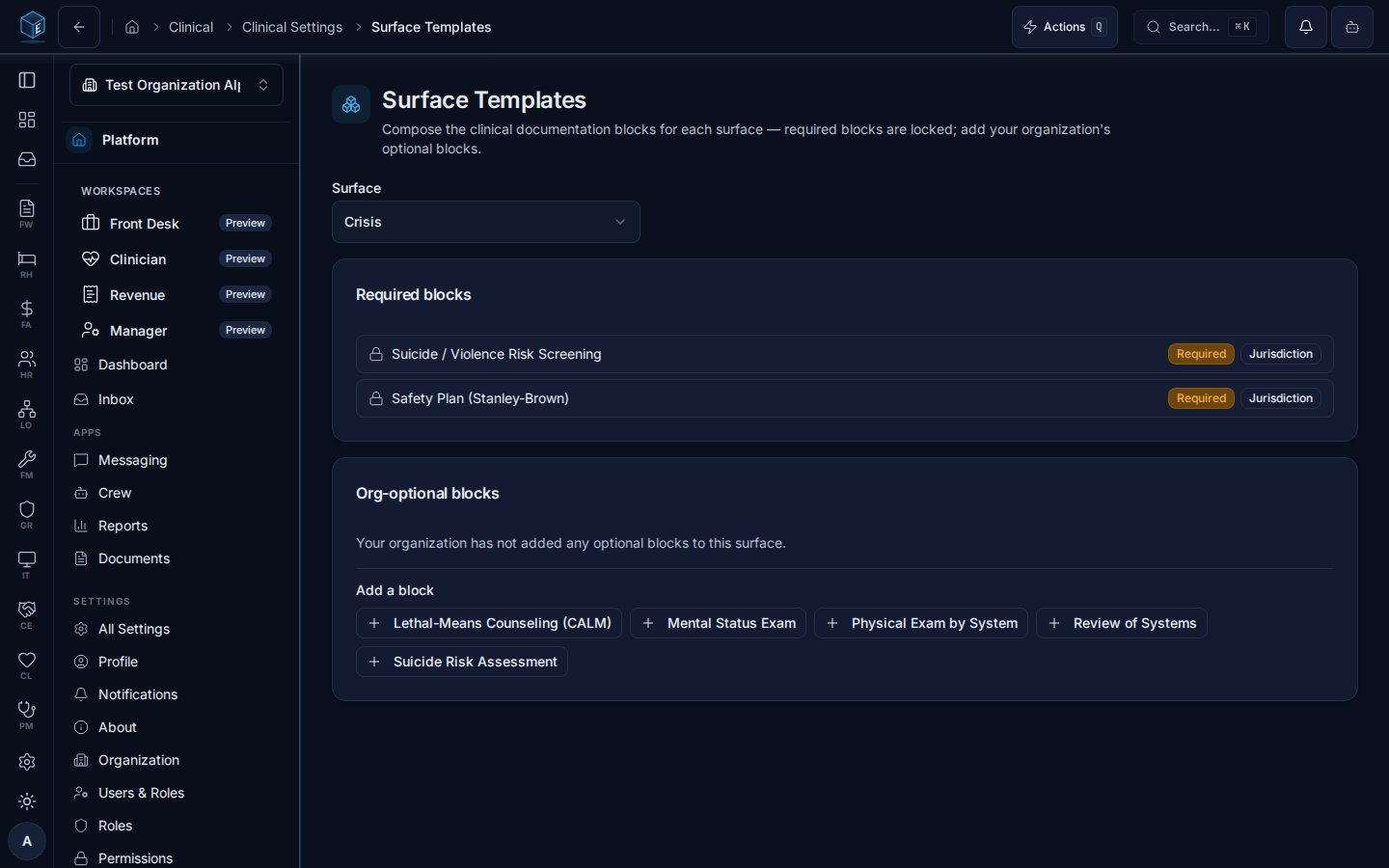
Org admins compose each surface's blocks at **Settings → Surface Templates** (`/cl/settings/surface-templates`):
* **Required blocks are locked.** Blocks required by the jurisdiction profile or an active accreditation overlay display with their source and cannot be removed — an organization can never drop a required block.
* **Org-optional blocks** can be added from the block catalog and removed at any time; the resolver feeds them to the renderer and the completeness engine alongside the required set.
## Who it's for
Requires permission: `cl.progress_note.view` (the tab); saving a block writes through the same clinical permissions as the owning record.
## Composing surfaces: Surface Templates admin
Org admins compose each surface's blocks at **Settings → Surface Templates** (`/cl/settings/surface-templates`):
* **Required blocks are locked.** Blocks required by the jurisdiction profile or an active accreditation overlay display with their source and cannot be removed — an organization can never drop a required block.
* **Org-optional blocks** can be added from the block catalog and removed at any time; the resolver feeds them to the renderer and the completeness engine alongside the required set.
 Requires permission: `cl.assessment_template.manage`
## Notes
* Field-level requiredness can vary by active accreditation overlay (e.g. TJC NPSG.15.01.01 elements on the suicide-risk blocks) — overlay-tagged fields activate only when the overlay applies to the organization.
* Blocks flagged for 42 CFR Part 2 contexts carry a Part 2 badge; segmentation follows the chart's SUD indicators and CL-11 consent gating.
Requires permission: `cl.assessment_template.manage`
## Notes
* Field-level requiredness can vary by active accreditation overlay (e.g. TJC NPSG.15.01.01 elements on the suicide-risk blocks) — overlay-tagged fields activate only when the overlay applies to the organization.
* Blocks flagged for 42 CFR Part 2 contexts carry a Part 2 badge; segmentation follows the chart's SUD indicators and CL-11 consent gating.