> ## Documentation Index
> Fetch the complete documentation index at: https://docs.encoreos.io/llms.txt
> Use this file to discover all available pages before exploring further.
# HubSpot Integration — Admin Guide
> Connect a HubSpot portal, manage field mappings and the polling interval, run the onboarding backfill, and handle dead letters and re-authorization.
# HubSpot Integration — Admin Guide
Everything here requires the `ce.hubspot.manage` permission (org admins have
it implicitly). The integration lives at **Settings → Integrations →
HubSpot** (`/ce/settings/integrations/hubspot`).
## Connecting a portal
Click **Connect HubSpot** and approve the consent screen in HubSpot. One
portal per organization. On success the page shows the portal id, granted
scopes, and the connection status; the default field mappings are seeded
automatically. Access and refresh tokens are stored in the platform's
encrypted vault — they never appear in the UI, the database rows, or logs.
The sync is **inbound only**: outbound writes are disabled platform-wide
until the CE-76 release (HubSpot BAA + per-organization attestation). The
settings page states this boundary; there is no toggle to bypass it.
## Field mappings
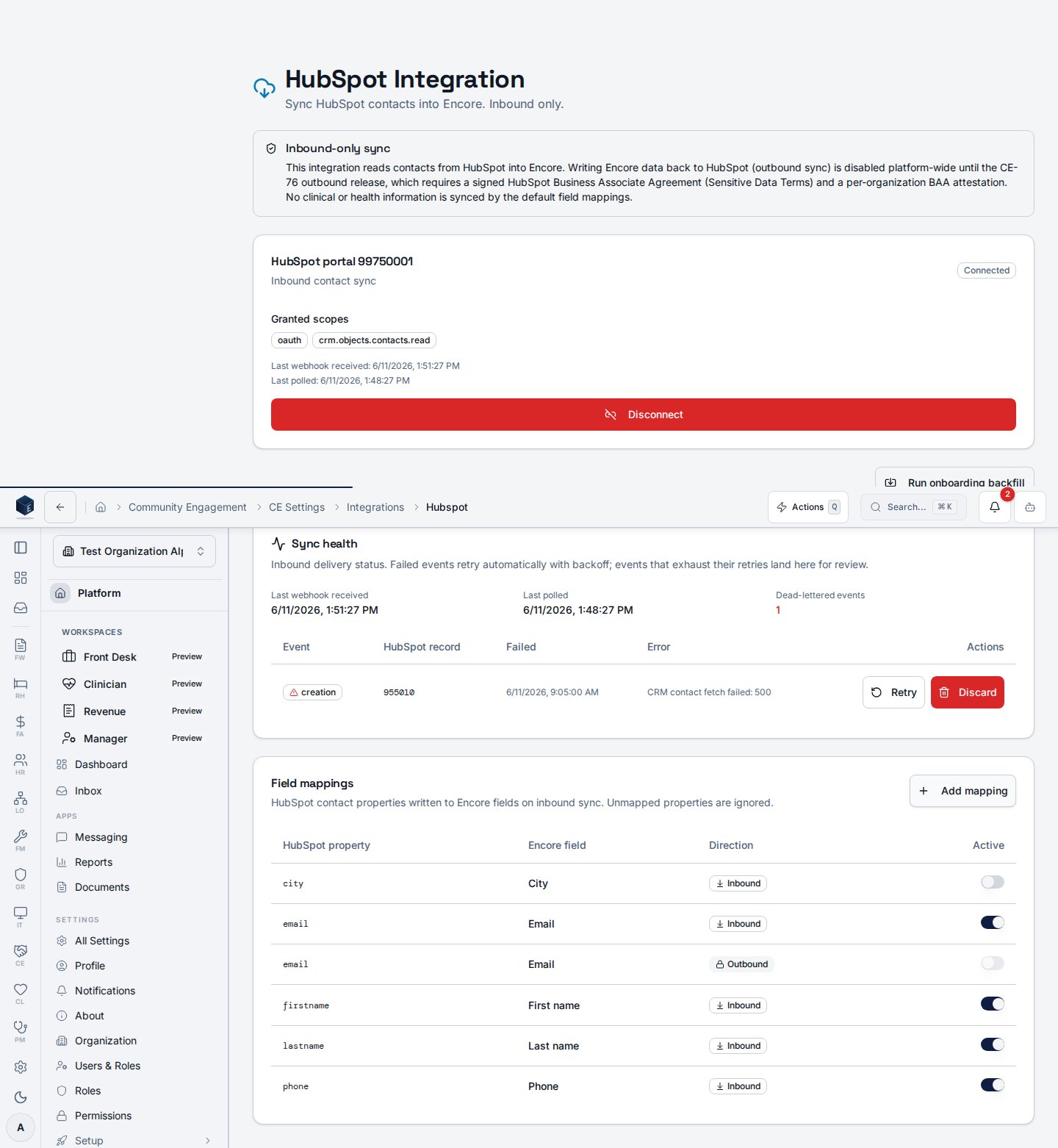 * **Defaults** (seeded on connect): first/last name, email, phone, mobile,
address, city, state, ZIP, and `lifecyclestage` → lead source details.
* **Add mapping** maps any HubSpot contact property onto a registry of safe
Encore fields (demographic and lead-source columns only — clinical and
insurance fields are structurally excluded).
* **Deactivate** a mapping to stop that property from writing; re-connecting
never overwrites your edits.
* **Direction is locked to inbound.** Rows with an outbound direction render
locked and cannot be activated until CE-76.
Unmapped properties are ignored silently (logged at debug level only).
## Polling interval
Webhooks deliver changes in seconds; an incremental poll sweeps for anything
missed. The interval is org-configurable via
`ce_module_settings.hubspot_poll_interval_minutes` (default 15, allowed
5–120).
## The onboarding backfill
**Run onboarding backfill** opens the wizard:
1. **Scope** — confirms the portal and the active inbound mappings.
2. **Dry run** — scans the entire HubSpot book and buckets every contact
(link automatically / needs review / will be created / in-set duplicates /
already linked) **without writing anything**.
3. **Report** — the bucket counts.
4. **Commit** — applies the buckets. Review hits are parked in the duplicate
review queue (`source=backfill`); duplicates *within* HubSpot collapse to
a single Encore contact with both HubSpot ids linked.
The run checkpoints page by page: if it's interrupted, re-running resumes
where it stopped and never duplicates contacts. Re-running after completion
reports everything as *already linked*.
## Dead letters
Inbound events that fail repeatedly (after automatic retries with backoff)
land in the dead-letter list on the sync health card with their sanitized
error. **Retry** re-queues the event through the standard pipeline —
idempotency guarantees a retry of an event that somehow already succeeded is
a no-op. **Discard** removes it permanently. The append-only sync log keeps
the audit record either way.
## Re-authorization
If HubSpot revokes the refresh token (for example the app was uninstalled
from the portal), the connection flips to **Needs re-authorization**, inbound
sync pauses without dropping anything, and every org admin receives a
notification. Click **Reconnect HubSpot** to run the OAuth flow again; queued
changes then drain automatically.
## Disconnecting
**Disconnect** revokes the refresh token at HubSpot (best effort), deletes
the vault credentials, and flips the connection to disconnected. Synced
contacts and their history remain in Encore; only the link to HubSpot stops
updating.
## Troubleshooting
| Symptom | Check |
| ---------------------------------------- | --------------------------------------------------------------------------------------- |
| Changes not arriving | Sync health → last webhook / last poll timestamps; connection status |
| Repeated dead letters for one record | The error column — a deleted HubSpot record or a mapping writing an invalid value |
| "Needs re-authorization" keeps returning | The HubSpot app's installed status in the portal; reconnect with a portal admin account |
| Backfill stopped midway | Re-run the wizard — it resumes from the checkpoint |
* **Defaults** (seeded on connect): first/last name, email, phone, mobile,
address, city, state, ZIP, and `lifecyclestage` → lead source details.
* **Add mapping** maps any HubSpot contact property onto a registry of safe
Encore fields (demographic and lead-source columns only — clinical and
insurance fields are structurally excluded).
* **Deactivate** a mapping to stop that property from writing; re-connecting
never overwrites your edits.
* **Direction is locked to inbound.** Rows with an outbound direction render
locked and cannot be activated until CE-76.
Unmapped properties are ignored silently (logged at debug level only).
## Polling interval
Webhooks deliver changes in seconds; an incremental poll sweeps for anything
missed. The interval is org-configurable via
`ce_module_settings.hubspot_poll_interval_minutes` (default 15, allowed
5–120).
## The onboarding backfill
**Run onboarding backfill** opens the wizard:
1. **Scope** — confirms the portal and the active inbound mappings.
2. **Dry run** — scans the entire HubSpot book and buckets every contact
(link automatically / needs review / will be created / in-set duplicates /
already linked) **without writing anything**.
3. **Report** — the bucket counts.
4. **Commit** — applies the buckets. Review hits are parked in the duplicate
review queue (`source=backfill`); duplicates *within* HubSpot collapse to
a single Encore contact with both HubSpot ids linked.
The run checkpoints page by page: if it's interrupted, re-running resumes
where it stopped and never duplicates contacts. Re-running after completion
reports everything as *already linked*.
## Dead letters
Inbound events that fail repeatedly (after automatic retries with backoff)
land in the dead-letter list on the sync health card with their sanitized
error. **Retry** re-queues the event through the standard pipeline —
idempotency guarantees a retry of an event that somehow already succeeded is
a no-op. **Discard** removes it permanently. The append-only sync log keeps
the audit record either way.
## Re-authorization
If HubSpot revokes the refresh token (for example the app was uninstalled
from the portal), the connection flips to **Needs re-authorization**, inbound
sync pauses without dropping anything, and every org admin receives a
notification. Click **Reconnect HubSpot** to run the OAuth flow again; queued
changes then drain automatically.
## Disconnecting
**Disconnect** revokes the refresh token at HubSpot (best effort), deletes
the vault credentials, and flips the connection to disconnected. Synced
contacts and their history remain in Encore; only the link to HubSpot stops
updating.
## Troubleshooting
| Symptom | Check |
| ---------------------------------------- | --------------------------------------------------------------------------------------- |
| Changes not arriving | Sync health → last webhook / last poll timestamps; connection status |
| Repeated dead letters for one record | The error column — a deleted HubSpot record or a mapping writing an invalid value |
| "Needs re-authorization" keeps returning | The HubSpot app's installed status in the portal; reconnect with a portal admin account |
| Backfill stopped midway | Re-run the wizard — it resumes from the checkpoint |